Pages

Wednesday, July 30, 2014

IPSec VPN Basic Configuration between two ASA 8.4.2

Topology


ASA1# sh ver

Cisco Adaptive Security Appliance Software Version 8.4(2)

Compiled on Wed 15-Jun-11 18:17 by builders
System image file is "Unknown, monitor mode tftp booted image"
Config file at boot was "startup-config"

ASA1 up 2 mins 54 secs

Hardware:   F1-GENERIC, 512 MB RAM, CPU Xeon 5500 series 2294 MHz
Internal ATA Compact Flash, 256MB
BIOS Flash unknown @ 0x0, 0KB


 0: Ext: GigabitEthernet0    : address is 000c.296a.2c4c, irq 0
 1: Ext: GigabitEthernet1    : address is 000c.296a.2c56, irq 0
 2: Ext: GigabitEthernet2    : address is 000c.296a.2c60, irq 0
 3: Ext: GigabitEthernet3    : address is 000c.296a.2c6a, irq 0
 4: Ext: GigabitEthernet4    : address is 000c.296a.2c74, irq 0
 5: Ext: GigabitEthernet5    : address is 000c.296a.2c7e, irq 0

Licensed features for this platform:
Maximum Physical Interfaces       : Unlimited      perpetual
Maximum VLANs                     : 100            perpetual
Inside Hosts                      : Unlimited      perpetual
Failover                          : Disabled       perpetual
VPN-DES                           : Disabled       perpetual
VPN-3DES-AES                      : Disabled       perpetual
Security Contexts                 : 0              perpetual
GTP/GPRS                          : Disabled       perpetual
AnyConnect Premium Peers          : 5000           perpetual
AnyConnect Essentials             : Disabled       perpetual
Other VPN Peers                   : 5000           perpetual
Total VPN Peers                   : 0              perpetual
Shared License                    : Disabled       perpetual
AnyConnect for Mobile             : Disabled       perpetual
AnyConnect for Cisco VPN Phone    : Disabled       perpetual
Advanced Endpoint Assessment      : Disabled       perpetual
UC Phone Proxy Sessions           : 2              perpetual
Total UC Proxy Sessions           : 2              perpetual
Botnet Traffic Filter             : Disabled       perpetual
Intercompany Media Engine         : Disabled       perpetual

This platform has an Unknown license.

Serial Number:
Running Permanent Activation Key: 0x00000000 0x00000000 0x00000000 0x00000000
Configuration register is 0x0
Configuration has not been modified since last system restart.


ASA1# sh run

: Saved
:
ASA Version 8.4(2)
!
hostname ASA1
enable password 8Ry2YjIyt7RRXU24 encrypted
passwd 2KFQnbNIdI.2KYOU encrypted
names
!
!--- Configure the outside interface.
!
interface GigabitEthernet0
 nameif outside
 security-level 0
 ip address 1.1.1.2 255.255.255.0
!
!--- Configure the inside interface.
!
interface GigabitEthernet1
 nameif inside
 security-level 100
 ip address 10.94.1.2 255.255.255.0
!
interface GigabitEthernet2
 shutdown
 no nameif
 no security-level
 no ip address
!
interface GigabitEthernet3
 shutdown
 no nameif
 no security-level
 no ip address
!
interface GigabitEthernet4
 shutdown
 no nameif
 no security-level
 no ip address
!
interface GigabitEthernet5
 shutdown
 no nameif
 no security-level
 no ip address
!
ftp mode passive

!--- This access list (inside_1_cryptomap) is used
!--- with the crypto map outside_map
!--- to determine which traffic should be encrypted and sent
!--- across the tunnel.
access-list inside_1_cryptomap extended permit ip host 10.94.1.1 host 10.99.1.1 

access-list 100 extended permit ip any any 

pager lines 24
mtu outside 1500
mtu inside 1500
icmp unreachable rate-limit 1 burst-size 1
no asdm history enable
arp timeout 14400

access-group 100 in interface outside
route outside 0.0.0.0 0.0.0.0 1.1.1.1 1

timeout xlate 3:00:00
timeout conn 1:00:00 half-closed 0:10:00 udp 0:02:00 icmp 0:00:02
timeout sunrpc 0:10:00 h323 0:05:00 h225 1:00:00 mgcp 0:05:00 mgcp-pat 0:05:00
timeout sip 0:30:00 sip_media 0:02:00 sip-invite 0:03:00 sip-disconnect 0:02:00
timeout sip-provisional-media 0:02:00 uauth 0:05:00 absolute
timeout tcp-proxy-reassembly 0:01:00
timeout floating-conn 0:00:00
dynamic-access-policy-record DfltAccessPolicy
user-identity default-domain LOCAL
no snmp-server location
no snmp-server contact
snmp-server enable traps snmp authentication linkup linkdown coldstart warmstart

!--- PHASE 2 CONFIGURATION ---!
!--- The encryption types for Phase 2 are defined here.
!--- Define the transform set for Phase 2.
crypto ipsec ikev1 transform-set ESP-DES-SHA esp-des esp-sha-hmac 


!--- Define which traffic should be sent to the IPsec peer.
crypto map outside_map 1 match address inside_1_cryptomap
!--- Sets the IPsec peer
crypto map outside_map 1 set peer 1.1.1.1 
!--- Sets the IPsec transform set "ESP-AES-256-SHA"
!--- to be used with the crypto map entry "outside_map".
crypto map outside_map 1 set ikev1 transform-set ESP-DES-SHA
!--- Specifies the interface to be used with
!--- the settings defined in this configuration.
crypto map outside_map interface outside


!--- PHASE 1 CONFIGURATION ---!

!--- This configuration uses isakmp policy 10.
!--- The configuration commands here define the Phase
!--- 1 policy parameters that are used.
crypto ikev1 enable outside

crypto ikev1 policy 10
 authentication pre-share
 encryption des
 hash sha     
 group 1
 lifetime 86400
crypto ikev1 policy 65535
 authentication pre-share
 encryption 3des
 hash sha
 group 2
 lifetime 86400
telnet timeout 5
ssh timeout 5
console timeout 0
threat-detection basic-threat
threat-detection statistics access-list
no threat-detection statistics tcp-intercept

!--- In order to create and manage the database of connection-specific
!--- records for ipsec-l2l—IPsec (LAN-to-LAN) tunnels, use the command
!--- tunnel-group in global configuration mode.
!--- For L2L connections the name of the tunnel group MUST be the IP
!--- address of the IPsec peer.
tunnel-group 1.1.1.1 type ipsec-l2l
tunnel-group 1.1.1.1 ipsec-attributes
!--- Enter the pre-shared-key in order to configure the
!--- authentication method.
 ikev1 pre-shared-key *****
!
!
prompt hostname context
no call-home reporting anonymous
call-home
 profile CiscoTAC-1
  no active
  destination address http https://tools.cisco.com/its/service/oddce/services/DDCEService
  destination address email callhome@cisco.com
  destination transport-method http
  subscribe-to-alert-group diagnostic
  subscribe-to-alert-group environment
  subscribe-to-alert-group inventory periodic monthly
  subscribe-to-alert-group configuration periodic monthly
  subscribe-to-alert-group telemetry periodic daily
crashinfo save disable
Cryptochecksum:811954ab13c5c9ec501d119d7421f3c1
: end


ASA2# sh run

: Saved
:
ASA Version 8.4(2)
!
hostname ASA2
enable password 8Ry2YjIyt7RRXU24 encrypted
passwd 2KFQnbNIdI.2KYOU encrypted
names
!
interface GigabitEthernet0
 nameif outside
 security-level 0
 ip address 1.1.1.1 255.255.255.0
!
interface GigabitEthernet1
 nameif inside
 security-level 100
 ip address 10.99.1.2 255.255.255.0
!
interface GigabitEthernet2
 shutdown
 no nameif
 no security-level
 no ip address
!
interface GigabitEthernet3
 shutdown
 no nameif
 no security-level
 no ip address
!
interface GigabitEthernet4
 shutdown
 no nameif
 no security-level
 no ip address
!
ftp mode passive
access-list inside_1_cryptomap extended permit ip host 10.99.1.1 host 10.94.1.1 
access-list 100 extended permit ip any any 
pager lines 24
mtu outside 1500
mtu inside 1500
icmp unreachable rate-limit 1 burst-size 1
no asdm history enable
arp timeout 14400
access-group 100 in interface outside
route outside 0.0.0.0 0.0.0.0 1.1.1.2 1
timeout xlate 3:00:00
timeout conn 1:00:00 half-closed 0:10:00 udp 0:02:00 icmp 0:00:02
timeout sunrpc 0:10:00 h323 0:05:00 h225 1:00:00 mgcp 0:05:00 mgcp-pat 0:05:00
timeout sip 0:30:00 sip_media 0:02:00 sip-invite 0:03:00 sip-disconnect 0:02:00
timeout sip-provisional-media 0:02:00 uauth 0:05:00 absolute
timeout tcp-proxy-reassembly 0:01:00
timeout floating-conn 0:00:00
dynamic-access-policy-record DfltAccessPolicy
user-identity default-domain LOCAL
no snmp-server location
no snmp-server contact
snmp-server enable traps snmp authentication linkup linkdown coldstart warmstart

crypto ipsec ikev1 transform-set ESP-DES-SHA esp-des esp-sha-hmac 

crypto map outside_map 1 match address inside_1_cryptomap

crypto map outside_map 1 set peer 1.1.1.2
crypto map outside_map 1 set ikev1 transform-set ESP-DES-SHA

crypto map outside_map interface outside
crypto ikev1 enable outside
crypto ikev1 policy 10
 authentication pre-share
 encryption des
 hash sha
 group 1
 lifetime 86400
crypto ikev1 policy 65535
 authentication pre-share
 encryption 3des
 hash sha     
 group 2
 lifetime 86400

telnet timeout 5
ssh timeout 5
console timeout 0
threat-detection basic-threat
threat-detection statistics access-list
no threat-detection statistics tcp-intercept

tunnel-group 1.1.1.2 type ipsec-l2l
tunnel-group 1.1.1.2 ipsec-attributes
 ikev1 pre-shared-key *****
!
class-map inspection_default
 match default-inspection-traffic
!
!
policy-map type inspect dns preset_dns_map
 parameters
  message-length maximum client auto
  message-length maximum 512
policy-map global_policy
 class inspection_default
  inspect dns preset_dns_map
  inspect ftp
  inspect h323 h225
  inspect h323 ras
  inspect ip-options
  inspect netbios
  inspect rsh
  inspect rtsp
  inspect skinny
  inspect esmtp
  inspect sqlnet
  inspect sunrpc
  inspect tftp
  inspect sip
  inspect xdmcp
!
service-policy global_policy global
prompt hostname context
no call-home reporting anonymous
call-home
 profile CiscoTAC-1
  no active
  destination address http https://tools.cisco.com/its/service/oddce/services/DDCEService
  destination address email callhome@cisco.com
  destination transport-method http
  subscribe-to-alert-group diagnostic
  subscribe-to-alert-group environment
  subscribe-to-alert-group inventory periodic monthly
  subscribe-to-alert-group configuration periodic monthly
  subscribe-to-alert-group telemetry periodic daily
crashinfo save disable
Cryptochecksum:5d513ce8a20ceaefd6b9916dfd717905
: end
ASA2#


Tuesday, July 29, 2014

CISCO ASA VPN Troubleshooting Tips

1. Clear VPN Configuration: 

clear configure crypto map VPN_AAAA


2. Debug and show commands:

Enable logging:

ciscoasa#terminal monitor
ciscoasa(config)# logging buffer-size 1048576
ciscoasa(config)# logging buffered 7
ciscoasa(config)# logging monitor 7
ciscoasa(config)# debug crypto condition peer 10.10.10.10
ciscoasaa(config)#
ciscoasa(config)# debug crypto ipsec 127


The debug icmp trace command is used to capture the ICMP traffic of the user.

ciscoasa#debug icmp trace

ciscoasa#

!--- Output is suppressed.

ICMP echo request from 192.168.1.50 to 192.168.1.1 ID=512 seq=5120 len=32
ICMP echo reply from 192.168.1.1 to 192.168.1.50 ID=512 seq=5120 len=32

!--- The user IP address is 192.168.1.50.


The user pings the inside interface of the ASA (ping 192.168.1.1). This output is displayed on the console.


In order to disable debug icmp trace, use one of these commands:

no debug icmp trace

undebug icmp trace

undebug all, Undebug all, or un all

Each of these three options helps the administrator to determine the source IP address. In this example, the source IP address of the user is 192.168.1.50. The administrator is ready to learn more about application X and determine the cause of the problem.

To see ISAKMP configuration use show run crypto isakmp
To see IPSec configuration  use show run crypto ipsec
To see crypto map configuration use show run crypto map
To see IPsec operational data use show crypto ipsec sa
To see ISAKMP operational data use show crypto isakmp sa

To debug isakmp use debug crypto isakmp
To debug ipsec use debug crypto ipsec

To manually tear down an ISAKMP or IPSEC SA:
clear crypto ipsec
clear crypto isakmp

To clear IPsec SA counters use Clear crypto ipsec sa counters
To clear IPsec SAs by entry use Clear IPsec SAs entry ipaddress
To clear IPsec SAs by map use Clear IPsec SAs map cryptomap_name
To clear IPsec SA by peer use Clear IPsec SA peer ipaddress
To clear ISAKMP SA by ipaddress use Clear crypto Isakmp SA ipaddress

3. Recover Pre-Shared Key in Pix/ASA: 

more system:running-config

4. Use a capture to confirm IPSec packets hit the firewall:

The administrator needs to create an access-list that defines what traffic the ASA needs to capture. After the access-list is defined, the capture command incorporates the access-list and applies it to an interface.

ciscoasa(config)#access-list inside_test permit icmp any host 192.168.1.1
ciscoasa(config)#capture inside_interface access-list inside_test interface inside
The user pings the inside interface of the ASA (ping 192.168.1.1). This output is displayed.

ciscoasa#show capture inside_interface
   1: 13:04:06.284897 192.168.1.50 > 192.168.1.1: icmp: echo request

!--- The user IP address is 192.168.1.50.

Note: In order to download the capture file to a system such as ethereal, you can do it as this output shows.


!--- Open an Internet Explorer and browse with this https link format:

https://[<pix_ip>/<asa_ip>]/capture/<capture name>/pcap
Refer to ASA/PIX: Packet Capturing using CLI and ASDM Configuration Example in order to know more about Packet Capturing in ASA.


Turn off the packet capture and remove the ACL:

ASA(config)#no capture inside_interface
ASA(config)#clear configure access-list inside_test


You can clear the capture log by using this command:
ASA#clear capture inside_interface

You can also use the pipe functionality when viewing the capture output:
ASA#show capture inside_interface | inc 192.168.1.1


To confirm that the IPSEC packets are reaching the firewall, a capture can be created for all UDP 500 traffic.
First create an access-list for the traffic you would like to capture.
Access-list capture1 permit udp any any eq 500

Next create a capture.
Capture cap1 access-list capture1 interface outside

Next display the results of the capture.
Show capture cap1 detail
1: 13:04:06.284897 192.168.1.50 > 192.168.1.1: UDP:500

Or view capture on web
https://capture/pcap/cap1


5. Syslog

Make sure logging is enabled. The logging level needs to be set to debug. Logging can be sent to various locations. This example uses the ASA log buffer. You might need an external logging server in production environments.

ciscoasa(config)#logging enable
ciscoasa(config)#logging buffered debugging
The user pings the inside interface of the ASA (ping 192.168.1.1). This output is displayed.

ciscoasa#show logging

!--- Output is suppressed.

%ASA-6-302020: Built ICMP connection for faddr 192.168.1.50/512
gaddr 192.168.1.1/0 laddr 192.168.1.1/0
%ASA-6-302021: Teardown ICMP connection for faddr 192.168.1.50/512
gaddr 192.168.1.1/0 laddr 192.168.1.1/0

!--- The user IP address is 192.168.1.50.

6. 'ping -f' command troubleshooting MTU size over IPSEC VPN

The -f flag from a Windows command prompt prevents an ICMP packet from being fragmented. This, combined with the -l flag allows you to set the size of the ICMP packet being sent.

So, assuming a standard ethernet MTU of 1500, and accounting for an 8-byte ICMP header, and 20-byte IP header, I should be able to send an ICMP packet sized to 1472 bytes, but 1473 should be too large:
C:\Users\netcanuck>ping 172.16.32.1 -f -l 1472

Pinging 172.16.32.1 with 1472 bytes of data:
Reply from 172.16.32.1: bytes=1472 time=3ms TTL=251
Reply from 172.16.32.1: bytes=1472 time=4ms TTL=251
Reply from 172.16.32.1: bytes=1472 time=3ms TTL=251

C:\Users\netcanuck>ping 172.16.32.1 -f -l 1473

Pinging 172.16.32.1 with 1473 bytes of data:
Packet needs to be fragmented but DF set.


7. Other ASA troubleshooting Commands

Please refer to this post.

Thursday, July 24, 2014

Script for a simple Checkpoint Firewall Integrity Check

Checkpoint Firewalls are having following important configuration files from this post:
  • objects.C
  • objects.C_41
  • objects_5_0.C
  • rules.C
  • rulebases.fws
  • rulebases_5_0.fws
For Integrity check, you can either monitor those files md5 value or just like me to monitor whole conf folder with some exception file such as prov_agent_state.conf which will be changed daily.

1. Scripting

Expert mode
Cd  /home/tttt/audit
ls -alF /var/opt/CPsuite-R75.40/fw1/conf/ > dir.md5

create script integrity_check.sh
vi integrity_check.sh or cat > integrity_check.sh (CTRL+D to end )

#!/bin/bash
MD5_1="$(md5sum 'dir1.md5' | cut -d ' ' -f 1)"

ls -alF /var/opt/CPsuite-R75.40/fw1/conf/ > dir.md5

sed "/prov_agent_state.conf/d" < dir.md5 > dir1.md5

MD5_2="$(md5sum 'dir1.md5' | cut -d ' ' -f 1)"

echo $MD5_1
echo $MD5_2
if [ $MD5_1 == $MD5_2 ]
then echo "No Changes"
else echo "Changed"
fi


chmod 755 integrity_check.sh
./integrity_check.sh

Running result:
[Expert@CP]# ./integrity_check.sh 
9d57784519e7571d38cbded6d1de9c97
No Changes

2. Some important changed files after a policy push

[Expert@Pub2]# cd $FWDIR/conf
[Expert@Pub2]# ls -l | grep Jul
-rw-rw-r--  1 admin  config       19 Jul 25 13:55 adlog_muh.dbidl
-rw-rw----  1 admin  root      57441 Jul 25 13:54 cache_pm_buffers.bin
-rw-rw----  1 admin  root        565 Jul 25 13:55 log_policy.C
-rw-rw----  1 admin  root         65 Jul 25 13:54 masters
-rw-rw-r--  1 admin  config      281 Jul 25 18:06 prov_agent_state.conf
-rwxrwx---  1 admin  bin         328 Jul 25 13:54 smtp.conf
-rw-rw----  1 admin  root      46422 Jul 25 13:54 thresholds.conf
[Expert@Pub-cp2]# cd /opt/CPsuite-R75.40/fw1/database
[Expert@Pub-cp2]# ls -l | grep Jul
drwxrwxr-x 2 admin config     4096 Jul 25 17:58 CrlCache_1
-rw-rw---- 1 admin root      33703 Jul 25 13:54 Sandbox-persistence.xml
drwxrwx--- 2 admin root       4096 Jul 25 18:06 SessionCache_1
-rw-rw---- 1 admin root          3 Jul 25 13:54 ad_query_profiles.C
-rw-rw---- 1 admin root       5468 Jul 25 13:54 authentication_objects.C
-rw-rw---- 1 admin root       6077 Jul 25 13:54 connectra_global_properties.C
-rw-rw---- 1 admin root        436 Jul 25 13:54 connectra_policy.C
-rw-rw---- 1 admin root      20481 Jul 25 17:41 cookiedb.NDB
-rw-rw---- 1 admin root        680 Jul 25 13:54 current_recovery.profile
-rw-rw---- 1 admin root      26781 Jul 25 13:54 data_files.C
-rw-rw---- 1 admin root      20481 Jul 25 17:41 deldb.NDB
-rw-rw---- 1 admin root          3 Jul 25 13:54 domain_objects_for_web_applications.C
-rw-rw---- 1 admin root        610 Jul 25 13:55 doubleSignCerts.C
-rw-rw---- 1 admin root         28 Jul 25 13:55 dynamic_objects.db
-rw-rw---- 1 admin root       5096 Jul 25 13:54 embedded_applications.C
-rw-rw---- 1 admin root        984 Jul 25 13:54 eps_notify.html
-rw-rw---- 1 admin root       1667 Jul 25 13:54 eps_notify.mail
-rw-rw---- 1 admin root     143361 Jul 25 13:55 fwauth.NDB
-rw-rw---- 1 admin root          0 Jul 25 13:54 fwuserauth.keys
-rw-rw---- 1 admin root     209697 Jul 25 13:54 ics_configuration.C
-rw-rw---- 1 admin root          3 Jul 25 13:54 identity_roles.C
-rw-rw---- 1 admin root        675 Jul 25 13:54 inspect.lf
-rw-rw---- 1 admin root       5356 Jul 25 13:54 languages.C
drwx------ 2 admin root       4096 Jul 25 13:54 logo
-rw-rw---- 1 admin root      40757 Jul 25 13:54 magic
-rw-rw---- 1 admin root     878700 Jul 25 13:54 magic.mgc
-rw-rw---- 1 admin root         35 Jul 25 13:54 mgmt_dhcp_data.C
-rw-rw---- 1 admin root         99 Jul 25 13:54 mv_tag.C
-rw-rw---- 1 admin root       1597 Jul 25 13:54 nac_agents.C
-rw-rw---- 1 admin root       2691 Jul 25 13:54 network_applications.C
-rw-rw---- 1 admin root   14909807 Jul 25 13:54 objects.C
-rw-rw---- 1 admin root       4940 Jul 25 13:54 products_updates.C
-rw-rw---- 1 admin root       3281 Jul 25 13:54 rad_services.C
-rw-rw---- 1 admin root      42342 Jul 25 13:54 request.xml
-rw-rw---- 1 admin root       6328 Jul 25 13:54 rulebase_tracks.C
-rw-rw---- 1 admin root    1128385 Jul 25 13:54 rules.C
-rw-rw---- 1 admin root        111 Jul 25 13:54 smart-center-servers.properties
-rw-rw---- 1 admin root          3 Jul 25 13:54 ssl_certificates.C
-rw-rw---- 1 admin root     937245 Jul 25 13:54 ssl_inspection.C
-rw-rw---- 1 admin root      72986 Jul 25 13:54 user_check_interactions.C
-rw-rw---- 1 admin root          0 Jul 25 13:54 userdef.C

3. Automatic Process

such as Tripwire doc shows detailed procedures how to do it.
another pdf file: http://www.it-secure.com/downloads/tfs-check_point.pdf

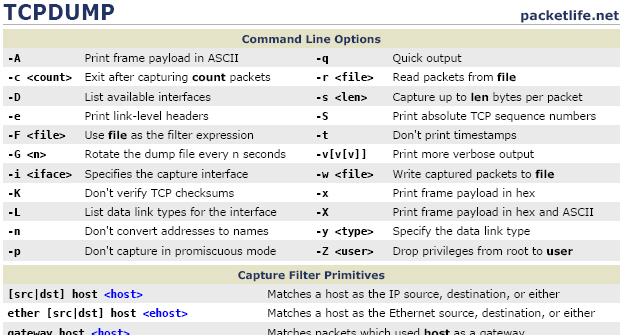
Understanding TCPDUMP Output


These examples in this post bases on Checkpoint Firewalls. In other platform, the output and

command options may have a difference.

Basic TCPDUMP Commands:


  • tcpdump port 257   , <– on the firewall, this will allow you to see if the logs are passing from the firewall to the manager, and what address they are heading to.
  • tcpdump -i WAN.15  <- data-blogger-escaped-capture="" data-blogger-escaped-everything="" data-blogger-escaped-interface="" data-blogger-escaped-li="" data-blogger-escaped-on="" data-blogger-escaped-this="" data-blogger-escaped-to="">
  • tcpdump -i eth1.16 icmp  <– to capture just PINGs on this interface
  • tcpdump -i  Mgmt -vvv -s0 -w tcpdumpfile.log   <– this captures the FULL packets to a file usefull for wireshark the -s0 stops the files being shortened
  • tcpdump -i INT port 67   <– view dhcp requests
  • tcpdump -eP -nni any host 10.9.4.30 
  • tcpdump -i any  
  • tcpdump -nn


    Flags:
  • S – SYN (Start Connection)
    . – No Flag Set
    P – PSH (Push Data)
    F – FIN (Finish Connection)
    R – RST (Reset Connection)
    “ack” means acknowledge, “win” means “sliding windows”, “mss” means “maximum segment size”, “nop” means “no operation”.
    Flags are some combination of S (SYN), F (FIN), P (PUSH), R (RST), W (ECN CWR) or E (ECN-Echo),
    or a single ’.’ (no flags)
    Selective Acknowledgment Permitted (SackOK): This option simply says that selective acknowledgments are permitted for this connection. SackOK must be included in the TCP options in both the SYN and SYN/ACK packets during the TCP three-way handshake, or it cannot be used. SackOK should not appear in any other packets.
    more explanation can be found from Steven’s post – `Masterclass – Tcpdump – Interpreting Output’

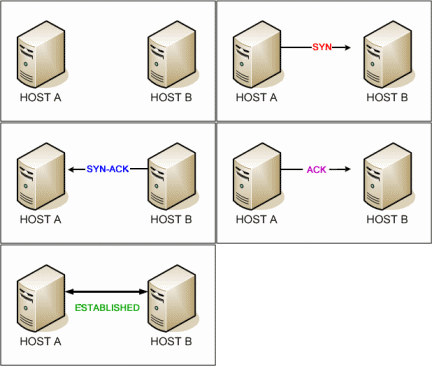
    Three-way Handshake:

    The three-way handshake is simply the source host and the destination host requesting a connection, and then confirming to each other that a connection has been made. As mentioned above, to open a session a client determines a local source port and an Initial Sequence Number (ISN). The ISN is
    a randomly determined integer between 0 and 4,294,967,295. Communicating hosts exchange ISNs during connection initialization. Each host sets two counters: sequence and acknowledgement. In the context of a single TCP packet, the sequence number is set by the sending host, and the acknowledgement number is set by the receiving host.
    Host A sends a TCP SYNchronize packet to Host B
    Host B receives A’s SYN
    Host B sends a SYNchronize-ACKnowledgement
    Host A receives B’s SYN-ACK
    Host A sends ACKnowledge
    Host B receives ACK.
    TCP socket connection is ESTABLISHED.
    tcp three-way handshake,syn,syn-ack,ack
    TCP Three Way Handshake (SYN,SYN-ACK,ACK) – See more at this URL:

    Commands and Outputs Examples:

    1. ICMP Example


    [Expert@ CP1:0]#tcpdump -i Mgmt host 172.16.1.53
    tcpdump: verbose output suppressed, use -v or -vv for full protocol decode
    listening on Mgmt, link-type EN10MB (Ethernet), capture size 96 bytes
    09:37:38.370763 IP 10.94.20.14 > 172.16.1.53: ICMP echo request, id 1, seq 3, length 40
    09:37:38.372210 IP 172.16.1.53 > 10.94.20.14: ICMP echo reply, id 1, seq 3, length 40
    09:37:39.365648 IP 10.94.20.14 > 172.16.1.53: ICMP echo request, id 1, seq 4, length 40
    09:37:39.366558 IP 172.16.1.53 > 10.94.200.14: ICMP echo reply, id 1, seq 4, length 40
    09:37:40.363506 IP 10.94.20.14 > 172.16.1.53: ICMP echo request, id 1, seq 5, length 40
    09:37:40.364318 IP 172.16.1.53 > 10.94.20.14: ICMP echo reply, id 1, seq 5, length 40
    09:37:41.361947 IP 10.94.20.14 > 172.16.1.53: ICMP echo request, id 1, seq 6, length 40
    09:37:41.362771 IP 172.16.1.53 > 10.94.20.14: ICMP echo reply, id 1, seq 6, length 40

    [Expert@CP1:0]# tcpdump -v -nn -i Mgmt host 172.16.1.53
    tcpdump: listening on Mgmt, link-type EN10MB (Ethernet), capture size 96 bytes
    09:38:29.232691 IP (tos 0x0, ttl 126, id 5783, offset 0, flags [none], proto: ICMP (1), length: 60) 10.94.20.14 > 172.16.1.53: ICMP echo request, id 1, seq 7, length 40
    09:38:29.233395 IP (tos 0x0, ttl 127, id 4146, offset 0, flags [none], proto: ICMP (1), length: 60) 172.16.1.53 > 10.94.20.14: ICMP echo reply, id 1, seq 7, length 40
    09:38:30.222653 IP (tos 0x0, ttl 126, id 5788, offset 0, flags [none], proto: ICMP (1), length: 60) 10.94.20.14 > 172.16.1.53: ICMP echo request, id 1, seq 8, length 40
    09:38:30.223565 IP (tos 0x0, ttl 127, id 4147, offset 0, flags [none], proto: ICMP (1), length: 60) 172.16.1.53 > 10.94.20.14: ICMP echo reply, id 1, seq 8, length 40
    09:38:31.220764 IP (tos 0x0, ttl 126, id 5791, offset 0, flags [none], proto: ICMP (1), length: 60) 10.94.20.14 > 172.16.1.53: ICMP echo request, id 1, seq 9, length 40
    09:38:31.221607 IP (tos 0x0, ttl 127, id 4149, offset 0, flags [none], proto: ICMP (1), length: 60) 172.16.1.53 > 10.94.20.14: ICMP echo reply, id 1, seq 9, length 40
    09:38:32.235355 IP (tos 0x0, ttl 126, id 5795, offset 0, flags [none], proto: ICMP (1), length: 60) 10.94.20.14 > 172.16.1.53: ICMP echo request, id 1, seq 10, length 40
    09:38:32.236151 IP (tos 0x0, ttl 127, id 4152, offset 0, flags [none], proto: ICMP (1), length: 60) 172.16.1.53 > 10.94.20.14: ICMP echo reply, id 1, seq 10, length 40


    2. HTTPS Example


    [Expert@Pub-cp2:0]# tcpdump -vvv -nn -i eth1-01 host 19.26.16.19
    tcpdump: listening on eth1-01, link-type EN10MB (Ethernet), capture size 96 bytes
    11:39:04.822700 IP (tos 0x0, ttl 126, id 7241, offset 0, flags [DF], proto: TCP (6), length: 52) 19.26.16.19.10747 > 19.26.16.24.443: S, cksum 0xea51 (correct), 2579834556:2579834556(0) win 8192   //SYN
    11:39:04.826136 IP (tos 0x0, ttl  63, id 0, offset 0, flags [DF], proto: TCP (6), length: 52) 19.26.16.24.443 > 19.26.16.19.10747: S, cksum 0x99db (correct), 487537799:487537799(0) ack 2579834557 win 5840  // SYN ACK
    11:39:04.826153 IP (tos 0x0, ttl  63, id 0, offset 0, flags [DF], proto: TCP (6), length: 52) 19.26.16.24.443 > 19.26.16.19.10747: S, cksum 0x99db (correct), 487537799:487537799(0) ack 2579834557 win 5840  // This packet is repeated SYN ACK
    11:39:04.826926 IP (tos 0x0, ttl 125, id 7242, offset 0, flags [DF], proto: TCP (6), length: 52) 19.26.16.19.10747 > 10.9.1.25.443: ., cksum 0xd4d0 (correct), 2579834557:2579834557(0) ack 487537800 win 256  //ACK
    11:39:06.883076 IP (tos 0x0, ttl 125, id 7243, offset 0, flags [DF], proto: TCP (6), length: 42) 19.26.16.19.10747 > 10.9.1.25.443: P, cksum 0xb101 (correct), 0:2(2) ack 1 win 256
    11:39:06.883285 IP (tos 0x0, ttl  63, id 16050, offset 0, flags [DF], proto: TCP (6), length: 40) 19.26.16.24.443 > 19.26.16.19.10747: ., cksum 0xf14d (correct), 1:1(0) ack 3 win 46
    11:39:07.048713 IP (tos 0x0, ttl 125, id 7244, offset 0, flags [DF], proto: TCP (6), length: 42) 19.26.16.19.10747 > 10.9.1.25.443: P, cksum 0xb0ff (correct), 2:4(2) ack 1 win 256
    11:39:07.048905 IP (tos 0x0, ttl  63, id 16051, offset 0, flags [DF], proto: TCP (6), length: 40) 19.26.16.24.443 > 19.26.16.19.10747: ., cksum 0xf14b (correct), 1:1(0) ack 5 win 46
    11:39:07.199352 IP (tos 0x0, ttl 125, id 7245, offset 0, flags [DF], proto: TCP (6), length: 42) 19.26.16.19.10747 > 10.9.1.25.443: P, cksum 0xb0fd (correct), 4:6(2) ack 1 win 256
    11:39:07.199883 IP (tos 0x0, ttl  63, id 16052, offset 0, flags [DF], proto: TCP (6), length: 40) 19.26.16.24.443 > 19.26.16.19.10747: ., cksum 0xf149 (correct), 1:1(0) ack 7 win 46
    11:39:07.342045 IP (tos 0x0, ttl 125, id 7246, offset 0, flags [DF], proto: TCP (6), length: 42) 19.26.16.19.10747 > 10.9.1.25.443: P, cksum 0xb0fb (correct), 6:8(2) ack 1 win 256
    11:39:07.342228 IP (tos 0x0, ttl  63, id 16053, offset 0, flags [DF], proto: TCP (6), length: 40) 19.26.16.24.443 > 19.26.16.19.10747: ., cksum 0xf147 (correct), 1:1(0) ack 9 win 46
    11:39:07.492210 IP (tos 0x0, ttl 125, id 7247, offset 0, flags [DF], proto: TCP (6), length: 42) 19.26.16.19.10747 > 10.9.1.25.443: P, cksum 0xb0f9 (correct), 8:10(2) ack 1 win 256
    11:39:07.492407 IP (tos 0x0, ttl  63, id 16054, offset 0, flags [DF], proto: TCP (6), length: 40) 19.26.16.24.443 > 19.26.16.19.10747: ., cksum 0xf145 (correct), 1:1(0) ack 11 win 46
    11:39:07.634867 IP (tos 0x0, ttl 125, id 7248, offset 0, flags [DF], proto: TCP (6), length: 42) 19.26.16.19.10747 > 10.9.1.25.443: P, cksum 0xb0f7 (correct), 10:12(2) ack 1 win 256
    11:39:07.635119 IP (tos 0x0, ttl  63, id 16055, offset 0, flags [DF], proto: TCP (6), length: 40) 19.26.16.24.443 > 19.26.16.19.10747: ., cksum 0xf143 (correct), 1:1(0) ack 13 win 46
    11:39:07.635269 IP (tos 0x0, ttl  63, id 16056, offset 0, flags [DF], proto: TCP (6), length: 40) 19.26.16.24.443 > 19.26.16.19.10747: F, cksum 0xf142 (correct), 1:1(0) ack 13 win 46
    11:39:07.635864 IP (tos 0x0, ttl 125, id 7249, offset 0, flags [DF], proto: TCP (6), length: 40) 19.26.16.19.10747 > 10.9.1.25.443: ., cksum 0xbe08 (correct), 12:12(0) ack 2 win 256
    11:39:07.635927 IP (tos 0x0, ttl 125, id 7250, offset 0, flags [DF], proto: TCP (6), length: 40) 19.26.16.19.10747 > 10.9.1.25.443: F, cksum 0xbe07 (correct), 12:12(0) ack 2 win 256
    11:39:07.636058 IP (tos 0x0, ttl  63, id 0, offset 0, flags [DF], proto: TCP (6), length: 40) 19.26.16.24.443 > 19.26.16.19.10747: ., cksum 0xf141 (correct), 2:2(0) ack 14 win 46


    3. SSH Example


    [Expert@Pub-CP1:0]# tcpdump -v -nn -i Mgmt host 172.16.1.53
    tcpdump: listening on Mgmt, link-type EN10MB (Ethernet), capture size 96 bytes
    09:46:34.443382 IP (tos 0x0, ttl 126, id 7173, offset 0, flags [DF], proto: TCP (6), length: 52) 10.9.2.14.50831 > 172.16.1.53.22: S, cksum 0xac58 (correct), 3232602545:3232602545(0) win 8192
    09:46:34.444081 IP (tos 0x0, ttl 127, id 6889, offset 0, flags [DF], proto: TCP (6), length: 52) 172.16.1.53.22 > 10.9.2.14.50831: S, cksum 0xb937 (correct), 41283738:41283738(0) ack 3232602546 win 8192
    09:46:34.444916 IP (tos 0x0, ttl 126, id 7175, offset 0, flags [DF], proto: TCP (6), length: 40) 10.9.2.14.50831 > 172.16.1.53.22: ., cksum 0x190b (correct), ack 1 win 256
    09:46:34.452567 IP (tos 0x0, ttl 127, id 6893, offset 0, flags [DF], proto: TCP (6), length: 73) 172.16.1.53.22 > 10.9.2.14.50831: P, cksum 0x1960 (correct), 1:34(33) ack 1 win 256
    09:46:34.647359 IP (tos 0x0, ttl 126, id 7180, offset 0, flags [DF], proto: TCP (6), length: 40) 10.9.2.14.50831 > 172.16.1.53.22: ., cksum 0x18ea (correct), ack 34 win 256
    09:46:35.764373 IP (tos 0x0, ttl 126, id 7184, offset 0, flags [DF], proto: TCP (6), length: 41) 10.9.2.14.50831 > 172.16.1.53.22: P, cksum 0x15e1 (correct), 1:2(1) ack 34 win 256
    09:46:35.764610 IP (tos 0x0, ttl 128, id 9109, offset 0, flags [DF], proto: TCP (6), length: 40) 172.16.1.53.22 > 10.9.2.14.50831: R, cksum 0x19f6 (correct), 41283772:41283772(0) win 0


    4. FTP Example


    [Expert@Pub-CP1:0]# tcpdump -v -nn -i Mgmt host 172.16.1.53
    tcpdump: listening on Mgmt, link-type EN10MB (Ethernet), capture size 96 bytes
    09:47:11.477696 IP (tos 0x0, ttl 126, id 30923, offset 0, flags [none], proto: TCP (6), length: 44) 10.9.2.14.50864 > 172.16.1.53.21: S, cksum 0xebe1 (correct), 2535345973:2535345973(0) win 32120
    09:47:11.479045 IP (tos 0x0, ttl 127, id 6954, offset 0, flags [DF], proto: TCP (6), length: 44) 172.16.1.53.21 > 10.9.2.14.50864: S, cksum 0x31a2 (correct), 3764401990:3764401990(0) ack 2535345974 win 8192
    09:47:11.480173 IP (tos 0x0, ttl 126, id 30925, offset 0, flags [none], proto: TCP (6), length: 40) 10.9.2.14.50864 > 172.16.1.53.21: ., cksum 0xebe6 (correct), ack 1 win 32120
    09:47:11.480858 IP (tos 0x0, ttl 127, id 6955, offset 0, flags [DF], proto: TCP (6), length: 40) 172.16.1.53.21 > 10.9.2.14.50864: ., cksum 0x695f (correct), ack 1 win 65535
    09:47:11.690070 IP (tos 0x0, ttl 127, id 6959, offset 0, flags [DF], proto: TCP (6), length: 334) 172.16.1.53.21 > 10.9.2.14.50864: P 1:295(294) ack 1 win 65535
    09:47:11.690579 IP (tos 0x0, ttl 126, id 30926, offset 0, flags [none], proto: TCP (6), length: 40) 10.9.2.14.50864 > 172.16.1.53.21: ., cksum 0xebe6 (correct), ack 295 win 31826
    09:47:13.470582 IP (tos 0x0, ttl 126, id 30933, offset 0, flags [none], proto: TCP (6), length: 46) 10.9.2.14.50864 > 172.16.1.53.21: P, cksum 0x02bf (correct), 1:7(6) ack 295 win 32120
    09:47:13.472164 IP (tos 0x0, ttl 127, id 6963, offset 0, flags [DF], proto: TCP (6), length: 81) 172.16.1.53.21 > 10.9.2.14.50864: P, cksum 0xc94d (correct), 295:336(41) ack 7 win 65529
    09:47:13.472557 IP (tos 0x0, ttl 126, id 30934, offset 0, flags [none], proto: TCP (6), length: 40) 10.9.2.14.50864 > 172.16.1.53.21: ., cksum 0xeaba (correct), ack 336 win 32079
    09:47:13.473093 IP (tos 0x0, ttl 127, id 6965, offset 0, flags [DF], proto: TCP (6), length: 40) 172.16.1.53.21 > 10.9.2.14.50864: F, cksum 0x680f (correct), 336:336(0) ack 7 win 65529
    09:47:13.473336 IP (tos 0x0, ttl 126, id 30936, offset 0, flags [none], proto: TCP (6), length: 40) 10.9.2.14.50864 > 172.16.1.53.21: ., cksum 0xea90 (correct), ack 337 win 32120
    09:47:13.489842 IP (tos 0x0, ttl 126, id 30939, offset 0, flags [none], proto: TCP (6), length: 40) 10.9.2.14.50864 > 172.16.1.53.21: F, cksum 0xea8f (correct), 7:7(0) ack 337 win 32120
    09:47:13.490369 IP (tos 0x0, ttl 127, id 6967, offset 0, flags [DF], proto: TCP (6), length: 40) 172.16.1.53.21 > 10.9.2.14.50864: ., cksum 0x680e (correct), ack 8 win 65529
    09:47:14.836964 IP (tos 0x0, ttl 126, id 19859, offset 0, flags [DF], proto: TCP (6), length: 112) 10.94.16.48.58884 > 172.16.1.53.445: P 1912308033:1912308105(72) ack 3052976289 win 258
    09:47:14.836979 IP (tos 0x0, ttl 126, id 19860, offset 0, flags [DF], proto: TCP (6), length: 112) 10.94.16.48.58884 > 172.16.1.53.445: P 72:144(72) ack 1 win 258
    09:47:14.837677 IP (tos 0x0, ttl 127, id 6970, offset 0, flags [DF], proto: TCP (6), length: 40) 172.16.1.53.445 > 10.94.16.48.58884: ., cksum 0x9ad5 (correct), ack 144 win 258
    09:47:14.837693 IP (tos 0x0, ttl 127, id 6971, offset 0, flags [DF], proto: TCP (6), length: 112) 172.16.1.53.445 > 10.94.16.48.58884: P 1:73(72) ack 144 win 258
    09:47:14.837700 IP (tos 0x0, ttl 127, id 6972, offset 0, flags [DF], proto: TCP (6), length: 112) 172.16.1.53.445 > 10.94.16.48.58884: P 73:145(72) ack 144 win 258
    09:47:14.838389 IP (tos 0x0, ttl 126, id 19870, offset 0, flags [DF], proto: TCP (6), length: 40) 10.94.16.48.58884 > 172.16.1.53.445: ., cksum 0x9a46 (correct), ack 145 win 257
    09:47:14.838843 IP (tos 0x0, ttl 126, id 19872, offset 0, flags [DF], proto: TCP (6), length: 40) 10.94.16.48.58884 > 172.16.1.53.445: R, cksum 0x9b43 (correct), 144:144(0) ack 145 win 0


    5. FTPS example


    [Expert@Pub:0]# tcpdump -v -n -i eth1-01 host 12.25.20.4
    tcpdump: listening on eth1-01, link-type EN10MB (Ethernet), capture size 96 bytes
    10:59:02.525754 IP (tos 0x0, ttl  39, id 26220, offset 0, flags [none], proto: TCP (6), length: 60) 12.25.20.4.62712 > 19.26.16.5.ftps: S, cksum 0xd8cb (correct), 1970824717:1970824717(0) win 65535
    10:59:02.526420 IP (tos 0x0, ttl 127, id 32480, offset 0, flags [DF], proto: TCP (6), length: 60) 19.26.16.5.ftps > 12.25.20.4.62712: S, cksum 0xdbb7 (correct), 2713847003:2713847003(0) ack 1970824718 win 8192
    10:59:02.570606 IP (tos 0x0, ttl  38, id 26433, offset 0, flags [none], proto: TCP (6), length: 52) 12.25.20.4.62712 > 12.17.3.59.ftps: ., cksum 0xa43c (correct), ack 2713847004 win 4096
    10:59:02.906868 IP (tos 0x0, ttl  46, id 22227, offset 0, flags [none], proto: TCP (6), length: 98) 12.25.20.4.62712 > 12.17.3.59.ftps: P 0:58(58) ack 1 win 2047
    10:59:02.908200 IP (tos 0x0, ttl 127, id 32486, offset 0, flags [DF], proto: TCP (6), length: 1476) 19.26.16.5.ftps > 12.25.20.4.62712: . 1:1425(1424) ack 59 win 261
    10:59:02.908216 IP (tos 0x0, ttl 127, id 32487, offset 0, flags [DF], proto: TCP (6), length: 245) 19.26.16.5.ftps > 12.25.20.4.62712: P 1425:1618(193) ack 59 win 261
    10:59:02.949626 IP (tos 0x0, ttl  47, id 2661, offset 0, flags [none], proto: TCP (6), length: 40) 12.25.20.4.62712 > 12.17.3.59.ftps: ., cksum 0xfe5b (correct), ack 1 win 2047
    10:59:02.968018 IP (tos 0x0, ttl  46, id 63635, offset 0, flags [none], proto: TCP (6), length: 366) 12.25.20.4.62712 > 12.17.3.59.ftps: P 58:384(326) ack 1618 win 2047
    10:59:02.972322 IP (tos 0x0, ttl  46, id 41339, offset 0, flags [none], proto: TCP (6), length: 40) 12.25.20.4.62712 > 12.17.3.59.ftps: F, cksum 0xf6c3 (correct), 384:384(0) ack 1618 win 2047
    10:59:02.972387 IP (tos 0x0, ttl  46, id 33795, offset 0, flags [none], proto: TCP (6), length: 40) 12.25.20.4.62712 > 12.17.3.59.ftps: ., cksum 0xf6c3 (correct), ack 1618 win 2047
    10:59:02.972523 IP (tos 0x0, ttl 127, id 32489, offset 0, flags [DF], proto: TCP (6), length: 52) 19.26.16.5.ftps > 12.25.20.4.62712: ., cksum 0x1e55 (correct), ack 386 win 260
    10:59:02.972737 IP (tos 0x0, ttl 127, id 32490, offset 0, flags [DF], proto: TCP (6), length: 52) 19.26.16.5.ftps > 12.25.20.4.62712: F, cksum 0x1e54 (correct), 1618:1618(0) ack 386 win 260
    10:59:03.015360 IP (tos 0x0, ttl  46, id 24500, offset 0, flags [none], proto: TCP (6), length: 40) 12.25.20.4.62712 > 12.17.3.59.ftps: ., cksum 0xf6c2 (correct), ack 1619 win 2047


    6. SQL Example 


    [Expert@Pub-CP1:0]# tcpdump -i eth1-02.104 host 172.16.1.2
    10:39:52.671997 IP 172.16.1.2.19209 > 10.9.10.252.ms-sql-s: S 3761967874:3761967874(0) win 8192
    10:39:52.673393 IP 10.9.10.252.ms-sql-s > 172.16.1.2.19209: S 4159880273:4159880273(0) ack 3761967875 win 8192
    10:39:52.673743 IP 172.16.1.2.19209 > 10.9.10.252.ms-sql-s: . ack 1 win 256
    10:39:52.673970 IP 172.16.1.2.19209 > 10.9.10.252.ms-sql-s: P 1:48(47) ack 1 win 256
    10:39:52.674791 IP 10.9.10.252.ms-sql-s > 172.16.1.2.19209: P 1:44(43) ack 48 win 256
    10:39:52.675230 IP 172.16.1.2.19209 > 10.9.10.252.ms-sql-s: P 48:151(103) ack 44 win 256
    10:39:52.675570 IP 10.9.10.252.ms-sql-s > 172.16.1.2.19209: P 44:661(617) ack 151 win 256
    10:39:52.676104 IP 172.16.1.2.19209 > 10.9.10.252.ms-sql-s: P 151:357(206) ack 661 win 254
    10:39:52.676980 IP 10.9.10.252.ms-sql-s > 172.16.1.2.19209: P 661:728(67) ack 357 win 255
    10:39:52.677889 IP 172.16.1.2.19209 > 10.9.10.252.ms-sql-s: P 357:714(357) ack 728 win 253
    10:39:52.680064 IP 10.9.10.252.ms-sql-s > 172.16.1.2.19209: P 728:1141(413) ack 714 win 254
    10:39:52.681073 IP 172.16.1.2.19209 > 10.9.10.252.ms-sql-s: P 714:866(152) ack 1141 win 252
    10:39:52.681402 IP 10.9.10.252.ms-sql-s > 172.16.1.2.19209: P 1141:1510(369) ack 866 win 253


    A problem SQL session :


    [Expert@Pub-CP1:0]# tcpdump -i eth1-02.104 host 172.16.1.2
    11:03:28.691563 IP 172.16.1.2.19451 > 10.9.10.252.ms-sql-s: S 3948339855:3948339855(0) win 8192
    11:03:28.692264 IP 10.9.10.252.ms-sql-s > 172.16.1.2.19451: S 909862134:909862134(0) ack 3948339856 win 8192
    11:03:28.692795 IP 172.16.1.2.19451 > 10.9.10.252.ms-sql-s: . ack 1 win 256
    11:03:28.693041 IP 172.16.1.2.19451 > 10.9.10.252.ms-sql-s: P 1:48(47) ack 1 win 256
    11:03:28.998541 IP 172.16.1.2.19451 > 10.9.10.252.ms-sql-s: P 1:48(47) ack 1 win 256
    11:03:29.606984 IP 172.16.1.2.19451 > 10.9.10.252.ms-sql-s: P 1:48(47) ack 1 win 256
    11:03:30.808145 IP 172.16.1.2.19451 > 10.9.10.252.ms-sql-s: P 1:48(47) ack 1 win 256
    11:03:31.692318 IP 10.9.10.252.ms-sql-s > 172.16.1.2.19451: S 909862134:909862134(0) ack 3948339856 win 8192
    11:03:31.692610 IP 172.16.1.2.19451 > 10.9.10.252.ms-sql-s: . ack 1 win 256
    11:03:32.025035 IP 172.16.1.2.19451 > 10.9.10.252.ms-sql-s: P 1:48(47) ack 1 win 256
    11:03:33.226224 IP 172.16.1.2.19451 > 10.9.10.252.ms-sql-s: P 1:48(47) ack 1 win 256
    11:03:35.628622 IP 172.16.1.2.19451 > 10.9.10.252.ms-sql-s: P 1:48(47) ack 1 win 256
    11:03:37.690075 IP 10.9.10.252.ms-sql-s > 172.16.1.2.19451: S 909862134:909862134(0) ack 3948339856 win 65535
    11:03:37.690422 IP 172.16.1.2.19451 > 10.9.10.252.ms-sql-s: . ack 1 win 256
    11:03:40.449096 IP 172.16.1.2.19451 > 10.9.10.252.ms-sql-s: P 1:48(47) ack 1 win 256
    11:03:43.681010 IP 172.16.1.2.19451 > 10.9.10.252.ms-sql-s: F 48:48(0) ack 1 win 256                      //Finish packets
    11:03:49.690374 IP 10.9.10.252.ms-sql-s > 172.16.1.2.19451: R 909862135:909862135(0) win 0     // Reset Packets


    7. A Problem Telnet Session


    [Expert@Pub:0]# tcpdump -v -n -i eth1-01 host 19.26.16.129
    tcpdump: listening on eth1-01, link-type EN10MB (Ethernet), capture size 96 bytes
    11:17:59.759390 IP (tos 0x0, ttl 126, id 360, offset 0, flags [DF], proto: TCP (6), length: 52) 19.26.16.129.10329 > 19.26.16.24.telnet: S, cksum 0x8b11 (correct), 4098502333:4098502333(0) win 8192
    11:18:02.756485 IP (tos 0x0, ttl 126, id 469, offset 0, flags [DF], proto: TCP (6), length: 52) 19.26.16.129.10329 > 19.26.16.24.telnet: S, cksum 0x8b11 (correct), 4098502333:4098502333(0) win 8192
    11:18:08.760662 IP (tos 0x0, ttl 126, id 658, offset 0, flags [DF], proto: TCP (6), length: 48) 19.26.16.129.10329 > 19.26.16.24.telnet: S, cksum 0x9f20 (correct), 4098502333:4098502333(0) win 8192


    Notes: 19.26.16.24 sent three Sync packets to 19.26.16.129, but received nothing back.

    4098502333:4098502333(0) means the sending TCP stack is setting 4098502333 as the initial synchronization number (ISN), and “0” (no) data is being passed in this packet.

    Generic TCP

    Here’s a line of output related to an SSH session. Note the -v parameter has been used, without it, the IP header information and some of the TCP information is not displayed.
    22:24:18.910372 IP (tos 0×10ttl 64id 9792offset 0flags [DF], proto TCP (6)length 88)
    78.47.105.76.ssh > 82.132.219.219.55495Flags [P.], cksum 0xcb29 (correct)seq497880562:497880610ack 1593322765win 379length 48
    So, let’s break down the components (bits and octets related to the IP header);
    • 22:24:18.910372 – the datagram’s timestamp
    • IP (tos 0×10ttl 64id 9792offset 0flags [DF], proto TCP (6)length 88) – the layer three datagram’s header fields and values;
      • tos 0×10 – the IP TOS value (more correctly in the present context, the DS and ECN fields (8bit, 2nd octet)
      • ttl 64 – the IP TTL value (8bit, 9th octet)
      • id 9792 – mostly used for identifying the parts of a fragmented datagram; incremented by one with every packet sent (16bit, 5th and 6th octets)
      • offset 0 – the fragment offset, used with fragmented packets (13bits of the 7th and 8th octets)
      • flags [DF] – any IP flags set; [DF] for Don’t Fragment and [MR] for More Fragments (3bits of the 7th octet)
      • proto TCP (6) – the higher layer (four) protocol and it’s number (8bits, 10th octet)
      • length 88 – the entire IP packet length, including headers (16bits, 3rd and 4th octets)
    • 78.47.105.76.ssh – the source IP address and port
    • 82.132.219.219.55495 – the destination IP address and port
    • Flags [P.] – any TCP flags; a period ‘.‘ indicates an ACK
    • cksum 0xcb29 (correct) – the packet’s TCP checksum value
    • seq 497880562:497880610 – the TCP packet’s sequence number
    • ack 1593322765 – the TCP packet’s acknowledgement number
    • win 379 – the source host’s TCP window
    • length 48 – the TCP packet length, including headers

    Generic UDP

    It’s odd how often people don’t think they even use UDP but we all do for Voice, Video, DNS, DHCP, NTP, VXLAN and the like.
    Here’s some output related to DNS. Request without -v;
    22:54:40.769351 IP 78.47.105.76.6891 > 213.133.100.100.domain: 28642+ AAAA? vps.allenz.eu. (31)
    Response with -v, as you can see, without it the IP header information and the UDP information is not displayed;
    22:47:08.352707 IP (tos 0×0ttl 60id 1457offset 0flags [none], proto UDP (17)length 72)
    213.133.99.99.domain > 78.47.105.76.16165: [udp sum ok] 11711 ServFail q: A? 40.1.255.158.bl.tiopan.com. 0/0/0 (44)
    So, let’s break down the components of that last one;
    • 22:47:08.352707 – the datagram’s timestamp
    • IP (tos 0×0ttl 60id 1457offset 0flags [none], proto UDP (17)length 72) – the layer three datagram’s header fields and values;
      • tos 0×0 – the IP TOS value (more correctly in the present context, the DS and ECN fields (8bit, 2nd octet)
      • ttl 60 – the IP TTL value (8bit, 9th octet)
      • id 1457 – mostly used for identifying the parts of a fragmented datagram; incremented by one with every packet sent (16bit, 5th and 6th octets)
      • offset 0 – the fragment offset, used with fragmented packets (13bits of the 7th and 8th octets)
      • flags [none] – any IP flags set; [DF] for Don’t Fragment and [MR] for More Fragments (3bits of the 7th octet)
      • proto UDP (17) – the higher layer (four) protocol and it’s number (8bits, 10th octet)
      • length 72– the entire IP packet length, including headers (16bits, 3rd and 4th octets)
    • 213.133.99.99.domain – the source IP address and port
    • 78.47.105.76.16165 – the destination IP address and port
    • [udp sum ok– the datagram’s checksum status
    • Everything else relates to the DNS application response.

    Notes on the proto(col) Field

    You can find a full list of protocol number assignments here. Here’s a few more you might know;
    • ICMP (1)
    • IGMP (2)
    • GRE (47)
    • ESP (50)
    • VINES (83) 
    • EIGRP (88)
    • ETHERIP (97)
    • OSPF (89)
    • VRRP (112)
    • L2TP (115)
    • SCTP (132) 

    Notes on Service Ports

    I’m sure you all know this but anyway, valid port numbers are 0 through to 65535. If you want to live by IANA assignments (and we all should right?);
    • 0 to 1023 are reserved for well known applications
    • 1024 to 49151 are registered (with IANA) ports
    • 49152 to 65535 are user and dynamic ports (aka ephemeral or temporary)

    Protocol Formatting

    tcpdump provides data formatting for the following protocols amongst others (see Jens comments below for more information);
    • ICMP
    • ISAKMP
    • ARP
    • NTP
    • DNS
    • STP
    • HSRP
    • SNMP
    • RADIUS
    Thanks again to Jens for this: If you see ‘[|proto]‘ at the end of the verbose output, e.g. ‘[|radius]‘ the snap length is too small for the application data to be captured;. just increase it (using the -s0 parameter) to see the complete application data information.
    Here’s a few examples;
    ARP: 22:45:47.220050 ARP, Ethernet (len 6), IPv4 (len 4), Request who-has 78.47.108.52 tell 78.47.108.49, length 46
    NTP (with -v);
    78.47.105.76.ntp > 213.239.239.166.ntp: NTPv4, length 48
    Client, Leap indicator:  (0), Stratum 3 (secondary reference), poll 10s, precision -22
    Root Delay: 0.020477, Root dispersion: 0.056991, Reference-ID: 83.137.98.96
    DNS: 213.133.99.99.domain > 78.47.105.76.16165: [udp sum ok] 11711 ServFail q: A? 40.1.255.158.bl.tiopan.com. 0/0/0 (44)

    Here are some Tcpdump Scenarios from Making a Connection with tcpdump, Part II

    Scenario 1: Established Telnet Connection

    Using tcpdump we can analyze the PDUs that establish and terminate a TCP/IP connection. TCP uses a special mechanism to open and close connections. The tcpdump output below display data from different connection scenarios between host 192.168.2.10 and 192.168.2.165. The following tcpdump command and options were used to generate output:
    #tcpdump -nn host 192.168.2.165 and port 23
    Before examining the output, let’s take a detour and get a brief overview of TCP/IP connection management. This small detour will assist those individuals who are new to protocols. To guarantee a reliable connection (startup and shutdown), TCP uses a method in which three messages are exchanged. The process is called a three-way-handshake. To startup a connection:
    • The requesting Host sends a synchronization flag (SYN) in a TCP segment to create a connection.
    • The receiving Host 192.168.2.165 receives the SYN flag and returns an acknowledgment flag (ACK).
    • The requesting Host 192.168.2.10 receives the SYN flag and returns it’s own ACK flag.
    A similar handshake process is used to close a connection using a finish flag (FIN).
    To establish a connection, the sending host creates a segment containing the IP address and port number of the host it want to connect to. The segment contains a SYN flag and the sending hosts initial sequence number. Data is segmented before it is sent. The sequence numbers allow the segments to be assembled in the correct order.
    20:06:32.845356 192.168.2.10.1249 > 192.168.2.165.23:
    S 3263977215:3263977215(0) win 16384 (DF)
    The receiving hosts responds with its own SYN flag and its initial sequence number. This segment also contains an ACK flag to acknowledge the sending host’s SYN (segment 3263977215 +1). This type of acknowledgment is called expectational acknowledgment, because the receiver acknowledges the sequence number of the next segment it expects to receive.
    20:06:32.845725 192.168.2.165.23 > 192.168.2.10.1249: S
    48495364:48495364(0) ack 3263977216 win 32120
    (DF)
    The sending host acknowledges the SYN flag from the receiving host by sending another segment containing the . and ACK flags.
    20:06:32.845921 192.168.2.10.1249 > 192.168.2.165.23: . ack 1 win 17520
    (DF)
    So far two flags, S and ., have been seen. There are five in total.
    • S: SYN (Synchronize sequence numbers – Connection establishment)
    • F: FIN (Ending of sending by sender – Connection termination)
    • R: RST (Reset connection)
    • P: PSH (Push data)
    • .: (No flag is set)

    Scenario 2: Closed Telnet Connection

    To terminate a connection, a segment containing a FIN flag is sent from host 192.168.2.165 back to the host with the open session.
    20:07:32.916410 192.168.2.165.23 > 192.168.2.10.1249: F 147:147(0) ack
    56 win 32120 (DF)
    This may appear backwards, but trust me, it’s not. Think of where the session is open–this is the point that is asking to close the connection. Host 192.168.2.10 acknowledges the FIN segment.
    20:07:32.916680 192.168.2.10.1249 > 192.168.2.165.23: . ack 148 win
    17374 (DF)
    Then host 192.168.2.10 terminates it connection by sending a segment containing a FIN flag.
    20:07:32.928907 192.168.2.10.1249 > 192.168.2.165.23: F 56:56(0) ack 148
    win 17374 (DF)
    Host 192.168.2.165 acknowledges the segment.
    20:07:32.929121 192.168.2.165.23 > 192.168.2.10.1249: . ack 57 win 32120
    (DF)
    Scenario 3: Telnet Connection Refused (no service offered at the host)
    To establish a connection, host 192.168.2.10 sends a segment containing the IP address and port number of the host it want to connect to. The segment contains a SYN flag and the sending hosts initial sequence number.
    05:28:00.080798 192.168.2.10.1063 > 192.168.2.165.23:
    S 3034008467:3034008467(0) win 16384 (DF)
    Host 192.168.2.165 acknowledges the SYN from host 192.168.2.10 by sending another segment containing the R (connection reset) and ACK flags.
    05:28:00.080979 192.168.2.165.23 > 192.168.2.10.1063: R 0:0(0)
    ack 3034008468 win 0
    Host doesn’t take no for answer and tries again.
    05:28:00.579420 192.168.2.10.1063 > 192.168.2.165.23: S
    3034008467:3034008467(0) win 16384 (DF)
    But it receives the same result from receiving host.
    05:28:00.579524 192.168.2.165.23 > 192.168.2.10.1063: R 0:0(0) ack 1 win
    0
    A final attempt is made to establish a connection.
    05:28:01.080114 192.168.2.10.1063 &glt; 192.168.2.165.23: S
    3034008467:3034008467(0) win 16384 (DF)
    Only three strikes in this ball game. Sending host gives up.
    05:28:01.080225 192.168.2.165.23 > 192.168.2.10.1063: R 0:0(0) ack 1 win
    0
    Compare the outputs from an Establish Telnet Connection scenario and Telnet Connection Refusal scenario. The outputs from the receiving host are different. For the Telnet Connection Refusal scenario, the Telnet service was turned off at the receiving host using the /etc/inetd.conf file. If the service is not available, no connection can be established. Note to self: simple security measures turn off services not being used.

    Scenario 3: Telnet Connection Refused (tcp wrappers security used at host)

    The same opening as before is used to establish a connection.
    05:40:39.838710 192.168.2.10.1064 > 192.168.2.165.23: S
    3223709294:3223709294(0) win 16384 (DF)
    The receiving host responds with its own SYN flag and its initial sequence number. This segment also contains an ACK flag to acknowledge the sending hosts SYN (segment 3223709294 +1).
    05:40:39.839045 192.168.2.165.23 > 192.168.2.10.1064: S
    063202536:2063202536(0) ack 3223709295 win 32120 1460,nop,nop,sackOK> (DF)
    Host 192.168.2.10 acknowledges the SYN from host 192.168.2.165 by sending another segment, which contains the . and ACK flags.
    05:40:39.839295 192.168.2.10.1064 > 192.168.2.165.23: . ack 1 win 17520
    (DF)
    Host 192.168.2.165 responds with a segment containing a FIN flag–connection terminated. Something has told the receiving host no connection is allowed.
    05:40:44.852844 192.168.2.165.23 > 192.168.2.10.1064:
    F 1:1(0) ack 1 win 32120 (DF)
    Host 192.168.2.10 has a no-flag-set second acknowledgment.
    05:40:44.853137 192.168.2.10.1064 > 192.168.2.165.23: . ack 2 win 17520
    (DF)
    Because a FIN flag segment was received, the connection must be terminated. So host 192.168.2.10 sends a FIN flag to terminate the connection.
    05:40:44.855050 192.168.2.10.1064 > 192.168.2.165.23: F 1:1(0) ack 2 win
    17520 (DF)
    Host 192.168.2.165 responds with a segment acknowledgment.
    05:40:44.855176 192.168.2.165.23 > 192.168.2.10.1064: . ack 2 win 32120
    (DF)
    Compare the outputs from an Establish Telnet Connection scenario and Telnet Connection Refusal (tcp wrappers) scenario. The outputs from the receiving host are different. In the Telnet Connection Refusal (tcp wrappers) scenario, tcp wrappers is enabled by adding the following line to the /etc/hosts.deny file: ALL:192.168.2.10. This means “deny all services to this host with address 192.168.2.10”. A similar connection test was done using a rule in iptables firewall. The resulting output was the same.
    The reader may gain some insight into how systems are at risk from the trappings of tcpdump. Before a system hack is possible, some effort is expended to engineer the hack. An examination of the data from a system can provide the hacker with some insight into where efforts might provide the greatest chance of success.

    Scenario 4: No Telnet Connection (host removed from the network)

    Same opening, different scenario.
    05:55:21.557846 192.168.2.10.1065 > 192.168.2.165.23: S
    3443876657:3443876657(0) win 16384 (DF)
    There’s no response, so the sending host tries the same request again.
    05:55:24.560891 192.168.2.10.1065 > 192.168.2.165.23: S
    3443876657:3443876657(0) win 16384 (DF)
    With still no response on the third try, the three-strike rule comes into effect. The sending host abandons the connection attempt.
    05:55:30.569584 192.168.2.10.1065 > 192.168.2.165.23: S
    3443876657:3443876657(0) win 16384 (DF)

    Reference: