Pages

Thursday, December 31, 2015

Understadning Cisco Access-Lists on Switches: PACL, VACL, RACL and MACL

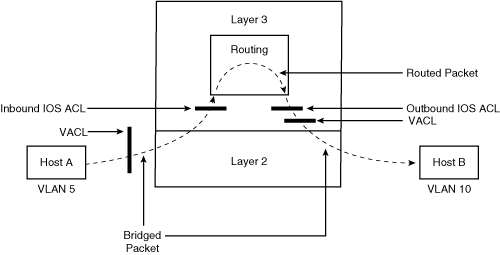
This 'ACLs on Switches' diagram shows PACL, VACL and RACL location and traffic direction on switch. It is clear and easy understanding.

The following explanation is from Security Features on Switches by .

Access Lists on Switches

The switch supports the following four types of ACLs for traffic filtering:
  • Router ACL
  • Port ACL
  • VLAN ACL
  • MAC ACL

Router ACL

As the name implies, Router ACLs are similar to the IOS ACL discussed in Chapter 2, "Access Control," and can be used to filter network traffic on the switched virtual interfaces (SVI). (SVI interfaces are Layer 3 interfaces on VLANs, on Layer 3 physical interfaces, and on Layer 3 EtherChannel interfaces.) Both standard and extended ACLs are supported. For more details to configure Router ACL, refer to Chapter 2.

Port ACL

Port ACLs are similar to Router ACLs but are supported on physical interfaces and configured on Layer 2 interfaces on a switch. Port ACL supports only inbound traffic filtering. Port ACL can be configured as three type access lists: standard, extended, and MAC-extended.
Processing of the Port ACL is similar to that of the Router ACLs; the switch examines ACLs associated with features configured on a given interface and permits or denies packet forwarding based on packet-matching criteria in the ACL.
When applied to a trunk port, the ACL filters traffic on all VLANs present on the trunk port. When applied to a port with voice VLAN, the ACL filters traffic on both data and voice VLANs.
The main benefit with Port ACL is that it can filter IP traffic (using IP access lists) and non-IP traffic (using MAC access list). Both types of filtering can be achieved—that is, a Layer 2 interface can have both an IP access list and a MAC access list applied to it at the same time.

VLAN ACL (VACL)

VLAN ACL (also called VLAN map) provides packet filtering for all types of traffic that are bridged within a VLAN or routed into or out of the VLAN. Unlike Router ACL, VACL is not defined by a direction (input or output). All packets entering the VLAN (bridged or routed) are checked against the VACL. It is possible to filter traffic based on the direction of the traffic by combining VACLs and Private VLAN features.
VACLs are processed in hardware, so there is no performance penalty in processing them. Therefore, they are also referred to as wire-speed ACLs. The forwarding rate remains unchanged regardless of the size of the access list because the lookup of VACLs is performed in hardware.

VACL on a Bridged Port

Figure 4-2 illustrates where the VACL is processed when VACL is applied on a bridged port for traffic from Host A in VLAN 5 that is communicating to Host B in VLAN 10 through the switch.

Figure 4-2 VACL on a Bridged Port

VACL on a Routed Port

Figure 4-3 illustrates how IOS ACL and VACL are applied on routed packets and Layer 3 switched packets. Following is the order of processing:
  1. VACL for input VLAN
  2. Input IOS ACL
  3. Output IOS ACL
  4. VACL for output VLAN

Figure 4-3 VACL on a Routed Port

Configuring VACL

Perform the following steps to configure and apply a VACL (VLAN access map) on the switch:
  1. Define the standard or extended access list to be used in VACL.
  2. Define a VLAN access map.
  3. Configure a match clause in a VLAN access map sequence.
  4. Configure an action clause in a VLAN access map sequence.
  5. Apply the VLAN access map to the specified VLANs.
  6. Display VLAN access map information.
Example 4-6 shows how to define and apply a VACL to drop packets matching access list 1 from network 192.168.1.0/24; all other packets matching access list 2 are forwarded. The VACL is applied to VLANs 5 through 10.

Example 4-6. VACL Configuration Example

Switch(config)#access-list 1 permit 192.168.1.0 0.0.0.255
Switch(config)#access-list 2 permit any
Switch(config)#vlan access-map mymap 10
Switch(config-access-map)#match ip address 1
Switch(config-access-map)#action drop
Switch(config-access-map)#exit
Switch(config)#vlan access-map mymap 20
Switch(config-access-map)#match ip address 2
Switch(config-access-map)#action forward
Switch(config-access-map)#exit
Switch(config)# vlan filter mymap vlan-list 5-10
Switch(config-access-map)#end

Switch# show vlan access-map
Vlan access-map "mymap" 10
Match clauses:
ip address: 1
Action:
drop
Vlan access-map "mymap" 20
Match clauses:
ip address: 2
Action:
Forward


Switch# show vlan filter
VLAN Map mymap is filtering VLANs:
5-10


MAC ACL

MAC ACL, also known as Ethernet ACL, can filter non-IP traffic on a VLAN and on a physical Layer 2 interface by using MAC addresses in a named MAC extended ACL. The steps to configure a MAC ACL are similar to those of extended named ACLs. MAC ACL supports only inbound traffic filtering.
To define the MAC Extended ACL, use the mac access-list extended command. Several non-IP protocols are supported.
After the MAC ACL is created, it can be applied to a Layer 2 interface using the mac access-group [acl-name] in command to filter non-IP traffic received on the interface.
Example 4-7 shows how to define and apply a MAC ACL to drop all (non-IP) AppleTalk Address Resolution Protocol (AARP) packets, allowing all other types of traffic.

Example 4-7. MAC ACL Configuration Example

Switch(config)# mac access-list extended my-mac-acl
Switch(config-ext-macl)# deny any any aarp
Switch(config-ext-macl)# permit any any
Switch(config-ext-macl)# exit
Switch(config)# interface Fastethernet0/10
Switch(config-if)# mac access-group my-mac-acl in
Switch(config-if)# end

Wednesday, December 23, 2015

USB to Serial Cable Driver Issue on Windows 10

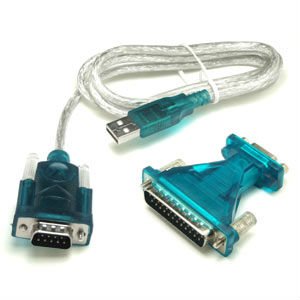
I have been using a Usb-to-Serial cable for many years without problem at windows xp and windows 7 system. Just recently upgraded to windows 10 , the cable does not work properly any more.

The Prolific USB-to-Serial Comm Port shows not working properly in the system Device Manager. There is a yellow exclamation mark next to my Prolific USB in device manager as shown below screenshots:
Device Status of the Device's Property shows:


    This device cannot start. (Code 10)
    A device which does not exist was specified.


This error is basically saying that Windows, for one reason or another, cannot communicate properly with one of your programs. This communication problem is usually caused by out-of-date, missing or corrupt device drivers. 
To resolve Error Code 10, I have followed following recommended steps found from Internet:
  1. Reboot your computer – this is always a first step to resolving any problems, if it works – great, if not – proceed to the next step!
  2. Select Start > All Programs > Windows Update
  3. Right-click on My Computer
  4. Click Properties > Hardware menu tab  > Device Manager
  5. Double-click the device that is causing the error (there will be a yellow triangle with exclamation mark to the left of it)
  6. Right-click the specific device and select Properties
  7. Click on the Driver menu tab and select Update Driver
  8. Windows may ask for the path of the driver in which case you will need to either insert your Drivers disk (if you have it) or download the Drivers from the manufacturers website
  9. Restart your computer
Unfortunately those steps do not work in my case. By Googling Internet, I found some explanation:
"What has happened is that there have been counterfeit "Prolific" chips coming from China. The counterfeit chips use the same Vendor ID (VID_067B) and Product ID (PID_2303) as the authentic Prolific chips. So, Prolific made changes to their newest drivers to render the adapters using counterfeit chips unusable. Unfortunately, it renders all earlier adapters inoperative and so you have to go out and buy new ones. Planned obsolescence? Getting a working driver installed for the average user is almost impossible."
So by default windows 10 will automatically install Windows WDF WHQL Driver v3.6.78.350 (06/05/2015) drivers for your device. Unfortunately the old chips sometimes do not work well with this new driver because of reason mentioned above. 
I am thinking maybe some old drivers may still works for my device. I started to google and try to download and install some other version drivers such as 3.0.0.10, 3.0.1.0 and  3.3.11.152,   finally found 3.3.11.152 is working fine for my old usb-to-serial device.
1. Download the correct driver

Download from this link:    USB-SERIAL Driver V3.3.11.152
Unzip and run the installer, "PL2303_Prolific_DriverInstaller_v1210.exe".

2. Change Default Driver to version 3.3.11.152


3. Verify from Device Manager


Monday, December 21, 2015

My Top Network Security Tools

I listed some of my favorite and useful Internet websites and network tools in previous post which has been used in my daily IT life. There are some network security related tools I am using at my environment. This post is a summarize for those tools and also I am trying to extend this list to add more later.

Online Security Scanning

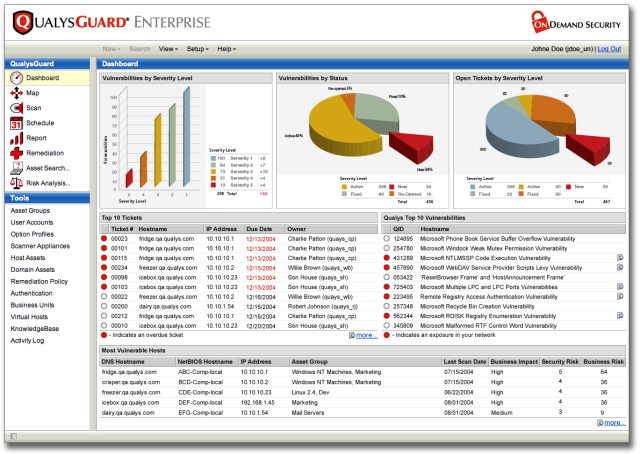
  • Qualys FreeScan - Online Vulnerability Scan can accurately scan your network, servers, desktops or web apps for security vulnerabilities. Scanning takes just minutes to find out where you're at risk.
  • Zscaler - Free, Instant Security Scan is a comprehensive suite of security services delivered from the cloud. It covers email, web and mobile computing. Some services the product provides are anti-malware, browser and application vulnerability management, policy enforcement for mobile computing, bandwidth and QoS management, web filtering, intellectual property protection and regulatory compliance.
  • Acunetix analyze complete web and network from Acunetix servers. You can register for free but full function 14 days online scan.  46% of web applications scanned with Acunetix Online Vulnerability Scanner contained a high risk vulnerability and 87% a medium risk vulnerability as per the 2015 Web App Vulnerability Report by Acunetix
  • Scan my server: provide one of the most comprehensive reports of varieties of security test like SQL Injection, Cross Site Scripting, PHP Code Injection, Source Disclosure, HTTP Header Injection, Blind SQL Injection and much more. Scan report is notified by email with vulnerability summary. But it requires you put a verification seal on your website to confirm your site ownership.


    Online Website Security Vulnerabilities & Malware Scan

    • ASafaWeb - Automated Security Analyser for ASP.NET Websites. You also can schedule a regular scanning for your website in case there is any security level change on your website and you will be notified at the first tim.
    • Qualus SSL Labs: provides deep analysis of your https URL including expiry day, overall rating, Cipher, SSL/TLS version, Handshake simulation, Protocol details, BEAST and much more.
    • Quttera - Free Online Website Malware Scanner checks website for malware and vulnerability exploits online
    • SiteGuarding: helps you to scan your domain for malware, website blacklisting, injected spam, defacement and much more. The scanner is compatible with WordPress, Joomla, Drupal, Magento, osCommerce, Bulletin and another platform.
    • Sucuri - Free Website Malware and Security Scanner
    • Tinfoil Security : first audits your website against top 10 OWASP vulnerabilities and then other known security holes. You will need to verify your site by upload a html file, or add a meta tag, or add a DNS record, or manual Tinfoil verification. 
    • UpGuard : is external risk assessment tool uses publicly available information to grade on various factors including SSL, Clickjack attack, Cookie, DNSSEC, Headers, etc.
    • VirusTotal is a free service that analyzes suspicious files and URLs and facilitates the quick detection of viruses, worms, trojans, and all kinds of malware.
    • Web Inspector - Scan a Webpage with entering a URL to find out whether it is malicious or not

      Free Security Check / Scanning Tools

      • Microsoft Baseline Security Analyzer (MBSA) can perform local or remote scans on Windows desktops and servers, identifying any missing service packs, security patches, and common security misconfigurations. 
      • Tripwire Free Tools : SecureScan and SecureCheqSecureScan finds security vulnerabilities on your network with Tripwire SecureScan and get instructions on how to fix them. Tripwire SecureCheq is free Microsoft Windows Configuration Security Check tool for Desktops and Servers. It tests for common configuration errors and weaknesses in Microsoft Windows desktops and servers.
      • Retina Gives You Powerful Vulnerability Assessment Across Your Entire Environment. For up to 256 IPs free, Retina Community identifies network vulnerabilities (including zero-day), configuration issues, and missing patches across operating systems, applications, devices, and virtual environments.
      • OpenVAS is a framework of several services and tools offering a comprehensive and powerful vulnerability scanning and vulnerability management solution.

      Packets Capturing and Analysing Tools

      • Tcpdump - Packet sniffers
      • Wireshark - Wireshark (known as Ethereal until a trademark dispute in Summer 2006) is a fantastic open source multi-platform network protocol analyzer. It allows you to examine data from a live network or from a capture file on disk. You can interactively browse the capture data, delving down into just the level of packet detail you need. Wireshark has several powerful features, including a rich display filter language and the ability to view the reconstructed stream of a TCP session. It also supports hundreds of protocols and media types. A tcpdump-like console version named tshark is included. One word of caution is that Wireshark has suffered from dozens of remotely exploitable security holes, so stay up-to-date and be wary of running it on untrusted or hostile networks (such as security conferences).
      • CloudShark works entirely in your web browser. No additional utilities, plugins, or downloads.

      TCP/UDP Tools

      • TCPView is a Windows program that will show you detailed listings of all TCP and UDP endpoints on your system, including the local and remote addresses and state of TCP connections. 
      • The Process Explorer display details your computer's running processes in a more visual representation than the standard Windows Task Manager. 
      • RINETD - Redirects TCP connections from one IP address and port to another. 

      Integrity Check

      • Tripwire - It was a simple tool to check file and folder integrity. Now Tripwire provide a whole set solution to discovers every asset on an organization’s network and delivers high-fidelity visibility and deep intelligence about these endpoints. Tripwire solutions also deliver actionable reports and alerts and enable the integration of valuable endpoint intelligence into operational systems like change management databases, ticketing systems, patch management and security solutions including SIEMS, malware detection and risk and analytics. 

      Penetration Test Tools

      • World's most used penetration testing software - metasploit
      • Kali Linux - is the new generation of the industry-leading Debian-based BackTrack Linux penetration testing and security auditing Linux distribution. Kali Linux is a complete re-build of BackTrack from the ground up, adhering completely to Debian development standards. Kali 2.0 Teaser is coming.
      • Nessus® is the industry’s most widely-deployed vulnerability, configuration, and compliance scanner.
      • BackTrack - BackTrack is a free bootable Linux distribution that contains a plethora of open source tools that you can use for network security and penetration testing. The tools are organized into different categories such as ‘Information Gathering’, ‘Vulnerability Assessment’, ‘Exploitation Tools’, ‘Privilege Escalation’ and ‘Maintaining Access’, amongst others.
      • Nmap ("Network Mapper") is a free and open source (license) utility for network discovery and security auditing. 

      Proxy Software


      Network Automation Tools

      • NetMRI provides automatic network discovery, switch port management, network change automation, and continuous security policy and configuration compliance management for multi-vendor routers, switches, and other layer-2 and layer-3 network devices. NetMRI is the only platform that supports traditional and virtual network constructs (such as VRF) for multi-vendor network automation.

      Security Intelligence Tools

      • Lancope, Inc. is a leading provider of network visibility and security intelligence to protect enterprises against today’s top threats. 
      • FireEye Network Security (NX) products, now available in modular 2- and 4-Gbps appliances, enable organizations to prevent, detect, and respond to network-based zero day exploit attempts, web drive-by downloads, and advanced malware that routinely bypass conventional signature-reliant defenses.


      Security information and event management (SIEM) 

      • IBM® Security QRadar® SIEM consolidates log source event data from thousands of devices endpoints and applications distributed throughout a network.
      • Splunk is an industry-leading platform for machine data, automatically indexes all your log data, including structured, unstructured and complex multi-line application log data. 

      Encryption Tools

      • Truecrypt - a strong encryption utility that can encrypt entire volumes or create an encrypted container within a file system. It has been announced this freeware project no longer maintained on 28 May 2014. 

      Windows System/Appication Test Software

      • Sandboxie, which lets you run programs independent of the rest of your system. That way they can't infect, access, or otherwise interfere with your Windows installation. It supports 64bits and Win8. 
      • PowerShadow works both pro-actively and protectively to shield you from anything that threatens the life of your computer system. Installation of PowerShadow is like planting an amazing protection mechanism called the Shadow Mode. It is designed to defend you against millions of viruses, spyware and Trojan horse that would love to invade your system.


      Antivirus


      • Avast! Free Antivirus. The testing result from third party is pretty good.  Avast Free Antivirus puts the free in freemium, and it's for those looking for a little extra from their free AV software. We wish Avast offered slightly quicker scans.Avast has two paid-upgrade antivirus products. Starting at $60 per year, Avast Internet Security adds a ransomware shield, a personal firewall and stronger protection against phishing attempts and malicious websites and a personal firewall.Avast Premier, starting at $80 per year, adds a file shredder and an automatic software updater for third-party programs. 
      • AVG.  AVG AntiVirus Free program provides good malware protection, but doesn't add many extra features other than its included file shredder. If you want to add encryption software, dedicated ransomware protection, an enhanced version of the Windows firewall and Android antivirus software, you'll need to get AVG Internet Security at $70 a year.

      Firewall Management Tools

      • Tufin Orchestration Suite: Tufin enables organizations to implement network security changes in the same business day through automation and impact analysis – orchestrating change processes end-to-end across physical environments and hybrid cloud platforms. It automatically designs,  provisions, analyzes and audits network changes from the application layer down to the network layer. 
      • FireMon provides enterprises with security management software that gives them deeper visibility and tighter control over their network security infrastructure. Its Security Intelligence Platform--including Security Manager, Policy Planner, Policy Optimizer and Risk Analyzer--enables customers to identify network risk, proactively eliminate those vulnerabilities and strengthen security throughout the organization, and reduce the cost of security operations. 
      • The AlgoSec Security Management Suite: The AlgoSec suite delivers a complete, integrated software solution for managing complex network security policies -- from the business application layer to the network infrastructure. With powerful visibility across virtual, cloud and physical environments, the AlgoSec suite automates and simplifies the entire security change management process to accelerate application delivery while ensuring security and compliance. The AlgoSec Security Management Suite, which includes Algosec BusinessFlow®, AlgoSec FireFlow® and AlgoSec Firewall Analyzer helps you.  


      Sunday, December 20, 2015

      Firefox Warning Message -"This Connection is Untrusted" Caused by Proxy Server Certificate

      I am getting the "This Connection Is Untrusted" message in Firefox for all security website using https even when I go to the Mozilla support page. Any secure site is viewed as an untrusted connection only in Firefox browser, but IE and Chrome are fine. The certificate is not trusted because the issuer certificate is unknown. Here is a screenshot when I tried to browse Google website from Firefox.


      I have tried following: https://support.mozilla.org/en-US/kb/connection-untrusted-error-message#w_the-certificate-is-not-trusted-because-the-issuer-certificate-is-unknown
      The file cert8.db in your profile folder may have become corrupted. Delete this file while Firefox is closed.

      1. Open your profile folder:

      • Click the menu button New Fx Menu , click help Help-29 and select The image "Troubleshooting Information" does not exist.. The Troubleshooting Information tab will open.
      • Under the Application Basics section, click on Show Folder. A window with your profile files will open.
      • Note: If you are unable to open or use Firefox, follow the instructions in Finding your profile without opening Firefox.
      2. Click the menu button New Fx Menu and then click Exit Close 29
      3. In Windows Explorer, click on the file named cert8.db (or cert8 if extensions are hidden)
      4. Press Delete.
      5. Restart Firefox.
        Unfortunately, this solution does not work for this case.  It becomes so annoying when using Firefox. Interesting thing is this is not happening on my Microsoft IE browser. I have looked at the other relevant articles already, and tried everything to fix this problem. I have completely reinstalled Firefox, I have refreshed it, I have deleted the cert8.db file, I have run it in safe mode, and I have run it with the Skip Cert Error 0.4.4 extension. Nothing works - I cannot even access support.mozilla.org without running into this error. If I let the skip cert error do its thing for a while, sometimes I can access a bare-bones version of the site with a white background and all links in blue underlined text, all aligned left. There's got to be a better way.

        Today I decided to look into this error messages and luckly found a solution for it. There is a inter-middle certificate issued from our Proxy server.  That is why I got all those warning messages.

         Although this untrusted certifcate is issued to *.google.com, but it is issued by our internal web-gate server, which is our Proxy server.


        The solution will be easy as well since we got the root cause. As soon as you export this web-gate Proxy server Certificate from IE browser, you can import it into Firefox to let Firefox trust it.


        Import it into Firefox:


        After exported certificate imported into Firefox, this annoying warning message is gone.

        Note: If you have multiple Proxy server certificates such as my case, you will have to export all of them and import them into your firefox.

        Saturday, December 19, 2015

        Steps to Upgrade Cisco ASA IOS and ASDM

        Here are steps to upgrade IOS from 8.2(1) to 9.1(6) and ASDM to 7.5.2. It is simple and straightforward. By the way these steps are working for all PIX/ASA version upgrade as well.

        1. Download Software from Cisco Website
        You may need to use your ASA's serial number to find out latest support IOS version and ASDM version from Cisco support site. CCO account will be needed as well.

        You will have two files for this upgrade:
        • asa916-k8.bin - for ASA IOS, about 26M
        • asdm-752.bin - for ASA's ASDM , about 25M
        2. Basic Configuration on ASA

        Configure management interface 0/0 with ip address 10.1.13. Also you will need to set up proper nameif and security level to enable this port. After all configured, do not forget to write all configuration to flash card.


        ciscoasa(config)# int management 0/0
        ciscoasa(config-if)# ip address 10.1.1.1 255.255.255.0
        ciscoasa(config-if)# management-only
        ciscoasa(config-if)#  nameif management
        INFO: Security level for "management" set to 0 by default.
        ciscoasa(config-if)#  security-level 100
        ciscoasa(config-if)#
        ciscoasa(config)# wr
        Building configuration...
        Cryptochecksum: 2f6ce793 14d757a0 d226a8da db8c3472

        2582 bytes copied in 3.580 secs (860 bytes/sec)
        [OK]

        3. TFTP configuration

        Set up your computer with ip address 10.1.1.2, which is same network as your ASA management interface. Start your TFTP application with proper configuration. I am using Tftpd32 by Ph.Jounin to set up my tftp server. Make sure you are selecting right server interface if you are having multiple network interfaces. I have put downloaded IOS 9.1.6 version and ASDM into d;\ios foler.

        After connected ASA's management interface with your tftp server, verify the connectivity from ASA to your TFTP server by ping-ing tftp server ip 10.1.1.2. You may need to disable your local firewall on your tftp server machine.


        ciscoasa(config)# ping 10.1.1.2
        Type escape sequence to abort.
        Sending 5, 100-byte ICMP Echos to 10.1.1.2, timeout is 2 seconds:
        !!!!!
        Success rate is 100 percent (5/5), round-trip min/avg/max = 1/1/1 ms


        4. Copy both IOS and ASDM files from TFTP to ASA Flash 

        ciscoasa(config)# copy tftp: flash:
        Address or name of remote host []? 10.1.1.2
        Source filename []? asa916-k8.bin
        Destination filename [asa916-k8.bin]?
        Accessing tftp://10.1.1.2/asa916-k8.bin...!!!!!!!!!!!!!!!!!!!!!!!!!!!!!!!!!!!!!!!!!!!!!!!!!!!!!!!!!!!!!!!!!!!!!!!!!!!!!!!!!!!!!!!!!!!!!!!!!!!!!!!!!!!!!!!!!!!!!!!!!!!!!!!!!!!!!!!!!!!!!!!!!!!!!!!!!!!
        Writing file disk0:/asa916-k8.bin...
        !!!!!!!!!!!!!!!!!!!!!!!!!!!!!!!!!!!!!!!!!!!!!!!!!!!!!!!!!!!!!!!!!!!!!!!!!!!!!!!!!!!!!!!!!!!!!!!!!!!!!!!!!!!!!!!!!!!!!!!!!!!!!!!!!!!!!!!!!!!!!!!!!!!!!!!!!!!
        27150336 bytes copied in 30.390 secs (905011 bytes/sec)

        ciscoasa(config)# copy tftp: flash:
        Address or name of remote host [10.1.1.2]?
        Source filename [asa916-k8.bin]? asdm-752.bin
        Destination filename [asdm-752.bin]?
        Accessing tftp://10.1.1.2/asdm-752.bin...!!!!!!!!!!!!!!!!!!!!!!!!!!!!!!!!!!!!!!!!!!!!!!!!!!!!!!!!!!!!!!!!!!!!!!!!!!!!!!!!!!!!!!!!!!!!!!!!!!!!!!!!!!!!!!!!!!!!!!!!!!!!!!!!!!!!!!!!!!!!!!!!!!!!!!!!!!!!!!!!!!!!!!!!!!!!!
        Writing file disk0:/asdm-752.bin...
        !!!!!!!!!!!!!!!!!!!!!!!!!!!!!!!!!!!!!!!!!!!!!!!!!!!!!!!!!!!!!!!!!!!!!!!!!!!!!!!!!!!!!!!!!!!!!!!!!!!!!!!!!!!!!!!!!!!!!!!!!!!!!!!!!!!!!!!!!!!!!!!!!!!!!!!!!!!!!!!!!!!!!!!!!!!!!
        25627616 bytes copied in 28.700 secs (915272 bytes/sec)


        5. Boot ASA with new IOS and load new ASDM image


        ciscoasa(config)# boot system disk0:/asa916-k8.bin
        ciscoasa(config)# asdm image disk0:/asdm-752.bin
        ciscoasa(config)# wr
        Building configuration...
        Cryptochecksum: bab14ac0 c6d4808b 1c61875d 96255622

        2646 bytes copied in 3.720 secs (882 bytes/sec)
        [OK]
        ciscoasa(config)#
        ciscoasa(config)# reload
        Proceed with reload? [confirm]
        ciscoasa(config)#


        ***
        *** --- START GRACEFUL SHUTDOWN ---
        Shutting down isakmp
        Shutting down webvpn
        Shutting down File system


        ***
        *** --- SHUTDOWN NOW ---
        Process shutdown finished
        Rebooting.....
        Restarting system.


        Following output is from booting console:


        Booting system, please wait...


        CISCO SYSTEMS
        Embedded BIOS Version 1.0(11)5 08/28/08 15:11:51.82

        Low Memory: 631 KB
        High Memory: 3968 MB
        PCI Device Table.
        Bus Dev Func VendID DevID Class              Irq
         00  00  00   8086   2578  Host Bridge      
         00  01  00   8086   2579  PCI-to-PCI Bridge
         00  03  00   8086   257B  PCI-to-PCI Bridge
         00  1C  00   8086   25AE  PCI-to-PCI Bridge
         00  1D  00   8086   25A9  Serial Bus         11
         00  1D  01   8086   25AA  Serial Bus         10
         00  1D  04   8086   25AB  System          
         00  1D  05   8086   25AC  IRQ Controller  
         00  1D  07   8086   25AD  Serial Bus         9
         00  1E  00   8086   244E  PCI-to-PCI Bridge
         00  1F  00   8086   25A1  ISA Bridge      
         00  1F  02   8086   25A3  IDE Controller     11
         00  1F  03   8086   25A4  Serial Bus         5
         00  1F  05   8086   25A6  Audio              5
         02  01  00   8086   1075  Ethernet           11
         03  01  00   177D   0003  Encrypt/Decrypt    9
         03  02  00   8086   1079  Ethernet           9
         03  02  01   8086   1079  Ethernet           9
         03  03  00   8086   1079  Ethernet           9
         03  03  01   8086   1079  Ethernet           9
         04  02  00   8086   1209  Ethernet           11
         04  03  00   8086   1209  Ethernet           5

        Evaluating BIOS Options ...
        Launch BIOS Extension to setup ROMMON

        Cisco Systems ROMMON Version (1.0(11)5) #0: Thu Aug 28 15:23:50 PDT 2008

        Platform ASA5550

        Use BREAK or ESC to interrupt boot.
        Use SPACE to begin boot immediately.
                                                     
        Launching BootLoader...
        Boot configuration file contains 1 entry.


        Loading disk0:/asa916-k8.bin... Booting...
        Platform ASA5550

        Loading...
        IO memory blocks requested from bigphys 32bit: 78436
        dosfsck 2.11, 12 Mar 2005, FAT32, LFN
        Starting check/repair pass.
        Starting verification pass.
        /dev/hda1: 130 files, 11109/31180 clusters
        dosfsck(/dev/hda1) returned 0
        Processor memory 3166699520, Reserved memory: 157286400

        Total SSMs found: 1
        SSM-4GE-INC, SN JAF1335BEME, HW ver 1.0, FW ver 1.0(0)8

        Total NICs found: 12
        mcwa i82557 Ethernet at irq 11  MAC: 0023.ebc4.364c
        mcwa i82557 Ethernet at irq  5  MAC: 0000.0001.0001
        i82547GI rev00 Gigabit Ethernet @ irq11 dev 1 index 05 MAC: 0000.0001.0002
        i82546GB rev03 Gigabit Ethernet @ irq09 dev 2 index 03 MAC: 0023.ebc4.364b
        i82546GB rev03 Gigabit Ethernet @ irq09 dev 2 index 02 MAC: 0023.ebc4.364a
        i82546GB rev03 Gigabit Ethernet @ irq09 dev 3 index 01 MAC: 0023.ebc4.3649
        i82546GB rev03 Gigabit Ethernet @ irq09 dev 3 index 00 MAC: 0023.ebc4.3648
        VCS7380 Gigabit Ethernet @ index 07 MAC: 0026.0b31.564c
        VCS7380 Gigabit Ethernet @ index 08 MAC: 0026.0b31.564d
        VCS7380 Gigabit Ethernet @ index 09 MAC: 0026.0b31.564e
        VCS7380 Gigabit Ethernet @ index 10 MAC: 0026.0b31.564f
        VCS7380 Gigabit Ethernet @ index 11 MAC: 0000.0003.0002

        INFO: Unable to read cluster interface-mode from flash
               Writing default mode "None" to flash
        Verify the activation-key, it might take a while...
        Running Permanent Activation Key: 0xd41ee978 0xb495d93b 0x48934db8 0xbd7c2014 0xc502138f

        Licensed features for this platform:
        Maximum Physical Interfaces       : Unlimited      perpetual
        Maximum VLANs                     : 400            perpetual
        Inside Hosts                      : Unlimited      perpetual
        Failover                          : Active/Active  perpetual
        Encryption-DES                    : Enabled        perpetual
        Encryption-3DES-AES               : Enabled        perpetual
        Security Contexts                 : 2              perpetual
        GTP/GPRS                          : Disabled       perpetual
        AnyConnect Premium Peers          : 2              perpetual
        AnyConnect Essentials             : Disabled       perpetual
        Other VPN Peers                   : 5000           perpetual
        Total VPN Peers                   : 5000           perpetual
        Shared License                    : Disabled       perpetual
        AnyConnect for Mobile             : Disabled       perpetual
        AnyConnect for Cisco VPN Phone    : Disabled       perpetual
        Advanced Endpoint Assessment      : Disabled       perpetual
        UC Phone Proxy Sessions           : 2              perpetual
        Total UC Proxy Sessions           : 2              perpetual
        Botnet Traffic Filter             : Disabled       perpetual
        Intercompany Media Engine         : Disabled       perpetual
        Cluster                           : Disabled       perpetual

        This platform has an ASA 5550 VPN Premium license.

        Encryption hardware device : Cisco ASA-55xx on-board accelerator (revision 0x0)
                                     Boot microcode        : CN1000-MC-BOOT-2.00
                                     SSL/IKE microcode     : CNLite-MC-SSLm-PLUS-2_05
                                     IPSec microcode       : CNlite-MC-IPSECm-MAIN-2.09

        Cisco Adaptive Security Appliance Software Version 9.1(6)

          ****************************** Warning *******************************
          This product contains cryptographic features and is
          subject to United States and local country laws
          governing, import, export, transfer, and use.
          Delivery of Cisco cryptographic products does not
          imply third-party authority to import, export,
          distribute, or use encryption. Importers, exporters,
          distributors and users are responsible for compliance
          with U.S. and local country laws. By using this
          product you agree to comply with applicable laws and
          regulations. If you are unable to comply with U.S.
          and local laws, return the enclosed items immediately.

          A summary of U.S. laws governing Cisco cryptographic
          products may be found at:
          http://www.cisco.com/wwl/export/crypto/tool/stqrg.html

          If you require further assistance please contact us by
          sending email to export@cisco.com.
          ******************************* Warning *******************************

        This product includes software developed by the OpenSSL Project
        for use in the OpenSSL Toolkit (http://www.openssl.org/)
        Copyright (C) 1995-1998 Eric Young (eay@cryptsoft.com)
        All rights reserved.
        Copyright (c) 1998-2011 The OpenSSL Project.
        All rights reserved.

        This product includes software developed at the University of
        California, Irvine for use in the DAV Explorer project
        (http://www.ics.uci.edu/~webdav/)
        Copyright (c) 1999-2005 Regents of the University of California.
        All rights reserved.

        Busybox, version 1.16.1, Copyright (C) 1989, 1991 Free Software Foundation, Inc.
        51 Franklin St, Fifth Floor, Boston, MA 02110-1301  USA
        Busybox comes with ABSOLUTELY NO WARRANTY.
        This is free software, and you are welcome to redistribute it under the General
        Public License v.2 (http://www.gnu.org/licenses/gpl-2.0.html)
        See User Manual (''Licensing'') for details.

        DOSFSTOOLS, version 2.11, Copyright (C) 1989, 1991 Free Software Foundation, Inc.
        59 Temple Place, Suite 330, Boston, MA 02111-1307
        675 Mass Ave, Cambridge, MA 02139
        DOSFSTOOLS comes with ABSOLUTELY NO WARRANTY.
        This is free software, and you are welcome to redistribute it under the General
        Public License v.2 (http://www.gnu.org/licenses/gpl-2.0.html)
        See User Manual (''Licensing'') for details.

        grub, version 0.94, Copyright (C) 1989, 1991 Free Software Foundation, Inc.
        59 Temple Place, Suite 330, Boston, MA 02111-1307
        grub comes with ABSOLUTELY NO WARRANTY.
        This is free software, and you are welcome to redistribute it under the General
        Public License v.2 (http://www.gnu.org/licenses/gpl-2.0.html)
        See User Manual (''Licensing'') for details.

        libgcc, version 4.3, Copyright (C) 2007 Free Software Foundation, Inc.
        libgcc comes with ABSOLUTELY NO WARRANTY.
        This is free software, and you are welcome to redistribute it under the General
        Public License v.2 (http://www.gnu.org/licenses/gpl-2.0.html)
        See User Manual (''Licensing'') for details.

        libstdc++, version 4.3, Copyright (C) 2007 Free Software Foundation, Inc.
        libstdc++ comes with ABSOLUTELY NO WARRANTY.
        This is free software, and you are welcome to redistribute it under the General
        Public License v.2 (http://www.gnu.org/licenses/gpl-2.0.html)
        See User Manual (''Licensing'') for details.

        Linux kernel, version 2.6.29.6, Copyright (C) 1989, 1991 Free Software
        Foundation, Inc.
        51 Franklin St, Fifth Floor, Boston, MA 02110-1301  USA
        Linux kernel comes with ABSOLUTELY NO WARRANTY.
        This is free software, and you are welcome to redistribute it under the General
        Public License v.2 (http://www.gnu.org/licenses/gpl-2.0.html)
        See User Manual (''Licensing'') for details.

        module-init-tools, version 3.10, Copyright (C) 1989, 1991 Free Software
        Foundation, Inc.
        59 Temple Place, Suite 330, Boston, MA 02111-1307 USA
        module-init-tools comes with ABSOLUTELY NO WARRANTY.
        This is free software, and you are welcome to redistribute it under the General
        Public License v.2 (http://www.gnu.org/licenses/gpl-2.0.html)
        See User Manual (''Licensing'') for details.

        numactl, version 2.0.3, Copyright (C) 2008 Author: Andi Kleen, SUSE Labs
        Version 2.0.0 by Cliff Wickman, Chritopher Lameter and Lee Schermerhorn
        numactl comes with ABSOLUTELY NO WARRANTY.
        This is free software, and you are welcome to redistribute it under the General
        Public License v.2 (http://www.gnu.org/licenses/gpl-2.0.html)
        See User Manual (''Licensing'') for details.

        pciutils, version 3.1.4, Copyright (C) 1989, 1991 Free Software Foundation, Inc.
        51 Franklin St, Fifth Floor, Boston, MA 02110-1301  USA
        pciutils comes with ABSOLUTELY NO WARRANTY.
        This is free software, and you are welcome to redistribute it under the General
        Public License v.2 (http://www.gnu.org/licenses/gpl-2.0.html)
        See User Manual (''Licensing'') for details.

        readline, version 5.2, Copyright (C) 1989, 1991 Free Software Foundation, Inc.
        59 Temple Place, Suite 330, Boston, MA 02111 USA
        readline comes with ABSOLUTELY NO WARRANTY.
        This is free software, and you are welcome to redistribute it under the General
        Public License v.2 (http://www.gnu.org/licenses/gpl-2.0.html)
        See User Manual (''Licensing'') for details.

        udev, version 146, Copyright (C) 1989, 1991 Free Software Foundation, Inc.
        51 Franklin St, Fifth Floor, Boston, MA 02110-1301  USA
        udev comes with ABSOLUTELY NO WARRANTY.
        This is free software, and you are welcome to redistribute it under the General
        Public License v.2 (http://www.gnu.org/licenses/gpl-2.0.html)
        See User Manual (''Licensing'') for details.

        util-linux, version 2.16.1, Copyright (C) 1989, 1991 Free Software Foundation, Inc.
        The following components, built for inclusion in Busybox.
        The following components from util-linux come with ABSOLUTELY NO WARRANTY.
        fdisk:
          Copyright (C) 1992  A. V. Le Blanc (LeBlanc@mcc.ac.uk)
          Copyright (C) 2001,2002 Vladimir Oleynik <dzo@simtreas.ru> (initial bb port)
        dmesg:
          Copyright 2006 Rob Landley <rob@landley.net>
          Copyright 2006 Bernhard Reutner-Fischer <rep.nop@aon.at>
        mkswap:
          Copyright 2006 Rob Landley <rob@landley.net>
        mount:
          Copyright (C) 1995, 1996 by Bruce Perens <bruce@pixar.com>.
          Copyright (C) 1999-2004 by Erik Andersen <andersen@codepoet.org>
          Copyright (C) 2005-2006 by Rob Landley <rob@landley.net>
        umount:
          Copyright (C) 1999-2004 by Erik Andersen <andersen@codepoet.org>
          Copyright (C) 2005 by Rob Landley <rob@landley.net>
        This is free software, and you are welcome to redistribute it under the General
        Public License v.2 (http://www.gnu.org/licenses/gpl-2.0.html)
        See User Manual (''Licensing'') for details.

        Cisco Adapative Security Appliance Software, version 9.1,
        Copyright (c) 1996-2015 by Cisco Systems, Inc.
        Certain components of Cisco ASA Software, Version 9.1 are licensed under the GNU
        Lesser Public License (LGPL) Version 2.1.  The software code licensed under LGPL
        Version 2.1 is free software that comes with ABSOLUTELY NO WARRANTY.  You can
        redistribute and/or modify such LGPL code under the terms of LGPL Version 2.1
        (http://www.gnu.org/licenses/lgpl-2.1.html).  See User Manual for licensing
        details.

                        Restricted Rights Legend

        Use, duplication, or disclosure by the Government is
        subject to restrictions as set forth in subparagraph
        (c) of the Commercial Computer Software - Restricted
        Rights clause at FAR sec. 52.227-19 and subparagraph
        (c) (1) (ii) of the Rights in Technical Data and Computer
        Software clause at DFARS sec. 252.227-7013.

                        Cisco Systems, Inc.
                        170 West Tasman Drive
                        San Jose, California 95134-1706

        Reading from flash...
        !
        REAL IP MIGRATION: WARNING
        In this version access-lists used in 'access-group', 'class-map',
        'dynamic-filter classify-list', 'aaa match' will be migrated from
        using IP address/ports as seen on interface, to their real values.
        If an access-list used by these features is shared with per-user ACL
        then the original access-list has to be recreated.
        INFO: Note that identical IP addresses or overlapping IP ranges on
        different interfaces are not detectable by automated Real IP migration.
        If your deployment contains such scenarios, please verify your migrated
        configuration is appropriate for those overlapping addresses/ranges.
        Please also refer to the ASA 8.3 migration guide for a complete
        explanation of the automated migration process.

        INFO: MIGRATION - Saving the startup configuration to file

        INFO: MIGRATION - Startup configuration saved to file 'flash:8_2_1_0_startup_cfg.sav'
        *** Output from config line 4, "ASA Version 8.2(1) "
        .
        Cryptochecksum (unchanged): 46743c59 c0bc15d3 43afde7f 39783981
        Real IP migration logs:
                No ACL was changed as part of Real-ip migration

        INFO: Power-On Self-Test in process.
        ...........................................................
        INFO: Power-On Self-Test complete.

        INFO: MIGRATION - Saving the startup errors to file 'flash:upgrade_startup_errors_201512181715.log'
        Type help or '?' for a list of available commands.
        ciscoasa> en
        Password:
        ciscoasa#
        ciscoasa#

        ciscoasa# conf t
        ciscoasa(config)#

        ***************************** NOTICE *****************************

        Help to improve the ASA platform by enabling anonymous reporting,
        which allows Cisco to securely receive minimal error and health
        information from the device. To learn more about this feature,
        please visit: http://www.cisco.com/go/smartcall

        Would you like to enable anonymous error reporting to help improve
        the product? [Y]es, [N]o, [A]sk later: n

        In the future, if you would like to enable this feature,
        issue the command "call-home reporting anonymous".

        Please remember to save your configuration.

        6. Verify ASDM

        Configure ASA to allow ASDM client network to access ASA's management port.
        ciscoasa(config)# http server enable
        ciscoasa(config)# http 10.1.1.0 255.255.255.0 management
        ciscoasa(config)# wr
        Building configuration...
        Cryptochecksum: d719ed8f 2578f2f0 20d50a04 fe506e2b

        3754 bytes copied in 3.190 secs (1251 bytes/sec)
        [OK]
        ciscoasa(config)# 

        Open your browser with url http://10.1.1.1, you should get following screen to install ASDM launcher.
         Here is log in window from ASDM Launcher. If it asks username and password, just leave it empty and press enter.


        Reference: