Pages

Showing posts with label Network. Show all posts

Wednesday, September 20, 2017

My Top Internet / Network Tools

There are lots of useful sites which helps the troubleshooting procedures. I listed some common tools or websites used by myself. Please let me know what you are using and I would like to try them and add them into this list.

1. Internet/Network Tools Portal
Ping – Shows how long it takes for packets to reach host
Traceroute – Traces the route of packets to destination host from our server
DNS lookup – Look up DNS record
WHOIS – Lists contact info for an IP or domain
Port check – Tests if port is opened on specified IP
Reverse lookup – Gets hostname by IP address
Proxy checker – Detects a proxy server
Bandwidth meter – Detects your download speed from our server
Network calculator – Calculates subnet range by network mask
Network mask calculator – Calculates network mask by subnet range
Country by IP – Detects country by IP or hostname
Unit converter – Converts values from one unit to another
DNS checks detailed dns information for a hostname ( www.facebook.com , www.yahoo.com , www.youtube.com )
IP-number checks ip number information such as dns reverse and forwards
route checks a specific routed prefix
AS numbers checks information on an AS-number
AS macros checks who belongs to an AS-macro

2. Speed Test


3. IP Subnet Calculator


4. Network Monitoring Related


5. DNS and Domain Name Related


6. BGP Toolkit

Choose any one of servers by clicking the spot and it will bring you to this kind of link: telnet://route-views.on.bb.telus.com 

route-views.ab>show bgp paths 47102
Address    Hash Refcount Metric Path
0x666C2980 2421        0      0 852 3257 4436 23498 47102 47102 i

route-views.ab>sh ip bgp 199.xxx.xxx.0
BGP routing table entry for 199.xxx.xxx.0/24, version 82108513
Bestpath Modifiers: deterministic-med
Paths: (1 available, best #1)
  Not advertised to any peer
  852 3257 4436 23498 47102 47102
    154.11.98.17 from 154.11.98.17 (154.11.0.71)
      Origin IGP, localpref 100, valid, external, best
      Dampinfo: penalty 1304, flapped 4 times in 00:14:31


7. Your Public IP Address


8. Online Diagram Drawing Sites


9. Snmp tools


10. HTTP and HTTPS Check Tools


    11. Email Diagnostic Tools


    12. Proxy Sites


    13. Remote Support / Online Meeting


    14. Remote (SSH / Telnet) Access Tools


    15. NTP Server


    16. Portable Software


    Before you click away to do some heavy network security reading, please leave a comment and share your favorite network and security tools so that I can add them to my list!


    Friday, August 11, 2017

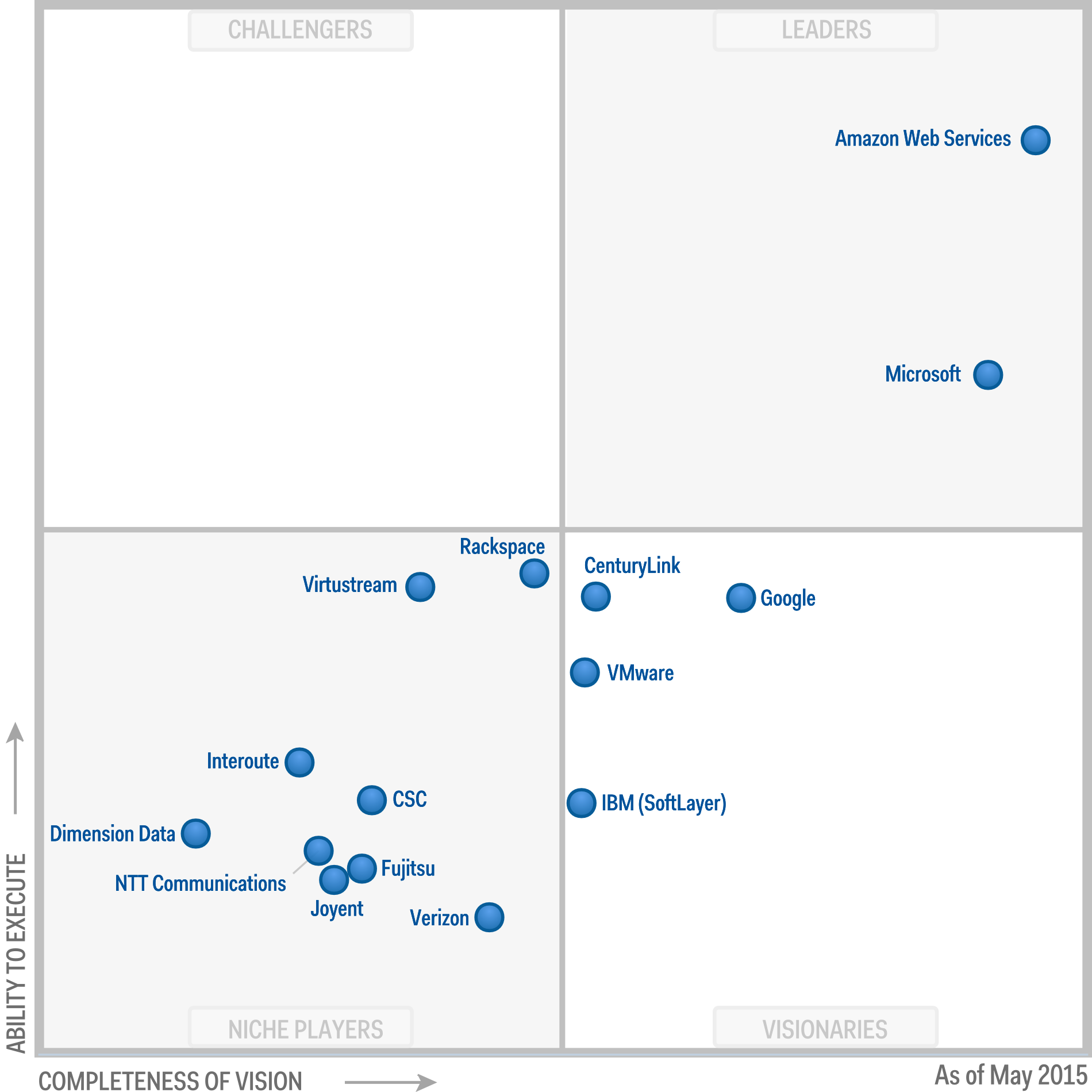
    Gartner Magic Quadrant for Cloud Infrastructure as a Service (Worldwide) (2017, 2016, 2015, 2014, 2013, 2012...)

    In the context of this Magic Quadrant, cloud compute IaaS (hereafter referred to simply as "cloud IaaS" or "IaaS") is defined as a standardized, highly automated offering, where compute resources, complemented by storage and networking capabilities, are owned by a service provider and offered to the customer on demand. The resources are scalable and elastic in near real time, and metered by use. Self-service interfaces are exposed directly to the customer, including a web-based UI and an API. The resources may be single-tenant or multitenant, and hosted by the service provider or on-premises in the customer's data center. Thus, this Magic Quadrant covers both public and private cloud IaaS offerings.

    2017
    On Jun 15 2017, Gartner has published  Magic Quadrant for Cloud Infrastructure as a Service that – no surprising  – has Amazon Web Services and Microsoft alone in the leader's quadrant, same as last few years.

    Reference: Magic Quadrant for Cloud Infrastructure as a Service, Worldwide


    2016

    In the 2016 Magic Quadrant for Cloud Infrastructure as a Service, Worldwide, for the 6th straight year, Gartner placed Amazon Web Services in the “Leaders” quadrant and named AWS as having both the furthest completeness of vision and the highest ability to execute.
    https://www.gartner.com/doc/reprints?id=1-2G2O5FC&ct=150519


    2015
    In the publication "2015 Magic Quadrant for Cloud Infrastructure as a Service, Worldwide" Gartner Amazon Web Services ranks in the "Leaders" quadrant and appreciates AWS both the completeness of its vision and the most pronounced ability to implement them.


    2014

    According to the report, Microsoft’s Azure cloud service is already making significant inroads despite the fact that it only launched the IaaS component of its business into general availability a little over a year ago.

    What’s interesting about this year’s Visionaries is that they all have new platforms — CenturyLink with the Tier 3 acquisition, CSC with the ServiceMesh acquisition coupled with the AWS partnership, Google with Google Compute Engine, IBM with the SoftLayer acquisition, and Verizon Terremark with the still-beta Verizon Cloud. (Arguably VMware falls into this bucket as well, despite being a Niche Player this year.) These providers are in the middle of reinventing themselves, most with the idea of battling it out for the #3 spot in the market.


    2013


    2012


    2010


    Thursday, July 27, 2017

    Gartner Magic Quadrant for Network Performance Monitoring and Diagnostics (2017, 2016, 2015, 2014 )

    According to Gartner, Network performance monitoring and diagnostics (NPMD) enable network professionals to understand the impact of network behavior on application and infrastructure performance, and conversely, via network instrumentation. Other users and use cases exist, especially because these tools provide insight into the quality of the end-user experience.

    The fast-growing network performance monitoring and diagnostics market is helping businesses support more complex environments and services through network visibility, performance issue detection and root cause analysis.

    Leaders in this industry are innovating around cloud-based monitoring, better support for software-defined environments and more flexible deployment models, according to research firm Gartner. The research firm estimates that the network performance monitoring and diagnostics tool market, which is a segment of the lager network management space, sits at $1.6 billion and is growing at a compound annual growth rate of 20.7 percent.

    2017
    NetScout (Formerly is Fluke) , Viavi (formerly is JDSU) and Riverbed are leaders in the Gartner NPMD Magic Quadrant for the fourth consecutive year. 


    2016
    Viavi Solutions (Formerly is part of JDS Uniphase), Riverbed and NetScout Systems (Fluke Networks) are listed in leader Quadrant, same as 2015 and 2014.


    note:Gartner Magic Quadrant 2016: Network Performance Monitoring & Diagnostics :


    2015

    Fluke, JDSU (Nework Instruments) and Riverbed ,  have been recognized as a "Leader" in Gartner’s 2015 “Magic Quadrant for Network Performance Monitoring and Diagnostics (NPMD)” for the second consecutive year. 


    2014


    Magic Quadrant for Network Performance Monitoring and Diagnostics

    Source: Gartner (March 2014)


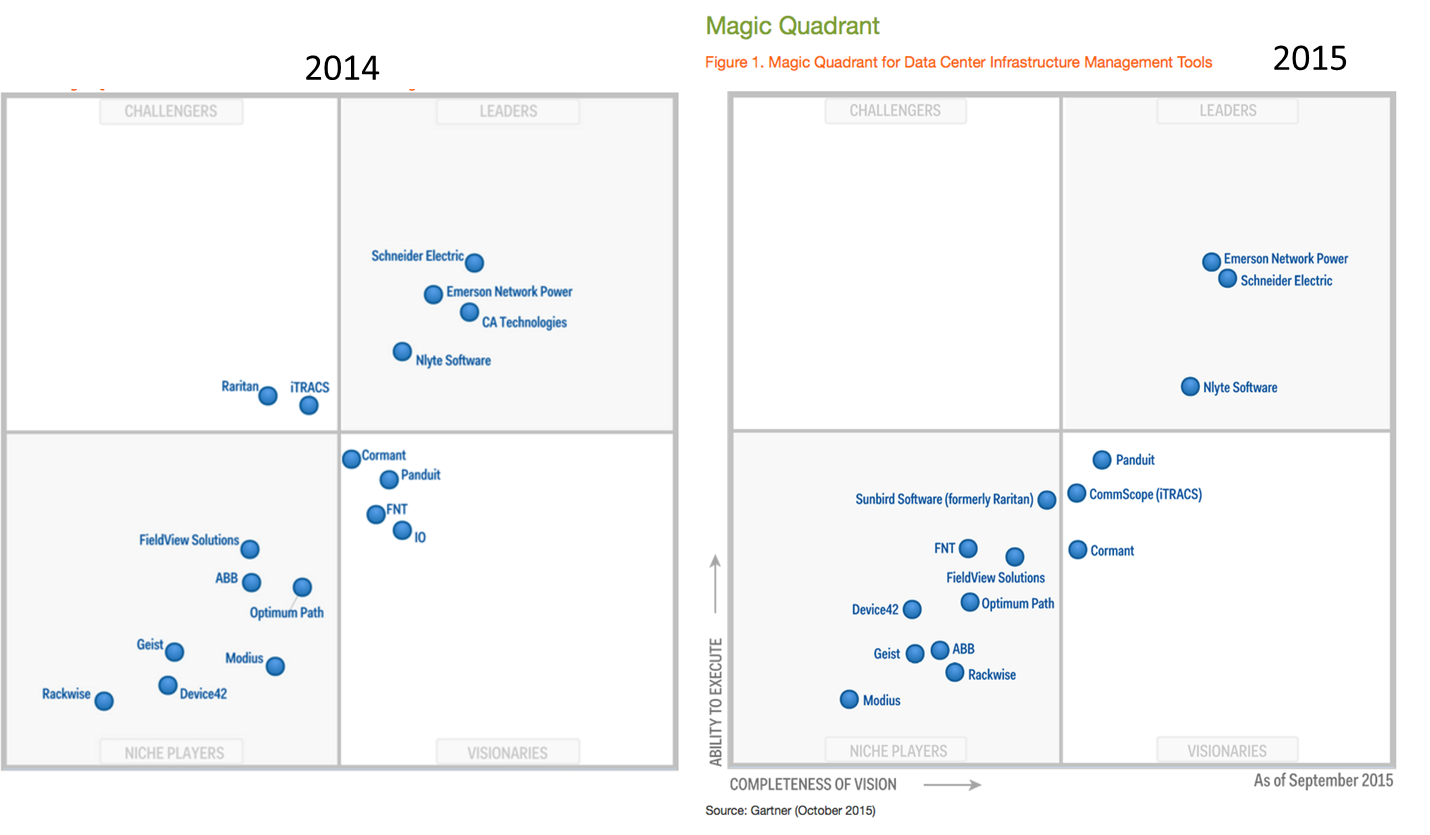
    Gartner Magic Quadrant for Data Center Infrastructure Management (DCIM) (2016, 2015,2014)

    Data center infrastructure management (DCIM) tools monitor, measure, manage and/or control data center resources and energy consumption of both IT-related equipment (such as servers, storage and network switches) and facilities infrastructure components (such as power distribution units [PDUs] and computer room air conditioners).

    2016
    Based on Gartner report on Oct 2016, Nlyte Software, Emerson Network Power, and Schneider Electric continue to lead in the DCIM software market.

    Gartner Magic Quadrant for DCIM, Oct 2016


    2015
    Magic Quadrant for Data Center Infrastructure Management Tools, Source: Gartner (October 2015)


    2014


    Friday, April 7, 2017

    Avocent® ACS 8000 Advanced Console System Configuration

    My company has used Avocent ACS (Advanced Console Server) to do network devices' console management for many years already. I were using 4000, 5000 and 6000 serie, and now 8000 series is coming to refresh some old ones.

    Emerson (EMR) acquired infrastructure management specialist Avocent Corporation (AVCT) for $1.2 billion on Oct 2009. Since then Emerson combined its Aperture and new Avocent businesses as a new division focused on helping data center customers better manage their infrastructure. Now it is part of Vertiv which launched as standalone business. The Vertiv's Trellis DCIM platform was the first to use real-time data to enhance data center management and has been recognized as a leader in every DCIM Magic Quadrant published by Gartner.

    Interesting thing is I even could not find Avocent product from Vertiv's product page. Totally there are 13 products under IT management category, but ACS product line is not there. I managed to google and find one link which shows more this product at this link: https://www.vertivco.com/en-us/products-catalog/monitoring-control-and-management/it-management/avocent-acs-8000-serial-consoles/


    Emerson Avocent ACS8000 Front


    "The Avocent® ACS 8000 advanced console server series continues the long running success story with a new, ground-up platform of innovation, integrating important new connectivity features such as gigabit fiber, USB and sensors. IT professionals and network operations center (NOC) personnel can now harness these new capabilities to further enable them to perform secure, remote data center management and out-of-band management of IT assets from anywhere in the world. Featuring a dual-core ARM processor architecture with expanded memory capabilities, the updated Linux operating system and DSView™ management software, provides the Avocent® ACS 8000 optimal performance, security, reliability for a complete out-of-band management solution."  - from ACS 8000's data sheet brochure.

    Here are some basic configuration steps I did.

    1. Console in device to configure static ip and gateway

    Using one of the supplied RJ-45 console adaptors, connect a terminal or workstation to the Console port. The console system is configured using a terminal or terminal emulator with session settings of: 9600, 8, N and 1, with no flow control.

    Log in to the console system as admin, with the default password avocent. At the command prompt, enter wiz to view the current IP configuration.

    login: admin
    Password:
    Welcome to ACS8000 <ACS8032-0530044575>.
    Type help for more information.
    --:- / cli-> help


    - Thank you for using the cli -
    Some basic and useful keys are:
    - tab (once/twice) - shows the next possible commands/option(s)
    - up/down arrow - navigates up/down in the command history
    - ls - shows sub-nodes
    - show - shows available configuration in the node
    - cntrl e - gets the current parameter value for editting
    Other hints:
    - Use backslash '\' to escape spaces, '\' and other control
    characters when assigning values to parameters.


    --:- / cli->
    wiz
    current ipv4 address: 0.0.0.0
    current ipv6 address: fe80:0000:0000:0000:02e0:86ff:fe29:15a8
    eth0:
    device_status = enabled
    ipv4_method = dhcp
    ipv4_address = 192.168.160.10
    ipv4_mask = 255.255.255.0
    ipv4_default_gateway =
    enable_lldp = no
    ipv6_method = stateless
    ipv6_address =
    ipv6_prefix_length =
    ipv6_default_gateway =
    mac address: 00:e0:86:29:15:a8
    dns:
    primary_dns =
    secondary_dns =
    domain =
    hostname = ACS8032-0530044575
    ipv6:
    Note: Enabling or disabling IPv6 requires a reboot to be effective.
    enable_ipv6 = yes
    -- MORE --:
    get_dns_from_dhcpv6 = no
    get_domain_from_dhcpv6 = no

    Some basic and useful keys are:
    - tab (once/twice) - shows the next possible option(s)
    - cntrl e - gets the current parameter value for editting
    Other hints:
    - Use backslash '\' to escape spaces, '\' and other control
    characters when assigning values to parameters.

    current ipv4 address: 0.0.0.0
    current ipv6 address: fe80:0000:0000:0000:02e0:86ff:fe29:15a8
    eth0:
    device_status (disabled,enabled) [enabled] :
    ipv4_method (dhcp,ipv4_address_unconfigured,static) [dhcp] :
    enable_lldp (no,yes) [no] : yes
    ipv6_method (dhcpv6,ipv6_address_unconfigured,stateless,static) [stateless] :
    mac address: 00:e0:86:29:15:a8
    dns:
    primary_dns :
    secondary_dns :
    domain :
    hostname [ACS8032-0530044575] : ACS-Vogell
    ipv6:
    enable_ipv6 (no,yes) [yes] : no
    current ipv4 address: 0.0.0.0
    current ipv6 address: fe80:0000:0000:0000:02e0:86ff:fe29:15a8
    eth0:
    device_status = enabled
    ipv4_method = dhcp
    ipv4_address = 192.168.160.10
    ipv4_mask = 255.255.255.0
    ipv4_default_gateway =
    enable_lldp = yes
    ipv6_method = stateless
    ipv6_address =
    ipv6_prefix_length =
    ipv6_default_gateway =
    mac address: 00:e0:86:29:15:a8
    dns:
    primary_dns =
    secondary_dns =
    domain =
    hostname = ACS-Vogell
    ipv6:
    Note: Enabling or disabling IPv6 requires a reboot to be effective.
    enable_ipv6 = no
    -- MORE --:
    get_dns_from_dhcpv6 = no
    get_domain_from_dhcpv6 = no
    Are all these parameters correct? (no, yes, quit) [no] :
    --:- / cli->
    reboot
    Rebooting the appliance will cause all currently active sessions to be disconnected.
    Are you sure you want to reboot the appliance? (yes, no) : yes
    --:- / cli->
    Broadcast message from root@ACS8032-0530044575 (Thu Apr 6 16:07:▒ 2017):
    The system is going down for reboot NOW!
    INIT: Sending processes the TERM signal

    INIT: Sending processes the KILL signal
    Stopping cacpd: cacpd.
    stopping Busybox Periodic Command Scheduler: crond... done.
    Signal Terminated sent to dial-in daemon.
    Stopping GSP connection API daemon.
    GSP Serial Daemon killed, PID file removed.
    Stopping logpipe: logpipe.
    Stopping power management service.
    stopped process in pidfile '/var/run/pmdng.pid' (pid 2040)
    Stopping wireless modem daemon.
    Stopping Data Buffering daemon.
    Stopping event notification:event_notify.
    Stopping socket client daemon.
    Stopping uicontrold: uicontrold.
    Stopping adsap2d: adsap2d.
    Stopping sshd:stopped /usr/sbin/sshd (pid 1365)
    done.
    Stopping web server: apache2.
    stopping mountd: done
    stopping nfsd: done
    Stopping network management services:stopped /usr/sbin/snmpd (pid 1401)
    no /usr/sbin/snmptrapd found; none killed
    snmpd, snmptrapd.
    Stopping internet superserver: xinetd.
    stopping statd: done
    Stopping LLDP services
    return code is 0
    Stopping strongSwan IPsec...
    Stopping aidpd: aidpd.
    Stopping environd: environd.
    Calling modprobe for IPv6
    Deconfiguring network interfaces... ifdown: interface eth0 not configured
    ifdown: interface eth1 not configured
    done.
    Stopping rpcbind daemon...
    done.
    Stopping NTP Clientstart-stop-daemon: warning: killing process 1996: No such process
    .
    Sending all processes the TERM signal...
    Sending all processes the KILL signal...
    [176577.522210] watchdog watchdog0: watchdog did not stop!
    Syncing hardware clock to system time
    Unmounting remote filesystems...
    Unmounting local filesystems...
    mount: can't find /mnt/ram in /etc/fstab
    Rebooting... [176580.781823] reboot: Restarting system
    U-Boot SPL 2015.01-00146-gae650bc (Sep 21 2016 - 12:18:56) ACS 1.17
    qspi boot


    U-Boot 2015.01-00146-gae650bc (Sep 21 2016 - 12:18:56) ACS 1.17

    Board: avocent dedhamlpc
    Status: SLC_RST (0x00080000)
    I2C: ready
    DRAM: ECC disabled 1 GiB
    MMC: zynq_sdhci: 0, zynq_sdhci: 1
    SF: Detected W25Q64CV with page size 256 Bytes, erase size 4 KiB, total 8 MiB
    In: serial
    Out: serial
    Err: serial
    SF: Detected W25Q64CV with page size 256 Bytes, erase size 4 KiB, total 8 MiB
    SERIAL NO.: 0530044575
    MPN: 500-253-501
    LAN1: 00:e0:86:29:15:a8
    LAN2: 00:e0:86:29:15:a9
    SF: Detected W25Q64CV with page size 256 Bytes, erase size 4 KiB, total 8 MiB
    Loading PL fabric from QSPI
    PL loaded successfully
    Net: Gem.e000b000, Gem.e000c000
    Hit any key to stop autoboot: 0
    Booting from hw, image #1 VERSION=1.0.1.2278+529+20+11 ...
    ## PL loaded successfully
    3338080 bytes read in 186 ms (17.1 MiB/s)
    12940 bytes read in 32 ms (394.5 KiB/s)
    ## bootargs: console=ttyPS0,9600n8 root=/dev/mmcblk0p9 rw rootfstype=ext4 rootwait earlyprintk
    ## Booting kernel from Legacy Image at 02080000 ...
    Image Name: Linux-3.17.0-xilinx
    Image Type: ARM Linux Kernel Image (uncompressed)
    Data Size: 3338016 Bytes = 3.2 MiB
    Load Address: 00008000
    Entry Point: 00008000
    Verifying Checksum ... OK
    ## Flattened Device Tree blob at 02000000
    Booting using the fdt blob at 0x2000000
    Loading Kernel Image ... OK
    Loading Device Tree to 1fff9000, end 1ffff28b ... OK

    Starting kernel ...

    [ 0.000000] Booting Linux on physical CPU 0x0
    [ 0.000000] Linux version 3.17.0-xilinx (acs@NGACS-BUILD) (gcc version 4.9.2 (GCC) ) #1 SMP Wed Sep 21 11:59:27 CDT 2016
    [ 0.000000] CPU: ARMv7 Processor [413fc090] revision 0 (ARMv7), cr=18c5387d
    [ 0.000000] CPU: PIPT / VIPT nonaliasing data cache, VIPT aliasing instruction cache
    [ 0.000000] Machine model: Dedham
    [ 0.000000] Memory policy: Data cache writealloc
    [ 0.000000] PERCPU: Embedded 7 pages/cpu @eefd9000 s8192 r8192 d12288 u32768
    [ 0.000000] Built 1 zonelists in Zone order, mobility grouping on. Total pages: 260624
    [ 0.000000] Kernel command line: console=ttyPS0,9600n8 root=/dev/mmcblk0p9 rw rootfstype=ext4 rootwait earlyprintk
    [ 0.000000] PID hash table entries: 4096 (order: 2, 16384 bytes)
    [ 0.000000] Dentry cache hash table entries: 131072 (order: 7, 524288 bytes)
    [ 0.000000] Inode-cache hash table entries: 65536 (order: 6, 262144 bytes)
    [ 0.000000] Memory: 1032756K/1048576K available (4555K kernel code, 209K rwdata, 1452K rodata, 232K init, 197K bss, 15820K reserved, 270336K highmem)
    [ 0.000000] Virtual kernel memory layout:
    [ 0.000000] vector : 0xffff0000 - 0xffff1000 ( 4 kB)
    [ 0.000000] fixmap : 0xffc00000 - 0xffe00000 (2048 kB)
    [ 0.000000] vmalloc : 0xf0000000 - 0xff000000 ( 240 MB)
    [ 0.000000] lowmem : 0xc0000000 - 0xef800000 ( 760 MB)
    [ 0.000000] pkmap : 0xbfe00000 - 0xc0000000 ( 2 MB)
    [ 0.000000] modules : 0xbf000000 - 0xbfe00000 ( 14 MB)
    [ 0.000000] .text : 0xc0008000 - 0xc05e606c (6009 kB)
    [ 0.000000] .init : 0xc05e7000 - 0xc0621000 ( 232 kB)
    [ 0.000000] .data : 0xc0622000 - 0xc0656740 ( 210 kB)
    [ 0.000000] .bss : 0xc0656740 - 0xc0687e90 ( 198 kB)
    [ 0.000000] Hierarchical RCU implementation.
    [ 0.000000] RCU restricting CPUs from NR_CPUS=4 to nr_cpu_ids=2.
    [ 0.000000] RCU: Adjusting geometry for rcu_fanout_leaf=16, nr_cpu_ids=2
    [ 0.000000] NR_IRQS:16 nr_irqs:16 16
    [ 0.000000] L2C: platform provided aux values match the hardware, so have no effect. Please remove them.
    [ 0.000000] L2C-310 erratum 769419 enabled
    [ 0.000000] L2C-310 enabling early BRESP for Cortex-A9
    [ 0.000000] L2C-310 full line of zeros enabled for Cortex-A9
    [ 0.000000] L2C-310 dynamic clock gating enabled, standby mode enabled
    [ 0.000000] L2C-310 cache controller enabled, 8 ways, 512 kB
    [ 0.000000] L2C-310: CACHE_ID 0x410000c8, AUX_CTRL 0x46060001
    [ 0.000000] slcr mapped to f0004000
    [ 0.000000] zynq_clock_init: clkc starts at f0004100
    [ 0.000000] Zynq clock init
    [ 0.000008] sched_clock: 64 bits at 383MHz, resolution 2ns, wraps every 2868291043328ns
    [ 0.000094] timer #0 at f0006000, irq=43
    [ 0.000326] Console: colour dummy device 80x30
    [ 0.000344] Calibrating delay loop... 1528.62 BogoMIPS (lpj=7643136)
    [ 0.090170] pid_max: default: 32768 minimum: 301
    [ 0.090287] Mount-cache hash table entries: 2048 (order: 1, 8192 bytes)
    [ 0.090298] Mountpoint-cache hash table entries: 2048 (order: 1, 8192 bytes)
    [ 0.090786] CPU: Testing write buffer coherency: ok
    [ 0.090947] CPU0: thread -1, cpu 0, socket 0, mpidr 80000000
    [ 0.091020] Setting up static identity map for 0x454318 - 0x454370
    [ 0.092384] CPU1: Booted secondary processor
    [ 0.130159] CPU1: thread -1, cpu 1, socket 0, mpidr 80000001
    [ 0.130223] Brought up 2 CPUs
    [ 0.130238] SMP: Total of 2 processors activated.
    [ 0.130243] CPU: All CPU(s) started in SVC mode.
    [ 0.130669] devtmpfs: initialized
    [ 0.132334] VFP support v0.3: implementor 41 architecture 3 part 30 variant 9 rev 4
    [ 0.133004] regulator-dummy: no parameters
    [ 0.135614] NET: Registered protocol family 16
    [ 0.136387] DMA: preallocated 256 KiB pool for atomic coherent allocations
    [ 0.137239] cpuidle: using governor ladder
    [ 0.137254] cpuidle: using governor menu
    [ 0.142187] hw-breakpoint: found 5 (+1 reserved) breakpoint and 1 watchpoint registers.
    [ 0.142199] hw-breakpoint: maximum watchpoint size is 4 bytes.
    [ 0.142303] zynq-ocm f800c000.ocmc: ZYNQ OCM pool: 256 KiB @ 0xf0080000
    [ 0.149477] VCCPINT: 1000 mV
    [ 0.149874] vgaarb: loaded
    [ 0.149971] avocent-acs-syscfg initialized. 32 ports
    [ 0.150421] SCSI subsystem initialized
    [ 0.150722] usbcore: registered new interface driver usbfs
    [ 0.150796] usbcore: registered new interface driver hub
    [ 0.150975] usbcore: registered new device driver usb
    [ 0.151250] EDAC MC: Ver: 3.0.0
    [ 0.152485] Switched to clocksource arm_global_timer
    [ 0.163795] NET: Registered protocol family 2
    [ 0.164498] TCP established hash table entries: 8192 (order: 3, 32768 bytes)
    [ 0.164580] TCP bind hash table entries: 8192 (order: 4, 65536 bytes)
    [ 0.164706] TCP: Hash tables configured (established 8192 bind 8192)
    [ 0.164772] TCP: reno registered
    [ 0.164787] UDP hash table entries: 512 (order: 2, 16384 bytes)
    [ 0.164836] UDP-Lite hash table entries: 512 (order: 2, 16384 bytes)
    [ 0.165048] NET: Registered protocol family 1
    [ 0.165322] RPC: Registered named UNIX socket transport module.
    [ 0.165331] RPC: Registered udp transport module.
    [ 0.165338] RPC: Registered tcp transport module.
    [ 0.165344] RPC: Registered tcp NFSv4.1 backchannel transport module.
    [ 0.165746] hw perfevents: enabled with armv7_cortex_a9 PMU driver, 7 counters available
    [ 0.166755] futex hash table entries: 512 (order: 3, 32768 bytes)
    [ 0.166840] audit: initializing netlink subsys (disabled)
    [ 0.166879] audit: type=2000 audit(0.150:1): initialized
    [ 0.168194] Registering unionfs 2.6 (for 3.17.0-rc1)
    [ 0.168652] fuse init (API version 7.23)
    [ 0.169075] msgmni has been set to 1489
    [ 0.169768] bounce: pool size: 64 pages
    [ 0.169834] Block layer SCSI generic (bsg) driver version 0.4 loaded (major 251)
    [ 0.169849] io scheduler noop registered
    [ 0.169860] io scheduler deadline registered
    [ 0.169890] io scheduler cfq registered (default)
    [ 0.170913] dma-pl330 f8003000.dmac: Loaded driver for PL330 DMAC-2364208
    [ 0.170928] dma-pl330 f8003000.dmac: DBUFF-128x8bytes Num_Chans-8 Num_Peri-4 Num_Events-16
    [ 0.171642] e0001000.serial: ttyPS0 at MMIO 0xe0001000 (irq = 82, base_baud = 6249999) is a xuartps
    [ 6.836936] console [ttyPS0] enabled
    [ 6.880011] Serial driver for Avocent FPGA based UARTs Rev: 3.12
    [ 6.951831] avctserial.0: ttyS1 at MMIO 0x40002000 (irq = 61, base_baud = 6250000) is a FPGA
    [ 7.052811] avctserial.0: ttyS2 at MMIO 0x40002020 (irq = 61, base_baud = 6250000) is a FPGA
    [ 7.153835] avctserial.0: ttyS3 at MMIO 0x40002040 (irq = 61, base_baud = 6250000) is a FPGA
    [ 7.254897] avctserial.0: ttyS4 at MMIO 0x40002060 (irq = 61, base_baud = 6250000) is a FPGA
    [ 7.355900] avctserial.0: ttyS5 at MMIO 0x40002080 (irq = 61, base_baud = 6250000) is a FPGA
    [ 7.456895] avctserial.0: ttyS6 at MMIO 0x400020a0 (irq = 61, base_baud = 6250000) is a FPGA
    [ 7.557937] avctserial.0: ttyS7 at MMIO 0x400020c0 (irq = 61, base_baud = 6250000) is a FPGA
    [ 7.658973] avctserial.0: ttyS8 at MMIO 0x400020e0 (irq = 61, base_baud = 6250000) is a FPGA
    [ 7.760007] avctserial.0: ttyS9 at MMIO 0x40002100 (irq = 61, base_baud = 6250000) is a FPGA
    [ 7.861044] avctserial.0: ttyS10 at MMIO 0x40002120 (irq = 61, base_baud = 6250000) is a FPGA
    [ 7.963112] avctserial.0: ttyS11 at MMIO 0x40002140 (irq = 61, base_baud = 6250000) is a FPGA
    [ 8.065201] avctserial.0: ttyS12 at MMIO 0x40002160 (irq = 61, base_baud = 6250000) is a FPGA
    [ 8.167279] avctserial.0: ttyS13 at MMIO 0x40002180 (irq = 61, base_baud = 6250000) is a FPGA
    [ 8.269343] avctserial.0: ttyS14 at MMIO 0x400021a0 (irq = 61, base_baud = 6250000) is a FPGA
    [ 8.371434] avctserial.0: ttyS15 at MMIO 0x400021c0 (irq = 61, base_baud = 6250000) is a FPGA
    [ 8.473504] avctserial.0: ttyS16 at MMIO 0x400021e0 (irq = 61, base_baud = 6250000) is a FPGA
    [ 8.575590] avctserial.0: ttyS17 at MMIO 0x40002200 (irq = 61, base_baud = 6250000) is a FPGA
    [ 8.677658] avctserial.0: ttyS18 at MMIO 0x40002220 (irq = 61, base_baud = 6250000) is a FPGA
    [ 8.779744] avctserial.0: ttyS19 at MMIO 0x40002240 (irq = 61, base_baud = 6250000) is a FPGA
    [ 8.881814] avctserial.0: ttyS20 at MMIO 0x40002260 (irq = 61, base_baud = 6250000) is a FPGA
    [ 8.983899] avctserial.0: ttyS21 at MMIO 0x40002280 (irq = 61, base_baud = 6250000) is a FPGA
    [ 9.085985] avctserial.0: ttyS22 at MMIO 0x400022a0 (irq = 61, base_baud = 6250000) is a FPGA
    [ 9.188058] avctserial.0: ttyS23 at MMIO 0x400022c0 (irq = 61, base_baud = 6250000) is a FPGA
    [ 9.290132] avctserial.0: ttyS24 at MMIO 0x400022e0 (irq = 61, base_baud = 6250000) is a FPGA
    [ 9.392204] avctserial.0: ttyS25 at MMIO 0x40002300 (irq = 61, base_baud = 6250000) is a FPGA
    [ 9.494279] avctserial.0: ttyS26 at MMIO 0x40002320 (irq = 61, base_baud = 6250000) is a FPGA
    [ 9.596360] avctserial.0: ttyS27 at MMIO 0x40002340 (irq = 61, base_baud = 6250000) is a FPGA
    [ 9.698441] avctserial.0: ttyS28 at MMIO 0x40002360 (irq = 61, base_baud = 6250000) is a FPGA
    [ 9.800495] avctserial.0: ttyS29 at MMIO 0x40002380 (irq = 61, base_baud = 6250000) is a FPGA
    [ 9.902577] avctserial.0: ttyS30 at MMIO 0x400023a0 (irq = 61, base_baud = 6250000) is a FPGA
    [ 10.004646] avctserial.0: ttyS31 at MMIO 0x400023c0 (irq = 61, base_baud = 6250000) is a FPGA
    [ 10.106736] avctserial.0: ttyS32 at MMIO 0x400023e0 (irq = 61, base_baud = 6250000) is a FPGA
    [ 10.208793] avctserial.0: ttyS33 at MMIO 0x40003000 (irq = 61, base_baud = 6250000) is a FPGA
    [ 10.310876] avctserial.0: ttyS34 at MMIO 0x40003020 (irq = 61, base_baud = 6250000) is a FPGA
    [ 10.413105] xdevcfg f8007000.devcfg: ioremap 0xf8007000 to f0064000
    [ 10.489812] brd: module loaded
    [ 10.528697] loop: module loaded
    [ 10.567101] m25p80 spi32766.0: s25fl064k (8192 Kbytes)
    [ 10.627756] 6 ofpart partitions found on MTD device spi32766.0
    [ 10.697426] Creating 6 MTD partitions on "spi32766.0":
    [ 10.758873] 0x000000000000-0x000000020000 : "qspi-fsbl-boot"
    [ 10.827403] 0x000000020000-0x000000040000 : "qspi-env"
    [ 10.888820] 0x000000040000-0x000000060000 : "qspi-env-backup"
    [ 10.957723] 0x000000060000-0x000000100000 : "qspi-uboot"
    [ 11.021280] 0x000000100000-0x000000101000 : "qspi-unitdata"
    [ 11.087818] 0x000000400000-0x000000800000 : "qspi-bitstream"
    [ 11.157685] libphy: XEMACPS mii bus: probed
    [ 11.207895] xemacps e000b000.ethernet: pdev->id -1, baseaddr 0xe000b000, irq 54
    [ 11.295145] xemacps e000c000.ethernet: pdev->id -1, baseaddr 0xe000c000, irq 77
    [ 11.382312] ehci_hcd: USB 2.0 'Enhanced' Host Controller (EHCI) Driver
    [ 11.460148] ehci-pci: EHCI PCI platform driver
    [ 11.513418] ULPI transceiver vendor/product ID 0x0424/0x0009
    [ 11.580911] Found SMSC USB334x ULPI transceiver.
    [ 11.636114] ULPI integrity check: passed.
    [ 11.684171] zynq-ehci zynq-ehci.0: Xilinx Zynq USB EHCI Host Controller
    [ 11.763209] zynq-ehci zynq-ehci.0: new USB bus registered, assigned bus number 1
    [ 11.872531] zynq-ehci zynq-ehci.0: irq 76, io mem 0x00000000
    [ 11.952500] zynq-ehci zynq-ehci.0: USB 2.0 started, EHCI 1.00
    [ 12.021002] hub 1-0:1.0: USB hub found
    [ 12.065084] hub 1-0:1.0: 1 port detected
    [ 12.112368] usbcore: registered new interface driver usb-storage
    [ 12.183928] usbcore: registered new interface driver usbserial
    [ 12.253609] usbcore: registered new interface driver usbserial_generic
    [ 12.331729] usbserial: USB Serial support registered for generic
    [ 12.403607] usbcore: registered new interface driver ftdi_sio
    [ 12.472348] usbserial: USB Serial support registered for FTDI USB Serial Device
    [ 12.560349] mousedev: PS/2 mouse device common for all mice
    [ 12.626832] i2c /dev entries driver
    [ 12.668582] cdns-i2c e0004000.i2c: 400 kHz mmio e0004000 irq 57
    [ 12.740624] rtc-ds1307 1-0068: rtc core: registered m41t00 as rtc0
    [ 12.813679] cdns-i2c e0005000.i2c: 400 kHz mmio e0005000 irq 80
    [ 12.872517] usb 1-1: new high-speed USB device number 2 using zynq-ehci
    [ 12.964301] lm75 1-0048: hwmon0: sensor 'lm75'
    [ 13.017421] cdns-wdt f8005000.watchdog: Xilinx Watchdog Timer at f007e000 with timeout 10s
    [ 13.115974] zynq-edac f8006000.memory-controller: ecc not enabled
    [ 13.188756] Xilinx Zynq CpuIdle Driver started
    [ 13.242008] sdhci: Secure Digital Host Controller Interface driver
    [ 13.315708] sdhci: Copyright(c) Pierre Ossman
    [ 13.367778] sdhci-pltfm: SDHCI platform and OF driver helper
    [ 13.435677] sdhci-arasan e0101000.sdhci: No vmmc regulator found
    [ 13.507359] sdhci-arasan e0101000.sdhci: No vqmmc regulator found
    [ 13.580438] hub 1-1:1.0: USB hub found
    [ 13.625282] hub 1-1:1.0: 4 ports detected
    [ 13.692519] mmc0: SDHCI controller on e0101000.sdhci [e0101000.sdhci] using ADMA
    [ 13.780288] sdhci-arasan e0100000.sdhci: No vmmc regulator found
    [ 13.854049] sdhci-arasan e0100000.sdhci: No vqmmc regulator found
    [ 13.962499] mmc1: SDHCI controller on e0100000.sdhci [e0100000.sdhci] using ADMA
    [ 14.050426] usbcore: registered new interface driver usbhid
    [ 14.066036] mmc0: BKOPS_EN bit is not set
    [ 14.068074] mmc0: new high speed MMC card at address 0001
    [ 14.068396] mmcblk0: mmc0:0001 016G70 14.6 GiB
    [ 14.068484] mmcblk0boot0: mmc0:0001 016G70 partition 1 4.00 MiB
    [ 14.068568] mmcblk0boot1: mmc0:0001 016G70 partition 2 4.00 MiB
    [ 14.068651] mmcblk0rpmb: mmc0:0001 016G70 partition 3 4.00 MiB
    [ 14.127354] mmcblk0: p1 < p5 p6 p7 p8 p9 p10 p11 p12 >
    [ 14.131021] mmcblk0boot1: unknown partition table
    [ 14.132196] mmcblk0boot0: unknown partition table
    [ 14.671948] usbhid: USB HID core driver
    [ 14.719329] Netfilter messages via NETLINK v0.30.
    [ 14.774736] ip_set: protocol 6
    [ 14.811324] TCP: cubic registered
    [ 14.850725] NET: Registered protocol family 17
    [ 14.904018] Registering SWP/SWPB emulation handler
    [ 14.961137] usb 1-1.1: new high-speed USB device number 3 using zynq-ehci
    [ 15.043392] rtc-ds1307 1-0068: setting system clock to 2017-04-06 16:07:52 UTC (1491494872)
    [ 15.156352] EXT4-fs (mmcblk0p9): mounted filesystem with ordered data mode. Opts: (null)
    [ 15.252293] VFS: Mounted root (ext4 filesystem) on device 179:9.
    [ 15.325280] devtmpfs: mounted
    [ 15.359929] Freeing unused kernel memory: 232K (c05e7000 - c0621000)
    [ 15.364071] hub 1-1.1:1.0: USB hub found
    [ 15.364654] hub 1-1.1:1.0: 4 ports detected
    [ 15.542716] usb 1-1.2: new high-speed USB device number 4 using zynq-ehci
    m▒ 15.779690] hub 1-1.2:1.0: 4 ports detected-1.2:1.0: USB hub found

    INIT: version 2.88 ACS8000 init
    Starting init_acs8000.sh
    boot from hardware - mount /var in RAM disk
    Starting init_hw_boot.sh
    [ 16.803049] EXT4-fs (mmcblk0p9): re-mounted. Opts: (null)
    Current boot image: 1.
    [ 16.920543] EXT4-fs (mmcblk0p7): mounted filesystem with ordered data mode. Opts: (null)
    Completed init_hw_boot.sh
    [ 17.151462] random: nonblocking pool is initialized
    Console speed is 9600
    [ 17.360932] EXT4-fs (mmcblk0p11): mounted filesystem with ordered data mode. Opts: (null)
    Completed init_acs8000.sh
    Starting udev
    unitdata ...
    bootlogd: cannot allocate pseudo tty: No such file or directory
    checkroot ..
    ramdisk ...
    mountall ...
    Populating volatile Filesystems.
    devpts ...
    /etc/init.d/rc: Called, Params: start
    Hostname: 'ACS8032-0530044575'
    Calling modprobe for IPv6
    Setting up IP spoofing protection: rp_filter.
    Enabling packet forwarding... done.
    Configuring network interfaces... udhcpc (v1.22.1) started
    Updating LLDP services IP address information
    return code is 0
    Sending discover...
    Sending discover...
    Sending discover...
    Sending discover...
    Sending discover...
    Updating LLDP services IP address information
    return code is 0
    No lease, failing
    RTNETLINK answers: No such process
    done.
    mountnfs ...
    net.ipv4.conf.default.rp_filter = 1
    net.ipv4.conf.all.rp_filter = 1
    Finish ...
    Making root file system read-only.
    INIT: Entering runlevel: 5
    Waiting for /dev to be fully populated ... done.
    Starting cacpd: cacpd.
    Starting event notification:event_notify.
    Starting GSP connection API daemon.
    Starting uicontrold: uicontrold.
    Starting adsap2d: Fork Successful. Retval: 0
    adsap2d.
    Starting sshd:done.
    Starting rpcbind daemon...done.
    starting statd: done
    NFS daemon support not enabled in kernel
    Starting network management services: snmpd.
    Starting internet superserver: xinetd.
    Starting aidpd: Fork Successful. Retval: 0
    aidpd.
    Starting environd: Fork Successful. Retval: 0
    environd.
    starting Busybox Periodic Command Scheduler: crond... done.
    Starting Data Buffering daemon.
    dial-in daemon successfully started with PID 1580.
    Starting logpipe: logpipe.
    Starting Socket Client daemon.
    Starting wireless modem daemon.
    GSP Serial Daemon successfully started with PID 1771.
    Starting NTP Client.
    Starting power management service.
    Starting strongSwan 5.2.1 IPsec [starter]...
    Starting LLDP services
    LLDP is not enabled.
    return code is 0
    Starting web server: apache2.
    /etc/init.d/rc: Called, Params: start

    ACS8000 1.0.1-20160921 ACS8032-0530044575 /dev/ttyPS0


    login: Starting watchdog timer

    login: admin
    Password:
    Welcome to ACS8000 <ACS8032-0530044575>.
    Type help for more information.


    --:- / cli->
    --:- / cli->
    --:- / cli->
    wiz
    current ipv4 address: 0.0.0.0
    current ipv6 address: fe80:0000:0000:0000:02e0:86ff:fe29:15a8
    eth0:
    device_status = enabled
    ipv4_method = dhcp
    ipv4_address = 192.168.160.10
    ipv4_mask = 255.255.255.0
    ipv4_default_gateway =
    enable_lldp = no
    ipv6_method = stateless
    ipv6_address =
    ipv6_prefix_length =
    ipv6_default_gateway =
    mac address: 00:e0:86:29:15:a8
    dns:
    primary_dns =
    secondary_dns =
    domain =
    hostname = ACS8032-0530044575
    ipv6:
    Note: Enabling or disabling IPv6 requires a reboot to be effective.
    enable_ipv6 = yes
    -- MORE --:
    get_dns_from_dhcpv6 = no
    get_domain_from_dhcpv6 = no

    Some basic and useful keys are:
    - tab (once/twice) - shows the next possible option(s)
    - cntrl e - gets the current parameter value for editting
    Other hints:
    - Use backslash '\' to escape spaces, '\' and other control
    characters when assigning values to parameters.

    current ipv4 address: 0.0.0.0
    current ipv6 address: fe80:0000:0000:0000:02e0:86ff:fe29:15a8
    eth0:
    device_status (disabled,enabled) [enabled] : enabled
    ipv4_method (dhcp,ipv4_address_unconfigured,static) [dhcp] : static

    static:
    ipv4_address [192.168.160.10] : 10.9.2.14
    ipv4_mask [255.255.255.0] : 255.255.254.0
    ipv4_default_gateway : 10.9.2.1
    enable_lldp (no,yes) [no] : yes
    ipv6_method (dhcpv6,ipv6_address_unconfigured,stateless,static) [stateless] :
    mac address: 00:e0:86:29:15:a8
    dns:
    primary_dns : 10.9.6.5
    secondary_dns : 10.9.6.6
    domain : gi-de.com
    hostname [ACS8032-0530044575] : AVS-VOGELL
    ipv6:
    enable_ipv6 (no,yes) [yes] : no
    current ipv4 address: 0.0.0.0
    current ipv6 address: fe80:0000:0000:0000:02e0:86ff:fe29:15a8
    eth0:
    device_status = enabled
    ipv4_method = static
    ipv4_address = 10.9.2.14
    ipv4_mask = 255.255.254.0
    ipv4_default_gateway = 10.9.3.1
    enable_lldp = yes
    ipv6_method = stateless
    ipv6_address =
    ipv6_prefix_length =
    ipv6_default_gateway =
    mac address: 00:e0:86:29:15:a8
    dns:
    primary_dns = 10.9.6.5
    secondary_dns = 10.9.6.6
    domain = gi-de.com
    hostname = AVS-VOGELL
    ipv6:
    Note: Enabling or disabling IPv6 requires a reboot to be effective.
    enable_ipv6 = no
    -- MORE --:
    get_dns_from_dhcpv6 = no
    get_domain_from_dhcpv6 = no
    Are all these parameters correct? (no, yes, quit) [no] : yes
    --:- / cli->
    Broadcast message from root@AVS-VOGELL (Thu Apr 6 16:16:59 201▒:

    The system is going down for system halt NOW!
    INIT: Sending processes the TERM signal

    INIT: Sending processes the KILL signal
    Stopping cacpd: cacpd.
    stopping Busybox Periodic Command Scheduler: crond... done.
    Signal Terminated sent to dial-in daemon.
    Stopping GSP connection API daemon.
    GSP Serial Daemon killed, PID file removed.
    Stopping logpipe: logpipe.
    Stopping power management service.
    stopped process in pidfile '/var/run/pmdng.pid' (pid 2026)
    Stopping wireless modem daemon.
    Stopping Data Buffering daemon.
    Stopping event notification:event_notify.
    Stopping socket client daemon.
    Stopping uicontrold: uicontrold.
    Stopping adsap2d: adsap2d.
    Stopping sshd:stopped /usr/sbin/sshd (pid 1365)
    done.
    Stopping web server: apache2.
    stopping mountd: done
    stopping nfsd: done
    Stopping network management services:stopped /usr/sbin/snmpd (pid 4481)
    no /usr/sbin/snmptrapd found; none killed
    snmpd, snmptrapd.
    Stopping internet superserver: xinetd.
    stopping statd: done
    Stopping LLDP services
    return code is 0
    Stopping strongSwan IPsec...
    Stopping aidpd: aidpd.
    Stopping environd: environd.
    Calling modprobe for IPv6
    Deconfiguring network interfaces... ifdown: interface eth1 not configured
    done.
    Stopping rpcbind daemon...
    done.
    Stopping NTP Clientstart-stop-daemon: warning: killing process 1982: No such process
    .
    Sending all processes the TERM signal...
    Sending all processes the KILL signal...
    [ 584.181968] watchdog watchdog0: watchdog did not stop!
    Syncing hardware clock to system time
    Unmounting remote filesystems...
    Unmounting local filesystems...
    mount: can't find /mnt/ram in /etc/fstab
    halt ...
    [ 587.443969] reboot: System halted
    [ 587.482632] System Halted, OK to turn off power


    2. Completing the First Time Configuration screen using browser to visit ip address configured on Step 1

    Step 1 - Security Profile

    Select the desired Security Profile. Click Next when finished.
    Avocent ACS8000 Security Profile


    Step 2 - Network Parameters

    Set the desired Network parameters. Click Next when finished.
    Avocent ACS8000 Network Configuration


    Step 3 - Ports

    The default CAS Profile configuration will be applied for all serial ports. Set the desired CAS profile parameters. By default, all ports are enabled. Click Next when finished.
    Avocent ACS8000 Ports Configuration


    Step 4 - Change root/admin password and add new uers
    Click the root link in the Users table. Enter and confirm the new password and click Next. Click the admin link. Enter and confirm the new password and click Next. Click Save to apply and save the configuration, then click Finish.
    Avocent ACS8000 User Configuration


    The console system is now configured and ready to accept users and connections to the ports.


    Avocent ACS8000 System Configuration


    Avocent ACS8000 Serial Ports


    Reference:


    Thursday, March 30, 2017

    Brocade Switch Access Through SSH and Web Tools


    1. Through SSH
    It is pretty straightforward, launch ssh client, enter your switch ip and credential, you will be in the command line.


    -----------------------------------------------------------------

    TEST1BRO1:FID128:admin>
    TEST1BRO1:FID128:admin>
    help
    aaaconfig Configure RADIUS for AAA services
    ad Specifies all administration domain (AD)-level
    operations
    ag Configure the Access Gateway feature
    agautomapbalance Configure the Access Gateway automapbalance feature
    agshow Displays the Access Gateway information registered
    with the fabric
    agtcfgdefault Reset SNMP agent to factory default
    aliadd Add a member to a zone alias
    alicreate Create a zone alias
    alidelete Delete a zone alias
    aliremove Remove a member from a zone alias
    alishow Print zone alias information
    apploginhistory Used to how the login history of external
    applications
    aptpolicy Get and set Advanced Performance Tuning policy
    auditcfg Modifies and displays audit log filter
    configuration.
    auditdump Display audit log
    authutil Get and set authentication configuration
    bannerset Set security banner
    bannershow Display security banner
    bcastshow Display broadcast routing information
    bladecfggemode Configure 1GigE/10GigE port configuration for blade
    bladedisable Disables all user ports on a blade.
    bladeenable Enables all User Ports on a blade.
    bladeswap Swaps area numbers for all ports on a blade
    bootluncfg Configure boot LUN for an HBA
    bottleneckmon Configure port bottleneck monitor
    bpportloopbacktest Functional test of port via blade processor path.
    bpturboramtest MBIST test for AP blade BP ASICs
    bufopmode Configure buffer credit model
    ceeportledtest Cycle user port LEDs.
    ceeportloopbacktest Functional test of port N->N path.
    ceeturboramtest MBIST test for ASICs
    cfgactvshow Display Effective zone configuration information
    cfgadd Add a member to a configuration
    cfgclear Clear all zone configurations
    cfgcreate Create a zone configuration
    cfgdelete Delete a zone configuration
    cfgdisable Disable a zone configuration
    cfgenable Enable a zone configuration
    cfgmcdtmode Configure legacy MCDT zoning behavior
    cfgremove Remove a member from a configuration
    cfgsave Save zone configurations in flash
    cfgsaveactivetodefined Moves the effective configuration to the defined
    configuration
    cfgshow Print zone configuration information
    cfgsize Print size details of zone database
    cfgtransabort Abort zone configuration transaction
    cfgtransshow Print zone configurations in transaction buffer
    chassisbeacon Set chassis beacon on or off
    chassisconfig Display or set the chassis configuration
    chassisdisable Disable all ports in chassis
    chassisdistribute Distributes data to physical chassis in a fabric
    chassisenable Enable all ports in chassis
    chassisname Display or set the chassis's Name
    chassisshow Display all Field Replaceable Units (FRU)
    clihistory Displays a log of most recently executed CLI
    commands
    cmsh Start CEE Management Shell
    configdefault Reset config to factory default
    configdownload Load switch config from a server
    configlist List the stored config files
    configremove Remove a stored config file
    configshow Print switch config parameters
    configupload Save switch config to a server
    configure Set logical switch config parameters
    configurechassis Set chassis config parameters
    cryptocfg Configure encryption node functions
    datatypeshow Display available diagnostic data types.
    date Print/set the system date and time
    dbgshow Display debug levels of various modules
    defzone Activates or deactivates a default zone
    configuration.
    diagclearerror Clears diagnostics failure status.
    diagdisablepost Disable diagnostic POST.
    diagenablepost Enable diagnostic POST.
    diaghelp Display diagnostic command descriptions.
    diagpost Displays the contents of port registers and
    memories.
    diagretry Sets diagnostic retry mode
    diagshow Display diagnostic status.
    diagstatus Display currently running diagnostic tests.
    distribute Distributes data to switches in a fabric.
    dlsreset Configure dynamic load sharing (DLS) option
    dlsset Configure dynamic load sharing (DLS) option
    dlsshow Display the state of the dynamic load sharing
    option
    dnsconfig Configure DNS service
    enclosureshow Display the switch enclosure attributes
    errclear Clear error log
    errdelimiterset Sets the error log start and end delimiter for
    messages sent to the console and syslog
    errdump Print error log (no page breaks)
    errfilterset Sets a filter for an error log destination
    errmoduleshow Displays all the defined modules in the system
    errshow Print error log
    fabportshow Display contents of a particular port's data
    fabretryshow Display retry count of various fabric commands
    fabriclog Displays or manipulates the fabric log
    fabricprincipal Configure Principal Switch Selection mode
    fabricshow Print fabric membership info
    fabstatsshow Displays the fabric statistics information
    fabswitchshow Display fabric switch state information
    fandisable Disables a fan unit.
    fanenable Enables a fan unit.
    fanshow Print fan status
    fastboot Reboot this switch and bypass POST
    fastwritecfg Configure FC fastwrite feature
    fcipchiptest Functional Test of Components in FCIP Complex.
    fciphelp Print FCIP help info
    fcipledtest Cycle user port LEDs.
    fcippathtest Data Path Test of the FCIP complex.
    fcoe Displays and configures FCoE ports FIP and fcmap
    configurations
    fcoelogincfg Enable/Disable Save or display FCoE login
    configuration
    fcoelogingroup Creates or modifies FCoE login configuration
    fcping Sends a FC ELS ECHO request to a port
    fcplogclear Clear the FCP log
    fcplogdisable Disable logging of FCP events
    fcplogenable Enable logging of FCP events
    fcplogshow Display FCP probing log information
    fcpprobeshow Display FCP probing information
    fcprlsshow Display FCP RLS (read link state) information
    fcrbcastconfig Configure interfabric broadcast frame forwarding
    fcrchiptest Functional Test of FCR FPGA.
    fcrconfigure Sets FC Router configuration parameters.
    fcredgeshow Displays FIDs assigned to defined EX_Port
    fcrfabricshow Displays FC Routers on a backbone fabric.
    fcrlsan Configure LSAN policies
    fcrlsancount Display maximum LSAN zone limit.
    fcrlsanmatrix Manage LSAN fabric matrix configuration.
    fcrpathtest Data Path Test on Connection between FCR FPGA and
    Central ASIC.
    fcrphydevshow Displays FC Router physical device information.
    fcrproxyconfig Displays or configures proxy devices presented by
    an FC Router.
    fcrproxydevshow Displays FC Router proxy device information.
    fcrresourceshow Displays FC Router physical resource usage.
    fcrrouterportcost Modify FC Router port cost configuration.
    fcrrouteshow Displays FC Router route information.
    fcrxlateconfig Displays or persistently configures a translate
    (xlate) domain's domain ID for both
    EX_Port-attached fabric and backbone fabric.
    fddcfg fddcfg manages the fabric data distribution
    configuration parameters.
    fdmicacheshow Display abbreviated remote FDMI device information
    according to remote domain ID
    fdmishow Display detailed FDMI device information
    ficoncfg Manage FICON configuration
    ficonclear Clears contents of the specified FICON management
    database
    ficoncupset Sets FICON-CUP parameters for a switch
    ficoncupshow Displays FICON-CUP parameters for a switch
    ficonhelp Displays FICON commands
    ficonshow Displays contents of the specified FICON management
    database
    fipscfg Configure FIPS mode operation
    firmwarecommit Commit firmware to stable storage
    firmwaredownload Download firmware into switch
    firmwaredownloadstatus Display the progress and status of firmwareDownload
    firmwarekeyshow Manage the keys used to check firmware signatures
    firmwarekeyupdate Manage the keys used to check firmware signatures
    firmwarerestore Restore the old firmware in the switch
    firmwareshow Display firmware versions in the switch
    fmconfig Configure Frame Monitors
    fosconfig Enable/disable FabOS services
    fosexec Invoke command in alternate VF context
    framerpathtest Tests data path between ASICs
    frureplace Replace a Field Replacable Unit
    fspfshow Print FSPF global information
    fwalarmsfilterset Configure alarms filtering for Fabric Watch
    fwalarmsfiltershow Show alarms filtering for Fabric Watch
    fwclassinit Initialize all Fabric Watch classes
    fwconfigreload Reload Fabric Watch configuration
    fwconfigure Configure Fabric Watch
    fwfrucfg Configure FRU state and notification
    fwhelp Print Fabric Watch help info
    fwmailcfg Configure Fabric Watch Email Alert
    fwportdetailshow Create a report with detailed port information
    fwsamshow Show availability monitor information
    fwset Set port persistence time
    fwsettocustom Set boundary & alarm level to custom
    fwsettodefault Set boundary & alarm level to default
    fwshow Show thresholds monitored and port persistence time
    grep Linux grep command
    h Print shell history
    hadisable Disables the High Availability feature in the
    switch.
    hadump Displays information about the status of the High
    Availability feature in the switch.
    haenable Enables the High Availability feature in the switch
    hafailover Forces the failover mechanism so that the Standby
    Control Processor (CP)becomes the Active CP.
    hashow Displays control processor (CP) status
    hasyncstart Enables HA state synchronization.
    hasyncstop Disables the HA state synchronization.
    help Print this list
    historylastshow Displays last history record
    historymode Display or set the mode of the history log
    historyshow Displays entire history log
    i Display process summary
    iclcfg Configure ICL state
    ifmodeset Set the link operating mode for a network interface
    ifmodeshow Display the link operating mode for a network
    interface
    interfaceshow Display the FSPF (TM) interface information
    interopmode Displays/enables/disables Brocade switch
    interoperability with switches from other
    manufacturers
    ioddelayreset Configure in-order-delivery (IOD) delay parameter
    ioddelayshow Configure in-order-delivery (IOD) delay parameter
    iodreset Turn off the in-order delivery (IOD) option
    iodset Manage the in-order delivery (IOD) option
    iodshow Display the state of the in-order delivery option
    ipaddrset Set ethernet and FC IP addresses
    ipaddrshow Print ethernet and FC IP addresses
    ipfilter Manage/display IP filters
    ipsecconfig Configure IPSec feature
    iscsihelp Print iSCSI help info
    islshow Display the current connections and status
    killtelnet Terminate telnet/serial login sessions
    interactively
    ldapcfg Configure LDAP role mapping
    ledtest Cycle system LEDs.
    lfcfg Configure logical fabrics
    lfexec Invoke command in alternate VF context
    licenseadd Adds license keys to switch
    licensehelp Print license help info
    licenseidshow Displays the system license ID
    licenseport Configure per-port POD license assignments
    licenseremove Removes a license key from this system
    licenseshow Displays current license keys
    licenseslotcfg Configure licenses on a slot basis
    linkcost Set or print the FSPF cost of a link
    login Login as a new user
    logout Logout from remote session
    lscfg Configure logical switches
    lsdbshow Displays the FSPF link state database
    memshow Display memory usage in the system.
    minispropshow Displays ASIC pair properties.
    more Linux more command
    mscapabilityshow Display Management Server Capability.
    msconfigure Configure Management Server
    msfr Create a MSFR Zone
    msplatshow Display the Management Server Platform Database
    msplatshowdbcb Display the Management Server Database Control
    Block
    msplcleardb Clear the Management Server Platform Database
    fabric-wide
    msplmgmtactivate Activate the Management Server Platform Database
    fabric-wide
    msplmgmtdeactivate Deactivate the Management Server Platform Database
    fabric-wide
    mstddisable Disables the Management Server Topology Discovery
    Management Service
    mstdenable Enables the Management Server Topology Discovery
    Management Service
    mstdreadconfig Display status of Management Server Topology
    Discovery Service
    myid Display the current login session details
    nbrstateshow Display FSPF (TM) neighbors' states
    nbrstatsclear Reset the FSPF (TM) interface counters
    netstat Display network connections and statistics
    nodefind Display all the devices' PID matching the given
    world wide name
    nsaliasshow Display local Name Server information with Aliases
    nsallshow Print global Name Server information
    nscamshow Print local Name Server Cache information
    nsshow Print local Name Server information information
    nszonemember Display the information of all the online devices
    which are zoned with the given device.
    openfr Create a MSFR Zone
    opensource Display information on open source software
    utilized in FabOS
    passwd Set usernames and passwords
    passwdcfg passwdcfg manages the password policies.
    pathinfo Display routing information between two ports
    pdshow Show information from Panic Dump file
    perfaddeemonitor Add end-to-end monitor
    perfaddipmonitor Add monitor for IP trafic frame count
    perfaddreadmonitor Add filter-based monitor - SCSI Read
    perfaddrwmonitor Add monitor - SCSI Read and Write
    perfaddscsimonitor Add monitor for SCSI frame count
    perfaddusermonitor Add filter-based monitor
    perfaddwritemonitor Add filter-based monitor - SCSI Write
    perfcfgclear Clear Performance settings from FLASH
    perfcfgrestore Restore Performance configuration from FLASH
    perfcfgsave Save Performance configuration to FLASH
    perfclearalpacrc Clears the CRC error count associated with a port
    and Arbitrated Loop Physical Address (AL_PA).
    perfcleareemonitor Clears statistics counters of one or more
    end-to-end performance monitors.
    perfclearfiltermonitor Clears counters of one or more filter-based
    performance monitors.
    perfdeleemonitor Delete end-to-end monitor
    perfdelfiltermonitor Delete filter-based monitor
    perfhelp Print Performance Monitoring help info
    perfmonitorclear Clear end-to-end/filter-based/ISL monitors
    perfmonitorshow Show end-to-end/filter-based/ISL monitors
    perfresourceshow Show monitor availability
    perfsetporteemask Set overall mask for end-to-end monitors
    perfshowalpacrc Get ALPA CRC count by port and ALPA
    perfshoweemonitor Show user-defined end-to-end monitors
    perfshowfiltermonitor Show filter-based monitors
    perfshowporteemask Show the current end-to-end mask
    perfttmon Configure bandwidth usage monitor
    ping Display the link operating mode for a network
    interface
    ping6 Display the link operating mode for a network
    interface
    pkicreate Creates public key infrastructure (PKI) objects
    pkiremove Removes existing public key infrastructure (PKI)
    objects
    pkishow Displays existing public key infrastructure (PKI)
    objects
    policy Configure IPSec encryption and authentication
    algorithms
    portaddress Configure low 16 bits of Fibre Channel Porrt ID
    portalpashow Show the ALPAs of a port
    portbeacon Enable or disable port beacon
    portbuffershow Print the buffer allocations for the ports of a
    quad
    portcamshow Display filter utilization
    portcfg Create/Delete a new ip interface/route/arp entry on
    the GigE port
    portcfgalpa Set AL_PA to 0x0 (default) or 0x13
    portcfgautodisable Configure auto disable
    portcfgcreditrecovery Configure credit recovery
    portcfgdefault Restore the port configuration to defaults
    portcfgeport Enable/Disable a port from becoming E_Port
    portcfgexport Sets a port to be an EX_Port and sets and displays
    EX_Port configuration parameters.
    portcfgfillword Configure a port to a particular fill word
    portcfgfportbuffers Configure F_Port buffers
    portcfggemediatype Configure media type for GigE port
    portcfggport Lock a port as a G_Port
    portcfgislmode Configure a port to be ISL R_RDY Mode
    enabled/disabled
    portcfglongdistance Configure a Long Distance Port
    portcfglosstov Configure frontend port signal debounce
    portcfglport Lock a port as a L_Port
    portcfgnpivport Configure NPIV functionality on a port.
    portcfgnport Enable/disable N_Port capability for a port
    portcfgpersistentdisable Persistently disable a port
    portcfgpersistentenable Enable a persistently disabled port
    portcfgqos Configure QoS feature
    portcfgshow Displays port configuration settings.
    portcfgspeed Configure a port to a particular speed level
    portcfgtrunkport Configure a port for trunking
    portcfgvexport Sets a port to be an VEX_Port connected to FC-IP
    and sets and displays VEX_Port configuration
    parameters.
    portcmd Execute commands (ping etc) on the GigE port
    portdebug Set debug level and verbosity level of port modules
    portdisable Disable a specified port
    portenable Enable a specified port
    porterrshow Print port error summary
    portfencing Configure Fabric Watch port fencing feature
    portflagsshow Display the port status bitmaps of all ports in a
    switch
    portledtest Cycle user port LEDs.
    portlogclear Clear port activity log
    portlogconfigshow Display portlog configuration
    portlogdisable Disable portlog facility
    portlogdump Print port log (no page breaks)
    portlogdumpport Print port log (no page breaks)
    portlogenable Enables port log facility
    portlogeventshow Display information about port log events
    portloginshow Display port login information
    portlogpdisc Set or clear the debug_pdisc_flag
    portlogreset Enable portlog facility
    portlogresize Resize the port log
    portlogshow Print port activity log
    portlogshowport Print port activity log
    portlogtypedisable Disable port logging
    portlogtypeenable Enable port logging
    portloopbacktest Functional test of port N->N path.
    portmirror Set a port's configuration to be disabled or
    enabled
    portname Assign or display the name associated with a port
    portperfshow Print port throughput numbers
    portrouteshow Display various routing tables for a port
    portshow Show configured ip interfaces/routes/arp entries on
    the GigE Port
    portstats64show Display the 64-bit hardware statistics for a port
    portstatsclear Clear the status of a specified switch port
    portstatsshow Print hardware statistics
    portswap Swaps area numbers
    portswapdisable Disable portswap feature
    portswapenable Enable portswap feature
    portswapshow Display port and area information
    porttest Functional test on a live fabric. Starts porttest.
    porttestshow Retreive information from porttest.
    portthconfig Configure Fabric Watch port threshold monitor
    porttrunkarea Configure area trunking
    portzoneshow Displays the enforced zone type of the F/FL-ports
    of a switch.
    powerofflistset sets slot power off list order
    powerofflistshow Displays slot power-off order.
    psshow Print power supply status
    reboot Reboot this processor
    routehelp Print routing help info
    saschiptest Functional Test of Components in SAS Complex.
    saspathtest Data Path Test of the SAS complex.
    secactivesize Displays size of the active (security) database
    secauthcertificate Configure FCAP switch certificate properties
    secauthsecret Creates/Manages DHCHAP secret key details
    seccertutil Creates/Manages/Displays third party PKI
    certificates
    secdefinesize Displays size of the defined (security) database
    secglobalshow Displays current internal security state
    information
    sechelp Displays information about security commands
    secpolicyabort Aborts changes to defined policy
    secpolicyactivate Activates all policy sets
    secpolicyadd Adds members to an existing policy
    secpolicycreate Creates a new policy
    secpolicydelete Deletes an existing policy
    secpolicydump Displays all members of existing policies
    secpolicyfcsmove Moves a member in the FCS policy
    secpolicyremove Removes members from an existing policy
    secpolicysave Saves defined policy set and sends to all switches
    secpolicyshow Shows members of one or more policies
    secstatsreset Resets security statistics
    secstatsshow Displays security statistics
    sensorshow Display sensor readings
    setdbg Set debug level of the specified module
    setmodem Enables or disables modem login to a control
    processor (CP)
    setverbose Set verbosity level of the specified module
    sfpshow Print Serial ID SFP information
    shellflowcontroldisable Disable xon-xoff flow control on console serial
    port
    shellflowcontrolenable Enable xon-xoff flow control on console serial port
    sleep Linux sleep command
    slotpoweroff Removes power from a slot.
    slotpoweron Restores power to a slot.
    slotshow Displays the status of all slots in the system.
    snmpconfig Configure SNMP
    snmpmibcapset Set options for configuring SNMP Mib/Trap
    Capability
    snmpmibcapshow Show SNMP Mib/Trap Configuration
    snmptraps Configure SNMP traps
    spinfab Functional test of switch to switch ISL cabling and
    trunk group operation.
    sshutil Configure SSH authentication options
    statsclear Clear port and diagnostic statistics.
    stopporttest Terminate the running porttest.
    supportffdc Modifies or displays first-failure data capture
    (FFDC) configuration.
    supportftp set support Ftp parameters
    supportsave retrieve support data from switch to host
    supportshow Prints switch information for debugging purposes.
    supportshowcfgdisable Disables a group of commands under supportshow
    command.
    supportshowcfgenable Enables a group of commands under supportshow
    command.
    supportshowcfgshow Displays the groups of commands enabled for
    display. by the supportshow command.
    switchbeacon Set switch beacon on or off
    switchcfgpersistentdisable Persistently disable a switch
    switchcfgpersistentenable Enable a persistently disabled switch
    switchcfgspeed Configures all ports of the switch to a particular
    speed level
    switchcfgtrunk Configure all ports on the switch for trunking
    switchdisable Disable this switch
    switchenable Enable this switch
    switchname Print/set this switch's name
    switchshow Print switch and port status
    switchstatuspolicyset Set policy parameters for overall switch status
    switchstatuspolicyshow Print policy parameters for overall switch status
    switchstatusshow Print overall switch status
    switchuptime Display the amount of time for which the switch is
    up
    switchviolation Display policy violations recorded in RAS log
    syslogdfacility Change the syslog facility
    syslogdipadd Add syslog daemon IP address
    syslogdipremove Remove syslog daemon IP address
    syslogdipshow Print the syslog daemon targets
    sysmonitor Configure system memory usage monitor
    sysshutdown Provides a graceful shutdown to protect the switch
    file systems.
    tempshow Print temperature readings
    thconfig Configure Fabric Watch thresholds
    timeout Set/show the IDLE timeout value for a login session
    top Linux top command
    topologyshow Display the unicast fabric topology
    tracedump generate/remove trace dump or display trace dump
    status
    trackchangeshelp Print Track Changes help info
    trackchangesset Configure alert for login/logout/config update
    trackchangesshow Displays status of track changes
    trunkdebug Debug a trunk link failure
    trunkshow Display trunking information
    tsclockserver Displays or sets the NTP server address
    tstimezone Displays or sets the time zone
    turboramtest Turbo SRAM test for bloom ASICs.
    uptime Print how long switch has been up
    urouteconfig Configure a static route
    urouteremove Remove a static route
    urouteshow Display unicast routing information
    usbstorage Manage USB storage device (available on Brocade
    Data Center Director only).
    userconfig Display or configure user accounts
    userrename Rename user login name
    version Print firmware version
    wwn Display or set the world wide name
    wwnaddress Configure persistent PID assignments
    zone Configure zone objects
    zoneadd Add a member to a zone
    zonecreate Create a zone
    zonedelete Delete a zone
    zonehelp Print zoning help info
    zoneobjectcopy Copies a zone object
    zoneobjectexpunge Expunges a zone object
    zoneobjectrename Rename a zoning Object
    zoneremove Remove a member from a zone
    zoneshow Print zone information

    TEST1BRO1:FID128:admin>
    cfgshow
    Defined configuration:
    cfg: gdscioffice
    backup; clunn1; clunn2; esx5; esx6; exch_backup; exch_phy_1;
    exch_phy_2; exch_xen1; exch_xen2; os7015t3P1; test1xenfe2p1_p1;
    test1xenfe2p2_p1; test1xenfe2p3_p1; test1xenfe2p4_p1;
    test1xenfe2p5_p1; test1xenvmpp2; vtcxmarkham_05; vtcxmarkham_07
    zone: backup 1,22; 1,23; ibmtapedrive2; netapp_a_p2; netapp_b_p2;
    test1bkpoffp
    zone: clunn1 1,22; 1,23; clun1; netapp_a_p2; netapp_b_p2
    zone: clunn2 1,22; 1,23; clun2; netapp_a_p2; netapp_b_p2
    zone: esx5 1,22; 1,23; esx5_p2; netapp_a_p2; netapp_b_p2
    zone: esx6 1,27; 1,31; esx6_p2; netapp_a_p2; netapp_b_p2
    zone: exch_backup
    1,12; 1,15; 1,21; 1,25; 1,27; 1,31; netapp_b_p2
    zone: exch_phy_1
    1,14; 1,15; 1,25
    zone: exch_phy_2
    1,15; 1,20; 1,25
    zone: exch_xen1
    1,15; 1,24; 1,25
    zone: exch_xen2
    1,15; 1,25; 1,26
    zone: os7015t3P1
    1,27; 1,31; netapp_a_p2; netapp_b_p2; os7015t3
    zone: test1xenfe2p1_p1
    1,22; 1,23; netapp_a_p2; netapp_b_p2; test1xenfe2p1
    zone: test1xenfe2p2_p1
    1,22; 1,23; netapp_a_p2; netapp_b_p2; test1xenfe2p2
    zone: test1xenfe2p3_p1
    1,27; 1,31; netapp_a_p2; netapp_b_p2; test1xenfe2p3
    zone: test1xenfe2p4_p1
    1,22; 1,23; netapp_a_p2; netapp_b_p2; test1xenfe2p4
    zone: test1xenfe2p5_p1
    1,22; 1,23; netapp_a_p2; netapp_b_p2; test1xenfe2p5
    zone: test1xenvmpp2
    1,15; 1,22; 1,23; 1,25; netapp_a_p2; netapp_b_p2;
    netbackupold; test1xenvmp
    zone: vtcxmarkham_05
    1,27; 1,31; netapp_a_p2; netapp_b_p2; vtcxmarkham05
    zone: vtcxmarkham_07
    1,17; 1,27; 1,31; netapp_a_p2; netapp_b_p2
    alias: clun1 1,10
    alias: clun2 1,11
    alias: esx5_p2 1,19
    alias: esx6_p2 1,18
    alias: ibmtapedrive2
    1,1
    alias: netapp_a_p2
    1,7
    alias: netapp_b_p2
    1,8
    alias: netbackupold
    1,2
    alias: os7015t3
    1,9
    alias: test1bkpoffp
    1,0
    alias: test1xenfe2p1
    1,5
    alias: test1xenfe2p2
    1,28
    alias: test1xenfe2p3
    1,6
    alias: test1xenfe2p4
    1,4
    alias: test1xenfe2p5
    1,29
    alias: test1xenvmp
    1,3
    alias: vtcxmarkham05
    1,16
    alias: vtcxmarkham07
    1,14

    Effective configuration:
    cfg: gdscioffice
    zone: backup 1,22
    1,23
    1,1
    1,7
    1,8
    1,0
    zone: clunn1 1,22
    1,23
    1,10
    1,7
    1,8
    zone: clunn2 1,22
    1,23
    1,11
    1,7
    1,8
    zone: esx5 1,22
    1,23
    1,19
    1,7
    1,8
    zone: esx6 1,27
    1,31
    1,18
    1,7
    1,8
    zone: exch_backup
    1,12
    1,15
    1,21
    1,25
    1,27
    1,31
    1,8
    zone: exch_phy_1
    1,14
    1,15
    1,25
    zone: exch_phy_2
    1,15
    1,20
    1,25
    zone: exch_xen1
    1,15
    1,24
    1,25
    zone: exch_xen2
    1,15
    1,25
    1,26
    zone: os7015t3P1
    1,27
    1,31
    1,7
    1,8
    1,9
    zone: test1xenfe2p1_p1
    1,22
    1,23
    1,7
    1,8
    1,5
    zone: test1xenfe2p2_p1
    1,22
    1,23
    1,7
    1,8
    1,28
    zone: test1xenfe2p3_p1
    1,27
    1,31
    1,7
    1,8
    1,6
    zone: test1xenfe2p4_p1
    1,22
    1,23
    1,7
    1,8
    1,4
    zone: test1xenfe2p5_p1
    1,22
    1,23
    1,7
    1,8
    1,29
    zone: test1xenvmpp2
    1,15
    1,22
    1,23
    1,25
    1,7
    1,8
    1,2
    1,3
    zone: vtcxmarkham_05
    1,27
    1,31
    1,7
    1,8
    1,16
    zone: vtcxmarkham_07
    1,17
    1,27
    1,31
    1,7
    1,8

    TEST1BRO1:FID128:admin>
    TEST1BRO1:FID128:admin>
    thconfig
    Fabric Watch is not licensed.
    TEST1BRO1:FID128:admin>
    TEST1BRO1:FID128:admin>
    switchshow
    switchName: TEST1BRO1
    switchType: 66.1
    switchState: Online
    switchMode: Native
    switchRole: Principal
    switchDomain: 1
    switchId: fffc01
    switchWwn: 10:00:00:05:33:7d:b2:b0
    zoning: ON (gdscioffice)
    switchBeacon: OFF
    FC Router: OFF
    Allow XISL Use: OFF
    LS Attributes: [FID: 128, Base Switch: No, Default Switch: Yes, Address Mode 0]

    Index Port Address Media Speed State Proto
    ==============================================
    0 0 010000 id N8 Online FC F-Port 21:00:00:24:ff:25:34:61
    1 1 010100 id N8 Online FC L-Port 1 public
    2 2 010200 id N8 No_Light FC
    3 3 010300 id N8 Online FC F-Port 21:00:00:24:ff:25:33:fe
    4 4 010400 id N8 Online FC F-Port 50:01:43:80:24:29:6b:90
    5 5 010500 id N8 Online FC F-Port 50:01:43:80:24:29:5d:10
    6 6 010600 id N8 Online FC F-Port 50:01:43:80:24:29:60:44
    7 7 010700 id N8 No_Light FC
    8 8 010800 id N8 No_Light FC
    9 9 010900 id N4 Online FC F-Port 21:01:00:1b:32:b7:c7:f4
    10 10 010a00 id N8 Online FC F-Port 50:01:43:80:24:29:5e:be
    11 11 010b00 id N8 Online FC F-Port 50:01:43:80:24:29:60:ee
    12 12 010c00 id N8 Online FC F-Port 10:00:00:90:fa:cb:b7:f7
    13 13 010d00 -- N8 No_Module FC
    14 14 010e00 id N8 Online FC F-Port 10:00:00:90:fa:cb:c2:10
    15 15 010f00 id N8 Online FC F-Port 1 N Port + 3 NPIV public
    16 16 011000 id N8 Online FC F-Port 50:01:43:80:24:29:5e:74
    17 17 011100 id N8 Online FC F-Port 50:01:43:80:24:29:61:30
    18 18 011200 id N8 Online FC F-Port 21:00:00:24:ff:32:6c:c5
    19 19 011300 id N8 Online FC F-Port 21:00:00:24:ff:25:33:5a
    20 20 011400 id N8 Online FC F-Port 10:00:00:90:fa:cb:c2:5e
    21 21 011500 id N8 Online FC L-Port 1 public
    22 22 011600 id N8 Online FC F-Port 1 N Port + 2 NPIV public
    23 23 011700 id N8 Online FC F-Port 1 N Port + 2 NPIV public
    24 24 011800 id N8 Online FC F-Port 10:00:00:90:fa:cb:b7:de
    25 25 011900 id N8 Online FC F-Port 1 N Port + 3 NPIV public
    26 26 011a00 id N8 Online FC F-Port 10:00:00:90:fa:cb:df:5f
    27 27 011b00 id N8 Online FC F-Port 1 N Port + 2 NPIV public
    28 28 011c00 id N8 Online FC F-Port 50:01:43:80:28:cf:97:9e
    29 29 011d00 id N8 Online FC F-Port 50:01:43:80:33:16:c2:2c
    30 30 011e00 id N8 No_Light FC
    31 31 011f00 id N8 Online FC F-Port 1 N Port + 2 NPIV public
    32 32 012000 -- N8 No_Module FC (No POD License) Disabled
    33 33 012100 -- N8 No_Module FC (No POD License) Disabled
    34 34 012200 -- N8 No_Module FC (No POD License) Disabled
    35 35 012300 -- N8 No_Module FC (No POD License) Disabled
    36 36 012400 -- N8 No_Module FC (No POD License) Disabled
    37 37 012500 -- N8 No_Module FC (No POD License) Disabled
    38 38 012600 -- N8 No_Module FC (No POD License) Disabled
    39 39 012700 -- N8 No_Module FC (No POD License) Disabled

    TEST1BRO1:FID128:admin>
    switchname
    TEST1BRO1
    TEST1BRO1:FID128:admin> 


    2. Through Web Tools in Firefox

    It cost me two hours to find out a solution for v6.4.1b Web Tools working in my browsers. Here is what I experienced. I was using latest Java 1.8 and quickly found it does not work properly. Based on  Internet search results, 1.7 or 1.6 suppose to work. Quickly installed both and enabled 1.6 / 1.7 , but it seems only 1.7 works with special tuning.
    Java Runtime Environment Settings

    It needs special url, not default http://<Brocade SW ip address>. It has to be http://<Brocade SW IP Address>/switchExplorer_installed.html. If you are using wrong url, you will always be directed to Java download site. 

    Even with 1.7 and with this special url, I still experienced famous "Failed to validate certificate" error. I tried to disable certificate verification, low down Java security level to medium. 


    But still same. It downloaded application, but failed to launch it because certificate could not be verified.


    Failed validate certificate


    More information on Failed to validate certificate error


    Eventually I found another small tuning on file java.security located in your windows machine's c:/program files/Java/JRE installed directory (jre/lib/security/java.security).

    searching for this line:

    jdk.certpath.disabledAlgorithms=MD2, RSA keySize < 1024

    Then change 1024 to 256 and save.


    Finanlly got it working.
    Brocade Web Tools Verifying Application Window


    Brocade Switch Login Window


    Initializing Brocade Web Tools

    Finally, Brocade Web Tools Interface shows up. 
    Brocade Web Tools Interface