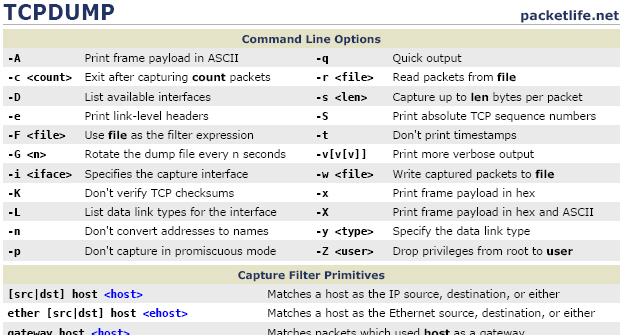
These examples in this post bases on Checkpoint Firewalls. In other platform, the output and
command options may have a difference.
Basic TCPDUMP Commands:
Flags:
S – SYN (Start Connection)
. – No Flag Set
P – PSH (Push Data)
F – FIN (Finish Connection)
R – RST (Reset Connection)
. – No Flag Set
P – PSH (Push Data)
F – FIN (Finish Connection)
R – RST (Reset Connection)
“ack” means acknowledge, “win” means “sliding windows”, “mss” means “maximum segment size”, “nop” means “no operation”.
Flags are some combination of S (SYN), F (FIN), P (PUSH), R (RST), W (ECN CWR) or E (ECN-Echo),
or a single ’.’ (no flags)
or a single ’.’ (no flags)
Selective Acknowledgment Permitted (SackOK): This option simply says that selective acknowledgments are permitted for this connection. SackOK must be included in the TCP options in both the SYN and SYN/ACK packets during the TCP three-way handshake, or it cannot be used. SackOK should not appear in any other packets.
more explanation can be found from Steven’s post – `Masterclass – Tcpdump – Interpreting Output’
Three-way Handshake:
The three-way handshake is simply the source host and the destination host requesting a connection, and then confirming to each other that a connection has been made. As mentioned above, to open a session a client determines a local source port and an Initial Sequence Number (ISN). The ISN is
a randomly determined integer between 0 and 4,294,967,295. Communicating hosts exchange ISNs during connection initialization. Each host sets two counters: sequence and acknowledgement. In the context of a single TCP packet, the sequence number is set by the sending host, and the acknowledgement number is set by the receiving host.
a randomly determined integer between 0 and 4,294,967,295. Communicating hosts exchange ISNs during connection initialization. Each host sets two counters: sequence and acknowledgement. In the context of a single TCP packet, the sequence number is set by the sending host, and the acknowledgement number is set by the receiving host.
Host A sends a TCP SYNchronize packet to Host B
 Host B receives A’s SYN
Host B sends a SYNchronize-ACKnowledgement
Host A receives B’s SYN-ACK
Host A sends ACKnowledge
Host B receives ACK.
TCP socket connection is ESTABLISHED.
tcp three-way handshake,syn,syn-ack,ack
TCP Three Way Handshake (SYN,SYN-ACK,ACK) – See more at this URL:
 Host B receives A’s SYN
Host B sends a SYNchronize-ACKnowledgement
Host A receives B’s SYN-ACK
Host A sends ACKnowledge
Host B receives ACK.
TCP socket connection is ESTABLISHED.
tcp three-way handshake,syn,syn-ack,ack
TCP Three Way Handshake (SYN,SYN-ACK,ACK) – See more at this URL:
Commands and Outputs Examples:
1. ICMP Example
[Expert@ CP1:0]#tcpdump -i Mgmt host 172.16.1.53 tcpdump: verbose output suppressed, use -v or -vv for full protocol decode listening on Mgmt, link-type EN10MB (Ethernet), capture size 96 bytes 09:37:38.370763 IP 10.94.20.14 > 172.16.1.53: ICMP echo request, id 1, seq 3, length 40 09:37:38.372210 IP 172.16.1.53 > 10.94.20.14: ICMP echo reply, id 1, seq 3, length 40 09:37:39.365648 IP 10.94.20.14 > 172.16.1.53: ICMP echo request, id 1, seq 4, length 40 09:37:39.366558 IP 172.16.1.53 > 10.94.200.14: ICMP echo reply, id 1, seq 4, length 40 09:37:40.363506 IP 10.94.20.14 > 172.16.1.53: ICMP echo request, id 1, seq 5, length 40 09:37:40.364318 IP 172.16.1.53 > 10.94.20.14: ICMP echo reply, id 1, seq 5, length 40 09:37:41.361947 IP 10.94.20.14 > 172.16.1.53: ICMP echo request, id 1, seq 6, length 40 09:37:41.362771 IP 172.16.1.53 > 10.94.20.14: ICMP echo reply, id 1, seq 6, length 40 [Expert@CP1:0]# tcpdump -v -nn -i Mgmt host 172.16.1.53 tcpdump: listening on Mgmt, link-type EN10MB (Ethernet), capture size 96 bytes 09:38:29.232691 IP (tos 0x0, ttl 126, id 5783, offset 0, flags [none], proto: ICMP (1), length: 60) 10.94.20.14 > 172.16.1.53: ICMP echo request, id 1, seq 7, length 40 09:38:29.233395 IP (tos 0x0, ttl 127, id 4146, offset 0, flags [none], proto: ICMP (1), length: 60) 172.16.1.53 > 10.94.20.14: ICMP echo reply, id 1, seq 7, length 40 09:38:30.222653 IP (tos 0x0, ttl 126, id 5788, offset 0, flags [none], proto: ICMP (1), length: 60) 10.94.20.14 > 172.16.1.53: ICMP echo request, id 1, seq 8, length 40 09:38:30.223565 IP (tos 0x0, ttl 127, id 4147, offset 0, flags [none], proto: ICMP (1), length: 60) 172.16.1.53 > 10.94.20.14: ICMP echo reply, id 1, seq 8, length 40 09:38:31.220764 IP (tos 0x0, ttl 126, id 5791, offset 0, flags [none], proto: ICMP (1), length: 60) 10.94.20.14 > 172.16.1.53: ICMP echo request, id 1, seq 9, length 40 09:38:31.221607 IP (tos 0x0, ttl 127, id 4149, offset 0, flags [none], proto: ICMP (1), length: 60) 172.16.1.53 > 10.94.20.14: ICMP echo reply, id 1, seq 9, length 40 09:38:32.235355 IP (tos 0x0, ttl 126, id 5795, offset 0, flags [none], proto: ICMP (1), length: 60) 10.94.20.14 > 172.16.1.53: ICMP echo request, id 1, seq 10, length 40 09:38:32.236151 IP (tos 0x0, ttl 127, id 4152, offset 0, flags [none], proto: ICMP (1), length: 60) 172.16.1.53 > 10.94.20.14: ICMP echo reply, id 1, seq 10, length 40 |
2. HTTPS Example
[Expert@Pub-cp2:0]# tcpdump -vvv -nn -i eth1-01 host 19.26.16.19 tcpdump: listening on eth1-01, link-type EN10MB (Ethernet), capture size 96 bytes 11:39:04.822700 IP (tos 0x0, ttl 126, id 7241, offset 0, flags [DF], proto: TCP (6), length: 52) 19.26.16.19.10747 > 19.26.16.24.443: S, cksum 0xea51 (correct), 2579834556:2579834556(0) win 8192 //SYN 11:39:04.826136 IP (tos 0x0, ttl 63, id 0, offset 0, flags [DF], proto: TCP (6), length: 52) 19.26.16.24.443 > 19.26.16.19.10747: S, cksum 0x99db (correct), 487537799:487537799(0) ack 2579834557 win 5840 // SYN ACK 11:39:04.826153 IP (tos 0x0, ttl 63, id 0, offset 0, flags [DF], proto: TCP (6), length: 52) 19.26.16.24.443 > 19.26.16.19.10747: S, cksum 0x99db (correct), 487537799:487537799(0) ack 2579834557 win 5840 // This packet is repeated SYN ACK 11:39:04.826926 IP (tos 0x0, ttl 125, id 7242, offset 0, flags [DF], proto: TCP (6), length: 52) 19.26.16.19.10747 > 10.9.1.25.443: ., cksum 0xd4d0 (correct), 2579834557:2579834557(0) ack 487537800 win 256 //ACK 11:39:06.883076 IP (tos 0x0, ttl 125, id 7243, offset 0, flags [DF], proto: TCP (6), length: 42) 19.26.16.19.10747 > 10.9.1.25.443: P, cksum 0xb101 (correct), 0:2(2) ack 1 win 256 11:39:06.883285 IP (tos 0x0, ttl 63, id 16050, offset 0, flags [DF], proto: TCP (6), length: 40) 19.26.16.24.443 > 19.26.16.19.10747: ., cksum 0xf14d (correct), 1:1(0) ack 3 win 46 11:39:07.048713 IP (tos 0x0, ttl 125, id 7244, offset 0, flags [DF], proto: TCP (6), length: 42) 19.26.16.19.10747 > 10.9.1.25.443: P, cksum 0xb0ff (correct), 2:4(2) ack 1 win 256 11:39:07.048905 IP (tos 0x0, ttl 63, id 16051, offset 0, flags [DF], proto: TCP (6), length: 40) 19.26.16.24.443 > 19.26.16.19.10747: ., cksum 0xf14b (correct), 1:1(0) ack 5 win 46 11:39:07.199352 IP (tos 0x0, ttl 125, id 7245, offset 0, flags [DF], proto: TCP (6), length: 42) 19.26.16.19.10747 > 10.9.1.25.443: P, cksum 0xb0fd (correct), 4:6(2) ack 1 win 256 11:39:07.199883 IP (tos 0x0, ttl 63, id 16052, offset 0, flags [DF], proto: TCP (6), length: 40) 19.26.16.24.443 > 19.26.16.19.10747: ., cksum 0xf149 (correct), 1:1(0) ack 7 win 46 11:39:07.342045 IP (tos 0x0, ttl 125, id 7246, offset 0, flags [DF], proto: TCP (6), length: 42) 19.26.16.19.10747 > 10.9.1.25.443: P, cksum 0xb0fb (correct), 6:8(2) ack 1 win 256 11:39:07.342228 IP (tos 0x0, ttl 63, id 16053, offset 0, flags [DF], proto: TCP (6), length: 40) 19.26.16.24.443 > 19.26.16.19.10747: ., cksum 0xf147 (correct), 1:1(0) ack 9 win 46 11:39:07.492210 IP (tos 0x0, ttl 125, id 7247, offset 0, flags [DF], proto: TCP (6), length: 42) 19.26.16.19.10747 > 10.9.1.25.443: P, cksum 0xb0f9 (correct), 8:10(2) ack 1 win 256 11:39:07.492407 IP (tos 0x0, ttl 63, id 16054, offset 0, flags [DF], proto: TCP (6), length: 40) 19.26.16.24.443 > 19.26.16.19.10747: ., cksum 0xf145 (correct), 1:1(0) ack 11 win 46 11:39:07.634867 IP (tos 0x0, ttl 125, id 7248, offset 0, flags [DF], proto: TCP (6), length: 42) 19.26.16.19.10747 > 10.9.1.25.443: P, cksum 0xb0f7 (correct), 10:12(2) ack 1 win 256 11:39:07.635119 IP (tos 0x0, ttl 63, id 16055, offset 0, flags [DF], proto: TCP (6), length: 40) 19.26.16.24.443 > 19.26.16.19.10747: ., cksum 0xf143 (correct), 1:1(0) ack 13 win 46 11:39:07.635269 IP (tos 0x0, ttl 63, id 16056, offset 0, flags [DF], proto: TCP (6), length: 40) 19.26.16.24.443 > 19.26.16.19.10747: F, cksum 0xf142 (correct), 1:1(0) ack 13 win 46 11:39:07.635864 IP (tos 0x0, ttl 125, id 7249, offset 0, flags [DF], proto: TCP (6), length: 40) 19.26.16.19.10747 > 10.9.1.25.443: ., cksum 0xbe08 (correct), 12:12(0) ack 2 win 256 11:39:07.635927 IP (tos 0x0, ttl 125, id 7250, offset 0, flags [DF], proto: TCP (6), length: 40) 19.26.16.19.10747 > 10.9.1.25.443: F, cksum 0xbe07 (correct), 12:12(0) ack 2 win 256 11:39:07.636058 IP (tos 0x0, ttl 63, id 0, offset 0, flags [DF], proto: TCP (6), length: 40) 19.26.16.24.443 > 19.26.16.19.10747: ., cksum 0xf141 (correct), 2:2(0) ack 14 win 46 |
3. SSH Example
[Expert@Pub-CP1:0]# tcpdump -v -nn -i Mgmt host 172.16.1.53 tcpdump: listening on Mgmt, link-type EN10MB (Ethernet), capture size 96 bytes 09:46:34.443382 IP (tos 0x0, ttl 126, id 7173, offset 0, flags [DF], proto: TCP (6), length: 52) 10.9.2.14.50831 > 172.16.1.53.22: S, cksum 0xac58 (correct), 3232602545:3232602545(0) win 8192 09:46:34.444081 IP (tos 0x0, ttl 127, id 6889, offset 0, flags [DF], proto: TCP (6), length: 52) 172.16.1.53.22 > 10.9.2.14.50831: S, cksum 0xb937 (correct), 41283738:41283738(0) ack 3232602546 win 8192 09:46:34.444916 IP (tos 0x0, ttl 126, id 7175, offset 0, flags [DF], proto: TCP (6), length: 40) 10.9.2.14.50831 > 172.16.1.53.22: ., cksum 0x190b (correct), ack 1 win 256 09:46:34.452567 IP (tos 0x0, ttl 127, id 6893, offset 0, flags [DF], proto: TCP (6), length: 73) 172.16.1.53.22 > 10.9.2.14.50831: P, cksum 0x1960 (correct), 1:34(33) ack 1 win 256 09:46:34.647359 IP (tos 0x0, ttl 126, id 7180, offset 0, flags [DF], proto: TCP (6), length: 40) 10.9.2.14.50831 > 172.16.1.53.22: ., cksum 0x18ea (correct), ack 34 win 256 09:46:35.764373 IP (tos 0x0, ttl 126, id 7184, offset 0, flags [DF], proto: TCP (6), length: 41) 10.9.2.14.50831 > 172.16.1.53.22: P, cksum 0x15e1 (correct), 1:2(1) ack 34 win 256 09:46:35.764610 IP (tos 0x0, ttl 128, id 9109, offset 0, flags [DF], proto: TCP (6), length: 40) 172.16.1.53.22 > 10.9.2.14.50831: R, cksum 0x19f6 (correct), 41283772:41283772(0) win 0 |
4. FTP Example
[Expert@Pub-CP1:0]# tcpdump -v -nn -i Mgmt host 172.16.1.53 tcpdump: listening on Mgmt, link-type EN10MB (Ethernet), capture size 96 bytes 09:47:11.477696 IP (tos 0x0, ttl 126, id 30923, offset 0, flags [none], proto: TCP (6), length: 44) 10.9.2.14.50864 > 172.16.1.53.21: S, cksum 0xebe1 (correct), 2535345973:2535345973(0) win 32120 09:47:11.479045 IP (tos 0x0, ttl 127, id 6954, offset 0, flags [DF], proto: TCP (6), length: 44) 172.16.1.53.21 > 10.9.2.14.50864: S, cksum 0x31a2 (correct), 3764401990:3764401990(0) ack 2535345974 win 8192 09:47:11.480173 IP (tos 0x0, ttl 126, id 30925, offset 0, flags [none], proto: TCP (6), length: 40) 10.9.2.14.50864 > 172.16.1.53.21: ., cksum 0xebe6 (correct), ack 1 win 32120 09:47:11.480858 IP (tos 0x0, ttl 127, id 6955, offset 0, flags [DF], proto: TCP (6), length: 40) 172.16.1.53.21 > 10.9.2.14.50864: ., cksum 0x695f (correct), ack 1 win 65535 09:47:11.690070 IP (tos 0x0, ttl 127, id 6959, offset 0, flags [DF], proto: TCP (6), length: 334) 172.16.1.53.21 > 10.9.2.14.50864: P 1:295(294) ack 1 win 65535 09:47:11.690579 IP (tos 0x0, ttl 126, id 30926, offset 0, flags [none], proto: TCP (6), length: 40) 10.9.2.14.50864 > 172.16.1.53.21: ., cksum 0xebe6 (correct), ack 295 win 31826 09:47:13.470582 IP (tos 0x0, ttl 126, id 30933, offset 0, flags [none], proto: TCP (6), length: 46) 10.9.2.14.50864 > 172.16.1.53.21: P, cksum 0x02bf (correct), 1:7(6) ack 295 win 32120 09:47:13.472164 IP (tos 0x0, ttl 127, id 6963, offset 0, flags [DF], proto: TCP (6), length: 81) 172.16.1.53.21 > 10.9.2.14.50864: P, cksum 0xc94d (correct), 295:336(41) ack 7 win 65529 09:47:13.472557 IP (tos 0x0, ttl 126, id 30934, offset 0, flags [none], proto: TCP (6), length: 40) 10.9.2.14.50864 > 172.16.1.53.21: ., cksum 0xeaba (correct), ack 336 win 32079 09:47:13.473093 IP (tos 0x0, ttl 127, id 6965, offset 0, flags [DF], proto: TCP (6), length: 40) 172.16.1.53.21 > 10.9.2.14.50864: F, cksum 0x680f (correct), 336:336(0) ack 7 win 65529 09:47:13.473336 IP (tos 0x0, ttl 126, id 30936, offset 0, flags [none], proto: TCP (6), length: 40) 10.9.2.14.50864 > 172.16.1.53.21: ., cksum 0xea90 (correct), ack 337 win 32120 09:47:13.489842 IP (tos 0x0, ttl 126, id 30939, offset 0, flags [none], proto: TCP (6), length: 40) 10.9.2.14.50864 > 172.16.1.53.21: F, cksum 0xea8f (correct), 7:7(0) ack 337 win 32120 09:47:13.490369 IP (tos 0x0, ttl 127, id 6967, offset 0, flags [DF], proto: TCP (6), length: 40) 172.16.1.53.21 > 10.9.2.14.50864: ., cksum 0x680e (correct), ack 8 win 65529 09:47:14.836964 IP (tos 0x0, ttl 126, id 19859, offset 0, flags [DF], proto: TCP (6), length: 112) 10.94.16.48.58884 > 172.16.1.53.445: P 1912308033:1912308105(72) ack 3052976289 win 258 09:47:14.836979 IP (tos 0x0, ttl 126, id 19860, offset 0, flags [DF], proto: TCP (6), length: 112) 10.94.16.48.58884 > 172.16.1.53.445: P 72:144(72) ack 1 win 258 09:47:14.837677 IP (tos 0x0, ttl 127, id 6970, offset 0, flags [DF], proto: TCP (6), length: 40) 172.16.1.53.445 > 10.94.16.48.58884: ., cksum 0x9ad5 (correct), ack 144 win 258 09:47:14.837693 IP (tos 0x0, ttl 127, id 6971, offset 0, flags [DF], proto: TCP (6), length: 112) 172.16.1.53.445 > 10.94.16.48.58884: P 1:73(72) ack 144 win 258 09:47:14.837700 IP (tos 0x0, ttl 127, id 6972, offset 0, flags [DF], proto: TCP (6), length: 112) 172.16.1.53.445 > 10.94.16.48.58884: P 73:145(72) ack 144 win 258 09:47:14.838389 IP (tos 0x0, ttl 126, id 19870, offset 0, flags [DF], proto: TCP (6), length: 40) 10.94.16.48.58884 > 172.16.1.53.445: ., cksum 0x9a46 (correct), ack 145 win 257 09:47:14.838843 IP (tos 0x0, ttl 126, id 19872, offset 0, flags [DF], proto: TCP (6), length: 40) 10.94.16.48.58884 > 172.16.1.53.445: R, cksum 0x9b43 (correct), 144:144(0) ack 145 win 0 |
5. FTPS example
[Expert@Pub:0]# tcpdump -v -n -i eth1-01 host 12.25.20.4 tcpdump: listening on eth1-01, link-type EN10MB (Ethernet), capture size 96 bytes 10:59:02.525754 IP (tos 0x0, ttl 39, id 26220, offset 0, flags [none], proto: TCP (6), length: 60) 12.25.20.4.62712 > 19.26.16.5.ftps: S, cksum 0xd8cb (correct), 1970824717:1970824717(0) win 65535 10:59:02.526420 IP (tos 0x0, ttl 127, id 32480, offset 0, flags [DF], proto: TCP (6), length: 60) 19.26.16.5.ftps > 12.25.20.4.62712: S, cksum 0xdbb7 (correct), 2713847003:2713847003(0) ack 1970824718 win 8192 10:59:02.570606 IP (tos 0x0, ttl 38, id 26433, offset 0, flags [none], proto: TCP (6), length: 52) 12.25.20.4.62712 > 12.17.3.59.ftps: ., cksum 0xa43c (correct), ack 2713847004 win 4096 10:59:02.906868 IP (tos 0x0, ttl 46, id 22227, offset 0, flags [none], proto: TCP (6), length: 98) 12.25.20.4.62712 > 12.17.3.59.ftps: P 0:58(58) ack 1 win 2047 10:59:02.908200 IP (tos 0x0, ttl 127, id 32486, offset 0, flags [DF], proto: TCP (6), length: 1476) 19.26.16.5.ftps > 12.25.20.4.62712: . 1:1425(1424) ack 59 win 261 10:59:02.908216 IP (tos 0x0, ttl 127, id 32487, offset 0, flags [DF], proto: TCP (6), length: 245) 19.26.16.5.ftps > 12.25.20.4.62712: P 1425:1618(193) ack 59 win 261 10:59:02.949626 IP (tos 0x0, ttl 47, id 2661, offset 0, flags [none], proto: TCP (6), length: 40) 12.25.20.4.62712 > 12.17.3.59.ftps: ., cksum 0xfe5b (correct), ack 1 win 2047 10:59:02.968018 IP (tos 0x0, ttl 46, id 63635, offset 0, flags [none], proto: TCP (6), length: 366) 12.25.20.4.62712 > 12.17.3.59.ftps: P 58:384(326) ack 1618 win 2047 10:59:02.972322 IP (tos 0x0, ttl 46, id 41339, offset 0, flags [none], proto: TCP (6), length: 40) 12.25.20.4.62712 > 12.17.3.59.ftps: F, cksum 0xf6c3 (correct), 384:384(0) ack 1618 win 2047 10:59:02.972387 IP (tos 0x0, ttl 46, id 33795, offset 0, flags [none], proto: TCP (6), length: 40) 12.25.20.4.62712 > 12.17.3.59.ftps: ., cksum 0xf6c3 (correct), ack 1618 win 2047 10:59:02.972523 IP (tos 0x0, ttl 127, id 32489, offset 0, flags [DF], proto: TCP (6), length: 52) 19.26.16.5.ftps > 12.25.20.4.62712: ., cksum 0x1e55 (correct), ack 386 win 260 10:59:02.972737 IP (tos 0x0, ttl 127, id 32490, offset 0, flags [DF], proto: TCP (6), length: 52) 19.26.16.5.ftps > 12.25.20.4.62712: F, cksum 0x1e54 (correct), 1618:1618(0) ack 386 win 260 10:59:03.015360 IP (tos 0x0, ttl 46, id 24500, offset 0, flags [none], proto: TCP (6), length: 40) 12.25.20.4.62712 > 12.17.3.59.ftps: ., cksum 0xf6c2 (correct), ack 1619 win 2047 |
6. SQL Example
[Expert@Pub-CP1:0]# tcpdump -i eth1-02.104 host 172.16.1.2 10:39:52.671997 IP 172.16.1.2.19209 > 10.9.10.252.ms-sql-s: S 3761967874:3761967874(0) win 8192 10:39:52.673393 IP 10.9.10.252.ms-sql-s > 172.16.1.2.19209: S 4159880273:4159880273(0) ack 3761967875 win 8192 10:39:52.673743 IP 172.16.1.2.19209 > 10.9.10.252.ms-sql-s: . ack 1 win 256 10:39:52.673970 IP 172.16.1.2.19209 > 10.9.10.252.ms-sql-s: P 1:48(47) ack 1 win 256 10:39:52.674791 IP 10.9.10.252.ms-sql-s > 172.16.1.2.19209: P 1:44(43) ack 48 win 256 10:39:52.675230 IP 172.16.1.2.19209 > 10.9.10.252.ms-sql-s: P 48:151(103) ack 44 win 256 10:39:52.675570 IP 10.9.10.252.ms-sql-s > 172.16.1.2.19209: P 44:661(617) ack 151 win 256 10:39:52.676104 IP 172.16.1.2.19209 > 10.9.10.252.ms-sql-s: P 151:357(206) ack 661 win 254 10:39:52.676980 IP 10.9.10.252.ms-sql-s > 172.16.1.2.19209: P 661:728(67) ack 357 win 255 10:39:52.677889 IP 172.16.1.2.19209 > 10.9.10.252.ms-sql-s: P 357:714(357) ack 728 win 253 10:39:52.680064 IP 10.9.10.252.ms-sql-s > 172.16.1.2.19209: P 728:1141(413) ack 714 win 254 10:39:52.681073 IP 172.16.1.2.19209 > 10.9.10.252.ms-sql-s: P 714:866(152) ack 1141 win 252 10:39:52.681402 IP 10.9.10.252.ms-sql-s > 172.16.1.2.19209: P 1141:1510(369) ack 866 win 253 |
A problem SQL session :
[Expert@Pub-CP1:0]# tcpdump -i eth1-02.104 host 172.16.1.2 11:03:28.691563 IP 172.16.1.2.19451 > 10.9.10.252.ms-sql-s: S 3948339855:3948339855(0) win 8192 11:03:28.692264 IP 10.9.10.252.ms-sql-s > 172.16.1.2.19451: S 909862134:909862134(0) ack 3948339856 win 8192 11:03:28.692795 IP 172.16.1.2.19451 > 10.9.10.252.ms-sql-s: . ack 1 win 256 11:03:28.693041 IP 172.16.1.2.19451 > 10.9.10.252.ms-sql-s: P 1:48(47) ack 1 win 256 11:03:28.998541 IP 172.16.1.2.19451 > 10.9.10.252.ms-sql-s: P 1:48(47) ack 1 win 256 11:03:29.606984 IP 172.16.1.2.19451 > 10.9.10.252.ms-sql-s: P 1:48(47) ack 1 win 256 11:03:30.808145 IP 172.16.1.2.19451 > 10.9.10.252.ms-sql-s: P 1:48(47) ack 1 win 256 11:03:31.692318 IP 10.9.10.252.ms-sql-s > 172.16.1.2.19451: S 909862134:909862134(0) ack 3948339856 win 8192 11:03:31.692610 IP 172.16.1.2.19451 > 10.9.10.252.ms-sql-s: . ack 1 win 256 11:03:32.025035 IP 172.16.1.2.19451 > 10.9.10.252.ms-sql-s: P 1:48(47) ack 1 win 256 11:03:33.226224 IP 172.16.1.2.19451 > 10.9.10.252.ms-sql-s: P 1:48(47) ack 1 win 256 11:03:35.628622 IP 172.16.1.2.19451 > 10.9.10.252.ms-sql-s: P 1:48(47) ack 1 win 256 11:03:37.690075 IP 10.9.10.252.ms-sql-s > 172.16.1.2.19451: S 909862134:909862134(0) ack 3948339856 win 65535 11:03:37.690422 IP 172.16.1.2.19451 > 10.9.10.252.ms-sql-s: . ack 1 win 256 11:03:40.449096 IP 172.16.1.2.19451 > 10.9.10.252.ms-sql-s: P 1:48(47) ack 1 win 256 11:03:43.681010 IP 172.16.1.2.19451 > 10.9.10.252.ms-sql-s: F 48:48(0) ack 1 win 256 //Finish packets 11:03:49.690374 IP 10.9.10.252.ms-sql-s > 172.16.1.2.19451: R 909862135:909862135(0) win 0 // Reset Packets |
7. A Problem Telnet Session
[Expert@Pub:0]# tcpdump -v -n -i eth1-01 host 19.26.16.129 tcpdump: listening on eth1-01, link-type EN10MB (Ethernet), capture size 96 bytes 11:17:59.759390 IP (tos 0x0, ttl 126, id 360, offset 0, flags [DF], proto: TCP (6), length: 52) 19.26.16.129.10329 > 19.26.16.24.telnet: S, cksum 0x8b11 (correct), 4098502333:4098502333(0) win 8192 11:18:02.756485 IP (tos 0x0, ttl 126, id 469, offset 0, flags [DF], proto: TCP (6), length: 52) 19.26.16.129.10329 > 19.26.16.24.telnet: S, cksum 0x8b11 (correct), 4098502333:4098502333(0) win 8192 11:18:08.760662 IP (tos 0x0, ttl 126, id 658, offset 0, flags [DF], proto: TCP (6), length: 48) 19.26.16.129.10329 > 19.26.16.24.telnet: S, cksum 0x9f20 (correct), 4098502333:4098502333(0) win 8192 |
4098502333:4098502333(0) means the sending TCP stack is setting 4098502333 as the initial synchronization number (ISN), and “0” (no) data is being passed in this packet.
Generic TCP
Here’s a line of output related to an SSH session. Note the -v parameter has been used, without it, the IP header information and some of the TCP information is not displayed.
22:24:18.910372 IP (tos 0×10, ttl 64, id 9792, offset 0, flags [DF], proto TCP (6), length 88)
78.47.105.76.ssh > 82.132.219.219.55495: Flags [P.], cksum 0xcb29 (correct), seq497880562:497880610, ack 1593322765, win 379, length 48
78.47.105.76.ssh > 82.132.219.219.55495: Flags [P.], cksum 0xcb29 (correct), seq497880562:497880610, ack 1593322765, win 379, length 48
So, let’s break down the components (bits and octets related to the IP header);
- 22:24:18.910372 – the datagram’s timestamp
- IP (tos 0×10, ttl 64, id 9792, offset 0, flags [DF], proto TCP (6), length 88) – the layer three datagram’s header fields and values;
- tos 0×10 – the IP TOS value (more correctly in the present context, the DS and ECN fields (8bit, 2nd octet)
- ttl 64 – the IP TTL value (8bit, 9th octet)
- id 9792 – mostly used for identifying the parts of a fragmented datagram; incremented by one with every packet sent (16bit, 5th and 6th octets)
- offset 0 – the fragment offset, used with fragmented packets (13bits of the 7th and 8th octets)
- flags [DF] – any IP flags set; [DF] for Don’t Fragment and [MR] for More Fragments (3bits of the 7th octet)
- proto TCP (6) – the higher layer (four) protocol and it’s number (8bits, 10th octet)
- length 88 – the entire IP packet length, including headers (16bits, 3rd and 4th octets)
- 78.47.105.76.ssh – the source IP address and port
- 82.132.219.219.55495 – the destination IP address and port
- Flags [P.] – any TCP flags; a period ‘.‘ indicates an ACK
- cksum 0xcb29 (correct) – the packet’s TCP checksum value
- seq 497880562:497880610 – the TCP packet’s sequence number
- ack 1593322765 – the TCP packet’s acknowledgement number
- win 379 – the source host’s TCP window
- length 48 – the TCP packet length, including headers
Generic UDP
It’s odd how often people don’t think they even use UDP but we all do for Voice, Video, DNS, DHCP, NTP, VXLAN and the like.
Here’s some output related to DNS. Request without -v;
22:54:40.769351 IP 78.47.105.76.6891 > 213.133.100.100.domain: 28642+ AAAA? vps.allenz.eu. (31)
Response with -v, as you can see, without it the IP header information and the UDP information is not displayed;
22:47:08.352707 IP (tos 0×0, ttl 60, id 1457, offset 0, flags [none], proto UDP (17), length 72)
213.133.99.99.domain > 78.47.105.76.16165: [udp sum ok] 11711 ServFail q: A? 40.1.255.158.bl.tiopan.com. 0/0/0 (44)
213.133.99.99.domain > 78.47.105.76.16165: [udp sum ok] 11711 ServFail q: A? 40.1.255.158.bl.tiopan.com. 0/0/0 (44)
So, let’s break down the components of that last one;
- 22:47:08.352707 – the datagram’s timestamp
- IP (tos 0×0, ttl 60, id 1457, offset 0, flags [none], proto UDP (17), length 72) – the layer three datagram’s header fields and values;
- tos 0×0 – the IP TOS value (more correctly in the present context, the DS and ECN fields (8bit, 2nd octet)
- ttl 60 – the IP TTL value (8bit, 9th octet)
- id 1457 – mostly used for identifying the parts of a fragmented datagram; incremented by one with every packet sent (16bit, 5th and 6th octets)
- offset 0 – the fragment offset, used with fragmented packets (13bits of the 7th and 8th octets)
- flags [none] – any IP flags set; [DF] for Don’t Fragment and [MR] for More Fragments (3bits of the 7th octet)
- proto UDP (17) – the higher layer (four) protocol and it’s number (8bits, 10th octet)
- length 72– the entire IP packet length, including headers (16bits, 3rd and 4th octets)
- 213.133.99.99.domain – the source IP address and port
- 78.47.105.76.16165 – the destination IP address and port
- [udp sum ok] – the datagram’s checksum status
- Everything else relates to the DNS application response.
Notes on the proto(col) Field
You can find a full list of protocol number assignments here. Here’s a few more you might know;
- ICMP (1)
- IGMP (2)
- GRE (47)
- ESP (50)
- VINES (83)
- EIGRP (88)
- ETHERIP (97)
- OSPF (89)
- VRRP (112)
- L2TP (115)
- SCTP (132)
Notes on Service Ports
I’m sure you all know this but anyway, valid port numbers are 0 through to 65535. If you want to live by IANA assignments (and we all should right?);
- 0 to 1023 are reserved for well known applications
- 1024 to 49151 are registered (with IANA) ports
- 49152 to 65535 are user and dynamic ports (aka ephemeral or temporary)
Protocol Formatting
tcpdump provides data formatting for the following protocols amongst others (see Jens comments below for more information);
- ICMP
- ISAKMP
- ARP
- NTP
- DNS
- STP
- HSRP
- SNMP
- RADIUS
Thanks again to Jens for this: If you see ‘[|proto]‘ at the end of the verbose output, e.g. ‘[|radius]‘ the snap length is too small for the application data to be captured;. just increase it (using the -s0 parameter) to see the complete application data information.
Here’s a few examples;
ARP: 22:45:47.220050 ARP, Ethernet (len 6), IPv4 (len 4), Request who-has 78.47.108.52 tell 78.47.108.49, length 46
NTP (with -v);
78.47.105.76.ntp > 213.239.239.166.ntp: NTPv4, length 48
Client, Leap indicator: (0), Stratum 3 (secondary reference), poll 10s, precision -22
Root Delay: 0.020477, Root dispersion: 0.056991, Reference-ID: 83.137.98.96
…
Client, Leap indicator: (0), Stratum 3 (secondary reference), poll 10s, precision -22
Root Delay: 0.020477, Root dispersion: 0.056991, Reference-ID: 83.137.98.96
…
DNS: 213.133.99.99.domain > 78.47.105.76.16165: [udp sum ok] 11711 ServFail q: A? 40.1.255.158.bl.tiopan.com. 0/0/0 (44)
Here are some Tcpdump Scenarios from Making a Connection with tcpdump, Part II
Scenario 1: Established Telnet Connection
Using tcpdump we can analyze the PDUs that establish and terminate a TCP/IP connection. TCP uses a special mechanism to open and close connections. The tcpdump output below display data from different connection scenarios between host 192.168.2.10 and 192.168.2.165. The following tcpdump command and options were used to generate output:
#tcpdump -nn host 192.168.2.165 and port 23
Before examining the output, let’s take a detour and get a brief overview of TCP/IP connection management. This small detour will assist those individuals who are new to protocols. To guarantee a reliable connection (startup and shutdown), TCP uses a method in which three messages are exchanged. The process is called a three-way-handshake. To startup a connection:
- The requesting Host sends a synchronization flag (SYN) in a TCP segment to create a connection.
- The receiving Host 192.168.2.165 receives the SYN flag and returns an acknowledgment flag (ACK).
- The requesting Host 192.168.2.10 receives the SYN flag and returns it’s own ACK flag.
A similar handshake process is used to close a connection using a finish flag (FIN).
To establish a connection, the sending host creates a segment containing the IP address and port number of the host it want to connect to. The segment contains a SYN flag and the sending hosts initial sequence number. Data is segmented before it is sent. The sequence numbers allow the segments to be assembled in the correct order.
To establish a connection, the sending host creates a segment containing the IP address and port number of the host it want to connect to. The segment contains a SYN flag and the sending hosts initial sequence number. Data is segmented before it is sent. The sequence numbers allow the segments to be assembled in the correct order.
20:06:32.845356 192.168.2.10.1249 > 192.168.2.165.23:
S 3263977215:3263977215(0) win 16384  (DF)
The receiving hosts responds with its own SYN flag and its initial sequence number. This segment also contains an ACK flag to acknowledge the sending host’s SYN (segment 3263977215 +1). This type of acknowledgment is called expectational acknowledgment, because the receiver acknowledges the sequence number of the next segment it expects to receive.
20:06:32.845725 192.168.2.165.23 > 192.168.2.10.1249: S
48495364:48495364(0) ack 3263977216 win 32120
(DF)
The sending host acknowledges the SYN flag from the receiving host by sending another segment containing the . and ACK flags.
20:06:32.845921 192.168.2.10.1249 > 192.168.2.165.23: . ack 1 win 17520
(DF)
So far two flags, S and ., have been seen. There are five in total.
- S: SYN (Synchronize sequence numbers – Connection establishment)
- F: FIN (Ending of sending by sender – Connection termination)
- R: RST (Reset connection)
- P: PSH (Push data)
- .: (No flag is set)
Scenario 2: Closed Telnet Connection
To terminate a connection, a segment containing a FIN flag is sent from host 192.168.2.165 back to the host with the open session.
20:07:32.916410 192.168.2.165.23 > 192.168.2.10.1249: F 147:147(0) ack
56 win 32120 (DF)
This may appear backwards, but trust me, it’s not. Think of where the session is open–this is the point that is asking to close the connection. Host 192.168.2.10 acknowledges the FIN segment.
20:07:32.916680 192.168.2.10.1249 > 192.168.2.165.23: . ack 148 win
17374 (DF)
Then host 192.168.2.10 terminates it connection by sending a segment containing a FIN flag.
20:07:32.928907 192.168.2.10.1249 > 192.168.2.165.23: F 56:56(0) ack 148
win 17374 (DF)
Host 192.168.2.165 acknowledges the segment.
20:07:32.929121 192.168.2.165.23 > 192.168.2.10.1249: . ack 57 win 32120
(DF)
To establish a connection, host 192.168.2.10 sends a segment containing the IP address and port number of the host it want to connect to. The segment contains a SYN flag and the sending hosts initial sequence number.
05:28:00.080798 192.168.2.10.1063 > 192.168.2.165.23:
S 3034008467:3034008467(0) win 16384  (DF)
Host 192.168.2.165 acknowledges the SYN from host 192.168.2.10 by sending another segment containing the R (connection reset) and ACK flags.
05:28:00.080979 192.168.2.165.23 > 192.168.2.10.1063: R 0:0(0)
ack 3034008468 win 0
Host doesn’t take no for answer and tries again.
05:28:00.579420 192.168.2.10.1063 > 192.168.2.165.23: S
3034008467:3034008467(0) win 16384  (DF)
But it receives the same result from receiving host.
05:28:00.579524 192.168.2.165.23 > 192.168.2.10.1063: R 0:0(0) ack 1 win
0
A final attempt is made to establish a connection.
05:28:01.080114 192.168.2.10.1063 &glt; 192.168.2.165.23: S
3034008467:3034008467(0) win 16384  (DF)
Only three strikes in this ball game. Sending host gives up.
05:28:01.080225 192.168.2.165.23 > 192.168.2.10.1063: R 0:0(0) ack 1 win
0
Compare the outputs from an Establish Telnet Connection scenario and Telnet Connection Refusal scenario. The outputs from the receiving host are different. For the Telnet Connection Refusal scenario, the Telnet service was turned off at the receiving host using the /etc/inetd.conf file. If the service is not available, no connection can be established. Note to self: simple security measures turn off services not being used.
Scenario 3: Telnet Connection Refused (tcp wrappers security used at host)
The same opening as before is used to establish a connection.
05:40:39.838710 192.168.2.10.1064 > 192.168.2.165.23: S
3223709294:3223709294(0) win 16384  (DF)
The receiving host responds with its own SYN flag and its initial sequence number. This segment also contains an ACK flag to acknowledge the sending hosts SYN (segment 3223709294 +1).
05:40:39.839045 192.168.2.165.23 > 192.168.2.10.1064: S
063202536:2063202536(0) ack 3223709295 win 32120 1460,nop,nop,sackOK> (DF)
Host 192.168.2.10 acknowledges the SYN from host 192.168.2.165 by sending another segment, which contains the . and ACK flags.
05:40:39.839295 192.168.2.10.1064 > 192.168.2.165.23: . ack 1 win 17520
(DF)
Host 192.168.2.165 responds with a segment containing a FIN flag–connection terminated. Something has told the receiving host no connection is allowed.
05:40:44.852844 192.168.2.165.23 > 192.168.2.10.1064:
F 1:1(0) ack 1 win 32120 (DF)
Host 192.168.2.10 has a no-flag-set second acknowledgment.
05:40:44.853137 192.168.2.10.1064 > 192.168.2.165.23: . ack 2 win 17520
(DF)
Because a FIN flag segment was received, the connection must be terminated. So host 192.168.2.10 sends a FIN flag to terminate the connection.
05:40:44.855050 192.168.2.10.1064 > 192.168.2.165.23: F 1:1(0) ack 2 win
17520 (DF)
Host 192.168.2.165 responds with a segment acknowledgment.
05:40:44.855176 192.168.2.165.23 > 192.168.2.10.1064: . ack 2 win 32120
(DF)
Compare the outputs from an Establish Telnet Connection scenario and Telnet Connection Refusal (tcp wrappers) scenario. The outputs from the receiving host are different. In the Telnet Connection Refusal (tcp wrappers) scenario, tcp wrappers is enabled by adding the following line to the /etc/hosts.deny file: ALL:192.168.2.10. This means “deny all services to this host with address 192.168.2.10”. A similar connection test was done using a rule in iptables firewall. The resulting output was the same.
The reader may gain some insight into how systems are at risk from the trappings of tcpdump. Before a system hack is possible, some effort is expended to engineer the hack. An examination of the data from a system can provide the hacker with some insight into where efforts might provide the greatest chance of success.
The reader may gain some insight into how systems are at risk from the trappings of tcpdump. Before a system hack is possible, some effort is expended to engineer the hack. An examination of the data from a system can provide the hacker with some insight into where efforts might provide the greatest chance of success.
Scenario 4: No Telnet Connection (host removed from the network)
Same opening, different scenario.
05:55:21.557846 192.168.2.10.1065 > 192.168.2.165.23: S
3443876657:3443876657(0) win 16384  (DF)
There’s no response, so the sending host tries the same request again.
05:55:24.560891 192.168.2.10.1065 > 192.168.2.165.23: S
3443876657:3443876657(0) win 16384  (DF)
With still no response on the third try, the three-strike rule comes into effect. The sending host abandons the connection attempt.
05:55:30.569584 192.168.2.10.1065 > 192.168.2.165.23: S
3443876657:3443876657(0) win 16384  (DF)


 [KB11810] Show KB Properties
