Pages

Tuesday, September 1, 2015

JunOS Space Radius Authentication with Free Radius Server TekRADIUS

TekRADIUS is a RADIUS server for Windows with built-in DHCP server. TekRADIUS is tested on Microsoft Windows XP, Vista, Windows 7/8/10 and Windows 2003/2008/2012 server. TekRADIUS complies with RFC 2865 and RFC 2866. TekRADIUS also supports TCP (RFC 6613) and TLS (RFC 6614-RadSec) transports. TekRADIUS has two editions; TekRADIUS(First edition; supports Microsoft SQL Server) and TekRADIUS LT (Second edition; supports SQLite). It runs as a Windows Service and comes with a Win32 management interface.  More feature can be checked from their website.

There are some previous usage posts in my blog:


Those configuration have been proven working well with Checkpoint, Juniper and Cisco devices. Recently our Juniper NSM upgraded to Juniper Space platform. There were some challenges to set up TekRADIUS to work with JunOS Space during configuration. Here are all steps I did and so far it works.

1. Download and Install TekRADIUS

You can get installation file from download page. Current version is 4.9.9. You can use LT version which is SQLite version. Installation is quite straightforward, and configuration is simple as well. 

2.TekRADIUS configuration.

TekRADIUS configuration is able to be done from console window. Go through all tab interfaces and put necessary information in. Your Radius server should be able ready in 10 minutes. In my lab configuration, there are some groups defined in TekRADIUS group tab. Admin group is using active directory authentication and it will automatically log into cisco devices enable mode with privilege 15. All admiistrators defined in users tab will be nested in those groups.
Defined Groups

For the users in admin-read group, difference from admin group is not able to log into enable mode automatically. You will have to enter enable password manually from Cisco device. In admin-read group, there are no cisco-avpair attribute in Success-reply packets.

Radius Client Configuration

Radius Server Configuration

Cisco Attribute

3. JunOS Space Configuration

3.1 Authentication Server Configuration


Authentication Server

3.2 Define a Remote Profile 'admin'


Remote Profile - admin

3.3 Configure JunOS Attribute in TekRadius

Basically, returned authorization data in the RADIUS server are stored as vendor-specific attributes (VSAs). Therefore, you need to update the Juniper dictionary file (Vendor Juniper in Dictionary Editor) in the RADIUS server with the Junos Space defined VSA (Juniper-Junosspace-Profiles). Users in the RADIUS server database should be assigned to return this VSAs, the values of which must correspond to the remote profiles created in the Junos Space server.

3.3.1 Create a new VSA under Vendor Juniper 's attributes list
new vsa - Juniper-Junosspace-Profiles
3.3.2 Assign this new VSA attribute into the group admin
New Success-reply Attribute
Assign this attribute with a value 'admin', which is matching the JunOS Space remote profile name we created at step 3.2. This value will be returned to JunOS Space to do authorization once authentication succeed. 

4. Verify

You should be able to log in with your AD account name and AD password.

4.1 from TekRADIUS server

Here is log from TekRadius server.

01/09/2015 8:50:18 PM - Active Directory Authentication commencing for user 'yanjohn'
01/09/2015 8:50:18 PM - Check items control - Start (Group : admin).
01/09/2015 8:50:18 PM - Check items control - Stop (Group : admin).
01/09/2015 8:50:18 PM - Windows authentication successfull for user 'yanjohn'
01/09/2015 8:50:18 PM - Fetching Success-Reply items - Start.
01/09/2015 8:50:18 PM - Fetching Success-Reply items - Stop.
01/09/2015 8:50:18 PM - Generating Reply Packet - Start.
01/09/2015 8:50:18 PM - Generating Reply Packet - Stop.

RadAuth reply to  : 10.94.200.18:59944 - 01/09/2015 8:50:18 PM
Size              : 82
Identifier        : 24
Attributes        : 

Juniper-Junosspace-Profiles = admin
cisco-avpair = shell:priv-lvl=15
Service-Type = 7


4.2 from JunOS Space Audit Logging

Audit Log

Reference:


Friday, August 28, 2015

Cisco 7600 Router Got Software Forced Crash During Booting

Symptoms:

One of Cisco7606 Routers got a software crash during booting process. Here is output from console.


System Bootstrap, Version 12.2(33r)SRD5, RELEASE SOFTWARE (fc1)
Technical Support: http://www.cisco.com/techsupport
Copyright (c) 2009 by cisco Systems, Inc.
C7600-RSP720/SP platform with 1048576 Kbytes of main memory

Autoboot executing command: "boot bootdisk:c7600rsp72043-advipservicesk9-mz.122-33.SRD3.bin"

Initializing ATA monitor library...

Self extracting the image... [OK]
Self decompressing the image : ################################################################################################################################################################################################################################# [OK]

              Restricted Rights Legend

Use, duplication, or disclosure by the Government is
subject to restrictions as set forth in subparagraph
(c) of the Commercial Computer Software - Restricted
Rights clause at FAR sec. 52.227-19 and subparagraph
(c) (1) (ii) of the Rights in Technical Data and Computer
Software clause at DFARS sec. 252.227-7013.

           cisco Systems, Inc.
           170 West Tasman Drive
           San Jose, California 95134-1706


Cisco IOS Software, c7600rsp72043_sp Software (c7600rsp72043_sp-ADVIPSERVICESK9-M), Version 12.2(33)SRD3, RELEASE SOFTWARE (fc3)
Technical Support: http://www.cisco.com/techsupport
Copyright (c) 1986-2009 by Cisco Systems, Inc.
Compiled Thu 10-Sep-09 12:50 by prod_rel_team
Image text-base: 0x0800015C, data-base: 0x0C000000


*Aug 27 13:13:43.659: %SYS-SP-3-LOGGER_FLUSHING: System pausing to ensure console debugging output.

*Aug 27 13:13:41.851: %PFREDUN-6-ACTIVE: Initializing as ACTIVE processor

*Aug 27 13:13:43.659: %OIR-SP-6-CONSOLE: Changing console ownership to route processor


System Bootstrap, Version 12.2(33r)SRD5, RELEASE SOFTWARE (fc1)
Technical Support: http://www.cisco.com/techsupport
Copyright (c) 2009 by cisco Systems, Inc.

Warning: monitor nvram area is corrupt ... using default values
C7600-RSP720/RP platform with 2097152 Kbytes of main memory

Download Start
!!!!!!!!!!!!!!!!!!!!!!!!!!!!!!!!!!!!!!!!!!!!!!!!!!!!!!!!!!!!!!!!!!!!!!!!!!!!!!!!!!!!!!!!!!!!!!!!!!!!!!!!!!!!!!!!!!!!!!!!!!!!!!!!!!!!!!!!!!!!!!!!!!!!!!!!!!!!!!!!!!!!!!!!!!!!!!!!!!!!!!!!!!!!!!!!!!!!!!!!!!!!!!!!!!!!!!!!!!!!!!!!!!!!!!!!!!!!!!!!!!!!!!!!!!!!!!!!!!!!!!!!!!!!!!!!!!!!!!!!!!!!!!!!!!!!!!!!!!!!!!!!!!!!!!!!!!!!!!!!!!!!!!!!!!!!!!!!!!!!!!!!!!!!!!!!!!!!!!!!!!!!!!!!!!!!!!!!!!!!!!!!!!!!!!!!!!!!!!!!!!!!!!!!!!!!!!!!!!!!!!!!!!!!!!!!!!!!!!!!!!!!!!!!!!!!!!!!!!!!!!!!!!!!!!!!!!!!!!!!!!!!!!!!!!!!!!!!!!!!!!!!!!!!!!!!!!!!!!!!!!!!!!!!!!!!!!!!!!!!!!!!!!!!!!!!!!!!!!!!!!!!!!!!!!!!!!!!!!!!!!!!!!!!!!!!!!!!!!!!!!!!!!!!!!!!!!!!!!!!!!!!!!!!!!!!!!!!!!!!!!!!!!!!!!!!!!!!!!!!!!!!!!!!!!!!!!!!!!!!!!!!!!!!!!!!!!!!!!!!!!!!!!!!!!!!!!!!!!!!!!!!!!!!!!!!!!!!!!!!!!!!!!!!!!!!!!!!!!!!!!!!!!!!!!!!!!!!!!!!!!!!!!!!!!!!!!!!!!!!!!!!!!!!!!!!!!!!!!!!!!!!!!!!!!!!!!!!!!!!!!!!!!!!!!!!!!!!!!!!!!!!!!!!!!!!!!!!!!!!!!!!!!!!!!!!!!!!!!!!!!!!!!!!!!!!!!!!!!!!!!!!!!!!!!!!!!!!!!!!!!!!!!!!!!!!!!!!!!!!!!!!!!!!!!!!!!!!!!!!!!!!!!!!!!!!!!!!!!!!!!!!!!!!!!!!!!!!!!!!!!!!!!!!!!!!!!!!!!!!!!!!!!!!!!!!!!!!!!!!!!!!!!!!!!!!!!!!!!!!!!
Download Completed! Booting the image.
Self decompressing the image : ##################################################################################################################################################################################################################################################################################################################################################################################################################################################################################################################################### [OK]

              Restricted Rights Legend

Use, duplication, or disclosure by the Government is
subject to restrictions as set forth in subparagraph
(c) of the Commercial Computer Software - Restricted
Rights clause at FAR sec. 52.227-19 and subparagraph
(c) (1) (ii) of the Rights in Technical Data and Computer
Software clause at DFARS sec. 252.227-7013.

           cisco Systems, Inc.
           170 West Tasman Drive
           San Jose, California 95134-1706


Cisco IOS Software, c7600rsp72043_rp Software (c7600rsp72043_rp-ADVIPSERVICESK9-M), Version 12.2(33)SRD3, RELEASE SOFTWARE (fc3)
Technical Support: http://www.cisco.com/techsupport
Copyright (c) 1986-2009 by Cisco Systems, Inc.
Compiled Thu 10-Sep-09 12:19 by prod_rel_team
Image text-base: 0x08000224, data-base: 0x10000000


This product contains cryptographic features and is subject to United
States and local country laws governing import, export, transfer and
use. Delivery of Cisco cryptographic products does not imply
third-party authority to import, export, distribute or use encryption.
Importers, exporters, distributors and users are responsible for
compliance with U.S. and local country laws. By using this product you
agree to comply with applicable laws and regulations. If you are unable
to comply with U.S. and local laws, return this product immediately.

A summary of U.S. laws governing Cisco cryptographic products may be found at:
http://www.cisco.com/wwl/export/crypto/tool/stqrg.html

If you require further assistance please contact us by sending email to
export@cisco.com.

Cisco CISCO7606-S (M8500) processor (revision 1.1) with 1835008K/131072K bytes of memory.
Processor board ID FOX1346GM8T
 BASEBOARD: RSP720
 CPU: MPC8548_E, Version: 2.0, (0x80390020)
 CORE: E500, Version: 2.0, (0x80210020)
 CPU:1200MHz, CCB:400MHz, DDR:200MHz,
 L1:    D-cache 32 kB enabled
        I-cache 32 kB enabled

Last reset from power-on
1 SIP-200 controller .
1 Virtual Ethernet interface
50 Gigabit Ethernet interfaces
3964K bytes of non-volatile configuration memory.

507024K bytes of Internal ATA PCMCIA card (Sector size 512 bytes).


Press RETURN to get started!


*Aug 27 13:14:26.503: RP: Currently running ROMMON from S (Gold) region
*Aug 27 13:14:26.847: %SPANTREE-5-EXTENDED_SYSID: Extended SysId enabled for type vlan
*Aug 27 08:14:30: %SYS-6-CLOCKUPDATE: System clock has been updated from 13:14:30 UTC Thu Aug 27 2015 to 08:14:30 EDT Thu Aug 27 2015, configured from console by console.
*Aug 27 09:14:30: %SYS-6-CLOCKUPDATE: System clock has been updated from 08:14:30 EDT Thu Aug 27 2015 to 09:14:30 EDT Thu Aug 27 2015, configured from console by console.
*Aug 27 09:14:32: %RTT-4-OPER_TIMEOUT: condition occurred, entry number = 10
*Aug 27 09:14:32: %SYS-5-CONFIG_I: Configured from memory by console
*Aug 27 09:14:34: %SYS-5-RESTART: System restarted --
Cisco IOS Software, c7600rsp72043_rp Software (c7600rsp72043_rp-ADVIPSERVICESK9-M), Version 12.2(33)SRD3, RELEASE SOFTWARE (fc3)
Technical Support: http://www.cisco.com/techsupport
Copyright (c) 1986-2009 by Cisco Systems, Inc.
Compiled Thu 10-Sep-09 12:19 by prod_rel_team
*Aug 27 09:14:34: %SSH-5-ENABLED: SSH 2.0 has been enabled
*Aug 27 09:14:34: %NTP-6-RESTART: NTP process starts
*Aug 27 13:13:43.975: %SYS-SP-3-LOGGER_FLUSHED: System was paused for 00:00:00 to ensure console debugging output.

Firmware compiled 23-Jul-09 11:21 by integ Build [100]
*Aug 27 13:14:24.003: %SPANTREE-SP-5-EXTENDED_SYSID: Extended SysId enabled for type vlan
*Aug 27 13:14:24.207: SP: SP: Currently running ROMMON from S (Gold) region
*Aug 27 13:14:32.119: %SW_VLAN-SP-6-VTP_DOMAIN_NAME_CHG: VTP domain name changed to CDMA_PMI.
*Aug 27 09:14:34: %SYS-6-LOGGINGHOST_STARTSTOP: Logging to host 172.16.100.249 port 514 started - CLI initiated
*Aug 27 13:14:34.119: %SYS-SP-5-RESTART: System restarted --
Cisco IOS Software, c7600rsp72043_sp Software (c7600rsp72043_sp-ADVIPSERVICESK9-M), Version 12.2(33)SRD3, RELEASE SOFTWARE (fc3)
Technical Support: http://www.cisco.com/techsupport
Copyright (c) 1986-2009 by Cisco Systems, Inc.
Compiled Thu 10-Sep-09 12:50 by prod_rel_team
*Aug 27 13:14:36: %OIR-SP-6-INSPS: Power supply inserted in slot 1
*Aug 27 13:14:36: %C7600_PWR-SP-2-PSFAIL: power supply 1 output failed.
*Aug 27 13:14:36: %C7600_POWER-SP-4-GLITCH: Recovered from glitch in system power supply.
*Aug 27 13:14:36: %OIR-SP-6-INSPS: Power supply inserted in slot 2
*Aug 27 09:14:36: %SNMP-5-CHASSISALARM: Chassis Alarm Trap: tmpAlarm(OFF), minorAlarm(ON), and/or majorAlarm(OFF)
*Aug 27 13:14:36: %C7600_PWR-SP-4-PSOK: power supply 2 turned on.
*Aug 27 09:14:39: %NTP-6-PEERREACH: Peer 127.127.7.1 is reachable
Aug 27 09:14:39: %NTP-5-PEERSYNC: NTP synced to peer 127.127.7.1
Aug 27 09:14:40: %SNMP-5-COLDSTART: SNMP agent on host Horner-C7606A is undergoing a cold start
*Aug 27 09:14:39: %FABRIC-SP-5-CLEAR_BLOCK: Clear block option is off for the fabric in slot 5.
*Aug 27 09:14:40: %FABRIC-SP-5-FABRIC_MODULE_ACTIVE: The Switch Fabric Module in slot 5 became active.

%Software-forced reload


 09:14:44 EDT Thu Aug 27 2015: Unexpected exception to CPU: vector 1500, PC = 0xA7E60E4 , LR = 0xA7E6084 
-Traceback= A7E60E4 A7E6084 A4EE088 A380674 A3C18D8 A3C1944 892CC54 892DE20 892EC00 A278880 A279000 A82F640 A82F9B8 A831120 A7DBEAC A883B54 

CPU Register Context:
MSR = 0x00029200  CR  = 0x24444024  CTR = 0x0A3CCB14  XER   = 0x00000000
R0  = 0x0A7E6084  R1  = 0x17ECF058  R2  = 0xFFFCFFFC  R3    = 0x18710E64
R4  = 0xFFFFFFFE  R5  = 0x00000000  R6  = 0x17ECF030  R7    = 0x100A0000
R8  = 0x00029200  R9  = 0x00000000  R10 = 0x111DA034  R11   = 0x18710E60
R12 = 0xA0000000  R13 = 0x04044000  R14 = 0x00000000  R15   = 0x12DB0000
R16 = 0x12DB49A4  R17 = 0x12DB48B8  R18 = 0x00000000  R19   = 0x79EB1D50
R20 = 0x00000000  R21 = 0x184FF95C  R22 = 0x00000000  R23   = 0x000000FF
R24 = 0x1872D21C  R25 = 0x00000040  R26 = 0x13DF6EEC  R27   = 0x0000001F
R28 = 0x00000001  R29 = 0x103F0000  R30 = 0x13DF6EEC  R31   = 0x00000000

Writing crashinfo to bootdisk:crashinfo_20150827-091444-EDT
1073 Unused bytes of context save space
*** System received a Software forced crash ***
signal= 0x17, code= 0x150e
*Aug 27 09:14:45: %SYS-SP-3-LOGGER_FLUSHING: System pausing to ensure console debugging output.

*Aug 27 09:14:43: %EARL-SP-2-PATCH_INVOCATION_LIMIT: 10 Recovery patch invocations in the last 30 secs have been attempted. Max limit reached
*Aug 27 09:14:45: %OIR-SP-6-CONSOLE: Changing console ownership to switch processor


*** System received a Software forced crash ***
signal= 0x17, code= 0x1500, context= 0xcf6d9ec
PC = 0x82b1ec0, Vector = 0x1500, SP = 0x14c86ff0

Soulution:

It seems RSP module got an issue. Fortunately, there is a standby RSP720 in warehouse. After replaced RSP720, it booted normally.

Route switch processor (RSP) is a module that is installed in one of the card slots in the router. The RSP provides switching and local and remote management for the router and also contains the uplink ports for the router. Both types of modules (supervisor engine and RSP) perform the same functions in the router.


RSP720-3CXL-GE (RSP720 with Integrated Switch Fabric/3CXL-GE)


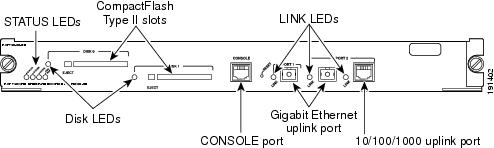
Front Panel of RSP720-3CXL-GE Explanation

Cisco Router 7206 with RSP720-3CXL-GE


RSP720-3CXL-GE

Two Gigabit Ethernet uplink ports: port 1 supports a 1-Gbps SFP module; port 2 is configurable with either a 1-Gbps SFP module or a 10/100/1000-Mbps RJ-45 connector

Integrated 720-Gbps switch fabric

PFC3CXL (high-capacity) and MSFC4 with 512-MB bootdisk 4-MB NVRAM, 4-MB ROMmon, and several DRAM options:

Route processor (RP): 1- to 4-GB DRAM (default 2 GB)

Switch processor (SP): 1- to 2-GB DRAM (default 1GB)

Two CompactFlash Type II slots on front panel (512 MB default with option to 1 GB) and two internal CompactFlash slots (one each for RP and SP, 512 MB default for each)

Requires larger power supplies and a high-speed fan tray

QoS port architecture (Rx/Tx): 1p1q4t/1p2q2t


Reference: 

Cisco 7600 Series Route Switch Processor 720 Data Sheet

Wednesday, August 26, 2015

Check Point Error: Partial Overlapping Encryption Domains When Verifying or Installing Policy

Usually when your firewall policy is not configured properly, Checkpoint SmartDashboard will notify you with useful details when you verify or install it. But sometimes, those information will make you feel lost. I met one case recently.

I worked on one IPSec VPN configuration  from my vpn gateway fw-ras to customer's gateway. The interesting traffic is from Customer public ip to our server's public ip address 20.153.121.59 which is NAT-ed to internal ip address 10.1.106.59. On my gateway's vpn domain includes this public ip 20.153.121.59 and Internal Segment 10.1.106.x/24.

The VPN works fine. Customer was able to reach us through IPSec VPN Tunnel. By the way I am using default NAT behaviour which is NAT happening on client side. The issue I met is the Partial Overlapping Encryption Domains warning message when I verified and installed policy.


Symptons:

Here is screenshots and copied error / warning messages:


"Network Security Policy 'Standard' was prepared on Wed Aug 26 13:36:44 2015.

The following errors and warnings exist: The gateways fw-ras and vpnm have partial overlapping encryption domains. Therefore, Endpoint Connect users will not support MEP configuration SecureRemote/SecureClient users will not be able to create site. If any of the GWs should not be exported to SR/SC, please remove it from the RemoteAccess community or uncheck the exportable for SR box. The overlapping domain include : 10.1.72.14 - 10.1.72.16 The exclusive domain of fw-ras include: 20.153.121.59 - 20.153.121.62 The exclusive domain of vpnm include: 10.1.240.0 - 10.1.240.255"

Basically it mentioned some ip addresses are used in multiple vpn domains, especially in RemoteAccess community. But I double checked both gateways fw-ras and vpnm, their encryption domains are not overlapping at all.

Interesting things, if I removed  20.153.121.59 from vpn encryption domain of gateway fw-ras, this error/warning message disappeared. But IPSec vpn configuration will need this public ip address to make sure the traffic can be encrypted and sent to customer's gateway.


Solutions:

Good thing in the message is it mentioned "If any of the GWs should not be exported to SR/SC, please remove it from the RemoteAccess community or uncheck the exportable for SR box". Since the gateway fw-ras is not in RemoteAccess community, the only option for me is to uncheck the exportable for SR box.

I found the option in the gateway's properties window -> IPSec VPN -> Traditional mode configuration...:


After unchecked the Exportable for SecuRemote/SecureClient, the installation is flawless.

Reference:

sk101986 - "The gateways XXX and YYY have partial overlapping encryption domains" error during Policy Verification


Checkpoint Monitord Process Consumes Excess Memory

During a regular review firewall mem and cpu usage, I found some of Checkpoint UTM272 R77.10 gateways are using lots memory and ssh / snmp access seems slow sometimes. With the TOP command , I am able to sort the mem / cpu usage and see who is hogging the resources.

The result of finding is monitord service. Monitord server is used by device sensors to monitor hardware and saves data into DB file stored on local. Before R76, it will keep one year data in DB. After R76, it only keeps 3 months history to save devices resources during process the data. In my case, the DB file is more than 350M which cause monitord service consumes lots memory to process DB file. Although we are using R77.10, it seems upgrading to R771.10, not fresh installation,  wont reset your DB file structure.

There is workaround provided at SK93587. Here are all steps I recorded to fix this.


1. Before applied the workaround, monitord is using 42.5% MEM.


top - 10:56:37 up 10 days,  1:08,  1 user,  load average: 0.00, 0.06, 0.43
Tasks:  83 total,   3 running,  80 sleeping,   0 stopped,   0 zombie
Cpu(s):  1.2%us,  1.1%sy,  0.0%ni, 97.3%id,  0.2%wa,  0.1%hi,  0.1%si,  0.0%st
Mem:    957272k total,   947392k used,     9880k free,     2772k buffers
Swap:  2096472k total,    43292k used,  2053180k free,   209280k cached
%MEM   PID USER      PR  NI  VIRT  RES  SHR S %CPU    TIME+  COMMAND             
 5.0  4226 admin     15   0  263m  47m  11m S  0.4  59:12.98 cpd                 
 0.1  2782 admin     15   0  2172 1084  836 R  0.2   0:00.05 top                 
 0.8  3988 admin     15   0 24344 7956 5780 S  0.2  22:38.83 snmpd               
 1.4  3947 admin     16   0 33796  13m 7964 S  0.1   2947:10 confd               
42.5  3952 admin     15   0  400m 397m 2332 S  0.1 119:05.53 monitord            
 0.1  3545 admin     18   0  1708  688  584 S  0.1   2:38.13 syslogd             
 0.1     1 admin     15   0  2040  580  548 S  0.0   0:01.47 init                
 0.0     2 admin     RT  -5     0    0    0 S  0.0   0:00.00 migration/0         
 0.0     3 admin     15   0     0    0    0 S  0.0   0:00.67 ksoftirqd/0         
 0.0     4 admin     RT  -5     0    0    0 S  0.0   0:00.00 watchdog/0          
 0.0     5 admin     10  -5     0    0    0 S  0.0   0:01.56 events/0                                                                                             


Next is the top outputs sorted by %MEM:              
top - 10:58:15 up 10 days,  1:10,  1 user,  load average: 0.00, 0.04, 0.38
Tasks:  83 total,   3 running,  80 sleeping,   0 stopped,   0 zombie
Cpu(s):  0.3%us,  0.3%sy,  0.0%ni, 99.0%id,  0.3%wa,  0.0%hi,  0.0%si,  0.0%st
Mem:    957272k total,   947972k used,     9300k free,     3036k buffers
Swap:  2096472k total,    43292k used,  2053180k free,   209708k cached

%MEM   PID USER      PR  NI  VIRT  RES  SHR S %CPU    TIME+  COMMAND             
42.5  3952 admin     15   0  400m 397m 2332 S  0.3 119:05.63 monitord            
 6.9  6938 admin     19   0  122m  64m 3836 S  0.0  19:09.09 DAService           
 5.0  4226 admin     15   0  263m  47m  11m S  0.0  59:13.25 cpd                 
 2.0  4386 admin     15   0  284m  18m  10m S  0.0   1:23.18 fw_full             
 1.5  3948 admin     15   0 38032  13m 1704 S  0.0  70:42.63 searchd             
 1.4  3947 admin     15   0 33796  13m 7964 S  0.0   2947:10 confd               
 1.4  6779 admin     15   0  163m  13m 7252 S  0.0   0:03.49 rtmd                
 0.8  3988 admin     15   0 24344 7956 5780 S  0.0  22:39.07 snmpd                

2. Rebuild monitord DB

[Expert@CP-DMZ-1:0]# tellpm process:monitord
[Expert@CP-DMZ-1:0]# 
Message from syslogd@ at Wed Aug 26 10:59:39 2015 ...
CP-DMZ-1 monitord[3952]: monitord got killed 
[Expert@CP-DMZ-1:0]# top  (Sorted result by %MEM)
                 
top - 11:00:09 up 10 days,  1:12,  1 user,  load average: 0.00, 0.02, 0.33
Tasks:  82 total,   2 running,  80 sleeping,   0 stopped,   0 zombie
Cpu(s):  2.3%us,  1.7%sy,  0.0%ni, 95.7%id,  0.3%wa,  0.0%hi,  0.0%si,  0.0%st
Mem:    957272k total,   542928k used,   414344k free,     3620k buffers
Swap:  2096472k total,    42700k used,  2053772k free,   208824k cached

  PID USER      PR  NI  VIRT  RES  SHR S %CPU %MEM    TIME+  COMMAND             
 6938 admin     19   0  122m  64m 3836 S  0.0  6.9  19:09.09 DAService           
 4226 admin     15   0  263m  47m  11m S  1.0  5.0  59:13.62 cpd                 
 4386 admin     15   0  284m  18m  10m S  0.0  2.0   1:23.18 fw_full             
 3948 admin     15   0 38032  13m 1704 S  0.0  1.5  70:42.63 searchd             
 3947 admin     15   0 33796  13m 7968 S  0.0  1.4   2947:10 confd               
 6779 admin     15   0  163m  13m 7252 S  0.0  1.4   0:03.49 rtmd                
 3930 admin     15   0 25300 7996 6340 S  0.0  0.8   0:00.41 pm                  
 3988 admin     15   0 24344 7956 5780 S  0.3  0.8  22:39.35 snmpd               
 4339 admin     15   0  149m 7352 5748 S  0.0  0.8   0:00.51 cphamcset           
 4367 admin     15   0 32944 7224 6472 S  0.0  0.8   1:09.32 routed              
 4374 admin     16   0 33044 7168 6976 S  0.0  0.7   0:13.16 routed              
 3951 admin     18   0 99768 7024 6620 S  0.0  0.7   0:06.79 rconfd              
 3983 admin     17   0 25272 6816 6136 S  0.0  0.7   0:00.34 cloningd            
 2228 admin     15   0 21000 5972 3324 S  0.0  0.6   0:00.52 clish               
 4240 admin     15   0  150m 5732 5592 S  0.0  0.6   0:00.75 mpdaemon                                                                                                                                                              
[Expert@CP-DMZ-1:0]# cd /var/log
[Expert@CP-DMZ-1:0]# ls -l db
-rw-r--r-- 1 admin root 356237312 Aug 26 10:45 db
[Expert@CP-DMZ-1:0]# cp /var/log/db  /var/log/db_ORIGINAL
[Expert@CP-DMZ-1:0]#  sqlite3 /var/log/db 
SQLite version 3.6.20
Enter ".help" for instructions
Enter SQL statements terminated with a ";"
sqlite> VACUUM;
sqlite> .exit 
[Expert@CP-DMZ-1:0]# tellpm process:monitord t
[Expert@CP-DMZ-1:0]# 


3. Check Memory usage after workaround applied

The memory usage has been reduced to only 4.9%, dropped from 42.5% we found from Step 1

top - 11:15:24 up 10 days,  1:27,  1 user,  load average: 0.00, 0.05, 0.18
Tasks:  83 total,   2 running,  81 sleeping,   0 stopped,   0 zombie
Cpu(s):  0.7%us,  0.3%sy,  0.0%ni, 98.3%id,  0.0%wa,  0.3%hi,  0.3%si,  0.0%st
Mem:    957272k total,   446428k used,   510844k free,     4808k buffers
Swap:  2096472k total,    42696k used,  2053776k free,    67228k cached

  PID USER      PR  NI  VIRT  RES  SHR S %CPU %MEM    TIME+  COMMAND             
 6938 admin     17   0  122m  64m 3836 S  0.0  6.9  19:09.09 DAService           
 4226 admin     15   0  263m  47m  11m S  0.0  5.0  59:16.10 cpd                 
 3088 admin     15   0 49684  45m 2320 S  0.0  4.9   0:01.55 monitord            
 4386 admin     15   0  284m  18m  10m S  0.0  2.0   1:23.23 fw_full             
 3948 admin     15   0 38032  13m 1704 S  0.0  1.5  70:42.63 searchd             
 3947 admin     15   0 33796  13m 7968 S  0.0  1.4   2947:10 confd               
 6779 admin     15   0  163m  13m 7252 S  0.0  1.4   0:03.49 rtmd                
 3930 admin     16   0 25300 8012 6340 S  0.0  0.8   0:00.41 pm                  
 3988 admin     15   0 24344 7956 5780 S  0.0  0.8  22:41.56 snmpd               
 4339 admin     15   0  149m 7352 5748 S  0.0  0.8   0:00.51 cphamcset           
 4367 admin     15   0 32944 7224 6472 S  0.0  0.8   1:09.33 routed              
 4374 admin     15   0 33044 7168 6976 S  0.0  0.7   0:13.19 routed              
 3951 admin     18   0 99768 7024 6620 S  0.0  0.7   0:06.79 rconfd              
 3983 admin     17   0 25272 6816 6136 S  0.0  0.7   0:00.34 cloningd            
 2228 admin     15   0 21000 5972 3324 S  0.0  0.6   0:00.52 clish               
 4240 admin     15   0  150m 5732 5592 S  0.0  0.6   0:00.75 mpdaemon            
 4787 admin     18   0 20936 5512 5508 S  0.0  0.6   0:00.28 cpviewd             
 4347 nobody    17   0 18748 5108 5104 S  0.0  0.5   0:00.21 ci_http_server        
And the DB size reduced from more than 350M to less than 40M

[Expert@CP-DMZ-1:0]# ls -l db
-rw-r--r-- 1 admin root 37168128 Aug 26 11:32 db


Reference: 

sk93587 - Output of 'top' command on Gaia OS shows that 'monitord' process consumes memory or CPU at high level


Monday, August 17, 2015

Update to Windows 10 Immediately Without Wait Validating from Microsoft

One of my windows 7 laptop is still waiting Microsoft to validate my computer's specific but my another one has been notified and successfully automatically updated. After a couple of  weeks waiting, this weekend I lost patience and decided to find other ways to update my windows 7 to windows 10.

Validating Windows 10 for your PC


One way I found is to use Microsoft media creation tool. Microsoft has provided a URL to download software for those who do not want to wait and want to update to win10 by themselves: http://www.microsoft.com/en-us/software-download/windows10 .

This Microsoft URL provides 32-bit version and 64-bit version tools for different devices. A blank USB or DVD (and DVD burner) with at least 4 GB of space will be needed if you want to create media.

Since my laptop is running on 32-bit version Windows 7, I downloaded this 32-bit tool MediaCreationTool.exe. When ran it, something happened (Something happened 0x80070490 - 0x20016) windows shows up.
Error: Something happened 0x80070490 - 0x20016

After searched Internet I found there is a useful tip to fix this annoying and meaningless error message.

By adding a new  DWORD (32-bit) AllowOSUpgrade value 1 under registry tree \\Computer\HKEY_LOCAL_MACHINE\SOFTWARE\Microsoft\Windows\CurrentVersion\WindowsUpdate\OSUpgrade, it will enable automatically windows update to download windows 10 into your machine.

AllowOSUpgrade value in Regedit
After closed Registry Editor window opened by command Regedit, Windows update automatically started to download Windows 10 updates.
Downloading Windows 10
After download 100% completed, it started the process to prepare for Windows 10 installation.
Preparing for Windows 10 installation

You may get a license agreement window, accept it, windows will ask you to reboot your machine to start this update. Waiting updating for around 30 minutes, there are a couple of rebooting during whole process. You machine's screen will show percentage and notify you where the procedures is. Eventually you will get into lovely Windows 10 screen.


Reference:
How to fix the Something Happened 0x80070002 – 0x20016 error and upgrade to Windows 10