Pages

Sunday, September 20, 2015

SRX Load Rescue Configuration After Reboot

It did not happen often, but when it happened, you will need to know how to fix it.


The rescue configuration is a previously committed, valid configuration. You must have previously set the rescue configuration through the J-Web interface or the CLI.

test@fw-srx-2> request system configuration rescue save 

test@fw-srx-2> show system configuration rescue 


During today's work, one of SRX firewalls got a problem to load regular configuration file, and it loaded rescue configuration. Here is what the console output told me:


*** FINAL System shutdown message from admin@fw-srx-2 ***           

System going down IMMEDIATELY                                                  


{secondary:node1}

john@fw-srx-2> Waiting (max 60 seconds) for system process `vnlru' to stop...done
Waiting (max 60 seconds) for system process `vnlru_mem' to stop...done
Waiting (max 60 seconds) for system process `bufdaemon' to stop...done
Waiting (max 60 seconds) for system process `syncer' to stop...
Syncing disks, vnodes remaining...0 0 0 done

syncing disks... All buffers synced.

Uptime: 32m35s
Rebooting...
cpu_reset: Stopping other CPUs


U-Boot 1.1.6-JNPR-1.7 (Build time: May  4 2010 - 06:59:58)


SRX_240_HIGHMEM board revision major:1, minor:50, serial #: AAEK3334

OCTEON CN5230R-SCP pass 2.0, Core clock: 600 MHz, DDR clock: 333 MHz (666 Mhz data rate)
DRAM:  1024 MB
Starting Memory POST... 
Checking datalines... OK
Checking address lines... OK
Checking 512K memory for U-Boot... OK.
Running U-Boot CRC Test... OK.
Flash:  4 MB
USB:   scanning bus for devices... 
Root Hub 0: 3 USB Device(s) found
Root Hub 1: 1 USB Device(s) found
       scanning bus for storage devices... 1 Storage Device(s) found
Clearing DRAM........ done
BIST check passed.
1:00:00.0 Vendor/Device ID = 0x811210b5
1:01:07.0 Vendor/Device ID = 0xc72414e4
Boot Media: nand-flash usb 
Net:   octeth0
POST Passed
Press SPACE to abort autoboot in 1 seconds
ELF file is 32 bit
Loading .text @ 0x8f000078 (246092 bytes)
Loading .rodata @ 0x8f03c1c4 (13940 bytes)
Loading .rodata.str1.4 @ 0x8f03f838 (16580 bytes)
Loading set_Xcommand_set @ 0x8f0438fc (104 bytes)
Loading .rodata.cst4 @ 0x8f043964 (20 bytes)
Loading .data @ 0x8f044000 (5620 bytes)
Loading .data.rel.ro @ 0x8f0455f4 (120 bytes)
Loading .data.rel @ 0x8f04566c (136 bytes)
Clearing .bss @ 0x8f0456f8 (11912 bytes)
## Starting application at 0x8f000078 ...
Consoles: U-Boot console  
Found compatible API, ver. 1.7

FreeBSD/MIPS U-Boot bootstrap loader, Revision 1.7

(builder@shoth.juniper.net, Tue May  4 07:15:51 UTC 2010)
Memory: 1024MB
[0]Booting from nand-flash slice 1
Un-Protected 1 sectors
writing to flash...
Protected 1 sectors
Loading /boot/defaults/loader.conf 
/kernel data=0xb0567c+0x134494 syms=[0x4+0x8aa50+0x4+0xc8fc6]


Hit [Enter] to boot immediately, or space bar for command prompt.

Booting [/kernel]...               
Kernel entry at 0x801000e0 ...
init regular console
Primary ICache: Sets 64 Size 128 Asso 4
Primary DCache: Sets 1 Size 128 Asso 64
Secondary DCache: Sets 512 Size 128 Asso 8
GDB: debug ports: uart
GDB: current port: uart
KDB: debugger backends: ddb gdb
KDB: current backend: ddb
kld_map_v: 0x8ff80000, kld_map_p: 0x0
Copyright (c) 1996-2014, Juniper Networks, Inc.
All rights reserved.
Copyright (c) 1992-2006 The FreeBSD Project.
Copyright (c) 1979, 1980, 1983, 1986, 1988, 1989, 1991, 1992, 1993, 1994
        The Regents of the University of California. All rights reserved.
JUNOS 12.1X44-D40.2 #0: 2014-08-28 12:20:14 UTC
    builder@alaranth.juniper.net:/volume/build/junos/12.1/service/12.1X44-D40.2/obj-octeon/junos/bsd/kernels/JSRXNLE/kernel
JUNOS 12.1X44-D40.2 #0: 2014-08-28 12:20:14 UTC
    builder@alaranth.juniper.net:/volume/build/junos/12.1/service/12.1X44-D40.2/obj-octeon/junos/bsd/kernels/JSRXNLE/kernel
real memory  = 1073741824 (1024MB)
avail memory = 526438400 (502MB)
FreeBSD/SMP: Multiprocessor System Detected: 4 CPUs
Security policy loaded: JUNOS MAC/pcap (mac_pcap)
Security policy loaded: JUNOS MAC/runasnonroot (mac_runasnonroot)
netisr_init: !debug_mpsafenet, forcing maxthreads from 4 to 1
cpu0 on motherboard
: CAVIUM's OCTEON 52XX CPU Rev. 0.8 with no FPU implemented
        L1 Cache: I size 32kb(128 line), D size 8kb(128 line), sixty four way.
        L2 Cache: Size 512kb, 8 way
obio0 on motherboard
uart0: <Octeon-16550 channel 0> on obio0
uart0: console (9600,n,8,1)
twsi0 on obio0
dwc0: <Synopsis DWC OTG Controller Driver> on obio0
usb0: <USB Bus for DWC OTG Controller> on dwc0
usb0: USB revision 2.0
uhub0: vendor 0x0000 DWC OTG root hub, class 9/0, rev 2.00/1.00, addr 1
uhub0: 1 port with 1 removable, self powered
uhub1: vendor 0x0409 product 0x005a, class 9/0, rev 2.00/1.00, addr 2
uhub1: single transaction translator
uhub1: 3 ports with 2 removable, self powered
umass0: STMicroelectronics ST72682  High Speed Mode, rev 2.00/2.10, addr 3
dwc1: <Synopsis DWC OTG Controller Driver> on obio0
usb1: <USB Bus for DWC OTG Controller> on dwc1
usb1: USB revision 2.0
uhub2: vendor 0x0000 DWC OTG root hub, class 9/0, rev 2.00/1.00, addr 1
uhub2: 1 port with 1 removable, self powered
cpld0 on obio0
pcib1: <Cavium on-chip PCIe HOST bridge> on obio0
Disabling Octeon big bar support
PCIe: Waiting for port 0 to finish reset
PCIe: Port 0 link active, 2 lanes
PCIe: Waiting for port 1 to finish reset
PCIe: Port 1 link active, 1 lanes
pcib1: Initialized controller
pci0: <PCI bus> on pcib1
pcib2: <PCI-PCI bridge> irq 0 at device 0.0 on pci0
pci1: <PCI bus> on pcib2
pci1: <serial bus, USB> at device 2.0 (no driver attached)
pci1: <network> at device 7.0 (no driver attached)
pcib0: <Cavium on-chip PCIe HOST bridge> on obio0
pci2: <PCI bus> on pcib0
pci2: <processor> at device 0.0 (no driver attached)
gblmem0 on obio0
octpkt0: <Octeon RGMII> on obio0
cfi0: <AMD/Fujitsu - 4MB> on obio0
Timecounter "mips" frequency 600000000 Hz quality 0
###PCB Group initialized for udppcbgroup
###PCB Group initialized for tcppcbgroup
da0 at umass-sim0 bus 0 target 0 lun 0
da0: <ST ST72682 2.10> Removable Direct Access SCSI-2 device 
da0: 40.000MB/s transfers
da0: 1000MB (2048000 512 byte sectors: 64H 32S/T 1000C)
Trying to mount root from ufs:/dev/da0s1a
Attaching /cf/packages/junos via /dev/mdctl...
Mounted junos package on /dev/md0...

Media check on da0

Zone 04 Block 0499 Addr 11f300 : Bad read
Recovering Block
Automatic reboot in progress...
** /dev/da0s1a
** Last Mounted on /
** Root file system
** Phase 1 - Check Blocks and Sizes
** Phase 2 - Check Pathnames
** Phase 3 - Check Connectivity
** Phase 4 - Check Reference Counts
** Phase 5 - Check Cyl groups
250 files, 75946 used, 73580 free (28 frags, 9194 blocks, 0.0% fragmentation)
Verified junos signed by PackageProduction_12_1_0
Verified jboot signed by PackageProduction_12_1_0
Verified junos-12.1X44-D40.2-domestic signed by PackageProduction_12_1_0
Checking integrity of BSD labels:
  s1: Passed
  s2: Passed
  s3: Passed
  s4: Passed
** /dev/bo0s3e
** Last Mounted on /config
** Phase 1 - Check Blocks and Sizes
** Phase 2 - Check Pathnames
** Phase 3 - Check Connectivity
** Phase 4 - Check Reference Counts
** Phase 5 - Check Cyl groups
28 files, 52 used, 12386 free (10 frags, 1547 blocks, 0.1% fragmentation)
** /dev/bo0s3f
** Last Mounted on /cf/var
** Phase 1 - Check Blocks and Sizes
** Phase 2 - Check Pathnames
** Phase 3 - Check Connectivity
** Phase 4 - Check Reference Counts
** Phase 5 - Check Cyl groups
616 files, 98342 used, 76976 free (544 frags, 9554 blocks, 0.3% fragmentation)
Checking integrity of licenses:
  JUNOS137657.lic: Passed
  JUNOS187398.lic: Passed
  JUNOS187665.lic: Passed
  JUNOS628672.lic: Passed
Checking integrity of configuration:
  rescue.conf.gz: Passed
Loading configuration ...
mgd: error: Cannot open configuration file: /config/juniper.conf
mgd: warning: loading configuration from /config/rescue.conf.gz
Time and ticks drifted too much,             resetting synchronization...
mgd: commit complete
Setting initial options: .
Starting optional daemons:  usbd.
Doing initial network setup:.
Initial interface configuration:
additional daemons: eventd.
Additional routing options:kern.module_path: /boot//kernel;/boot/modules -> /boot/modules;/modules/ifpfe_drv;/modules;
kld netpfe drv: ifpfed_dialer.
Doing additional network setup:.
Starting final network daemons:.
setting ldconfig path: /usr/lib /opt/lib
starting standard daemons: cron.
Initial rc.mips initialization:.
Local package initialization:.
starting local daemons:set cores for group access
.
kern.securelevel: -1 -> 1
Creating JAIL MFS partition...
JAIL MFS partition created
boot.upgrade.uboot="0xBFC00000"
boot.upgrade.loader="0xBFE00000"
Boot media /dev/da0 has dual root support
WARNING: JUNOS versions running on dual partitions are not same
** /dev/da0s2a
** Last Mounted on /mfs/tmp/snap-tmp.1334/mnt.1334
** Phase 1 - Check Blocks and Sizes
** Phase 2 - Check Pathnames
** Phase 3 - Check Connectivity
** Phase 4 - Check Reference Counts
** Phase 5 - Check Cyl groups
250 files, 75914 used, 74124 free (28 frags, 9262 blocks, 0.0% fragmentation)
Sun Sep 20 17:48:34 UTC 2015

fw-srx-2 (ttyu0)


login: 

For somehow, the regular configuration could not be loaded, and system used rescue configuration instead.

Fix is quite simple. Made a little change to configuration and commit it to generate a new configuration. Reboot and this time console showed the regular configuration loaded successfully:


Checking integrity of licenses:

  JUNOS137657.lic: Passed
  JUNOS187398.lic: Passed
  JUNOS187665.lic: Passed
  JUNOS628672.lic: Passed
Checking integrity of configuration:
  rescue.conf.gz: Passed
Loading configuration ...
mgd: commit complete
Setting initial options: .


Thursday, September 17, 2015

Import Existing Juniper SRX Cluster into JunOS Space Security Director

This instruction is made to those new to JunOS Space and Security Director. The whole procedures are easy to understand with those screenshots and real example.

This is also the last one for my whole series of posts regarding JunOS Space

1. Add both cluster member's fxp0.0 (mgmt interface) IP addresses into JunOS Space

Go to Network Management Platform -> Devices -> Discover Targets, click + icon to add IP address int Device Target


2. Add at least One Existing Cluster Login User Account

It has defined in your existing cluster configuration -> System -> login configuration

3. Execute Discover

If your JunOS Space has access to your cluster and account information is correct, you will get a chart to show how many devices discovered.


You also can check discovery status from Jobs -> Job Management menu to get more information regarding your discovery jobs.


4. Verify your Discovered Devices

From Devices -> Device Management, you can check if devices has been discovered and if has been managed.

5. Start to Use Security Director

After both cluster member devices found from Device management place, you can change applications to Security Director.

From Security Director Devices, you will find only one cluster listed.

6. Start to Import Configurations

From actions menu, you can import this cluster's configuration into JunOS Space Security Director.
It will list all policies and let you decide which one you want to import.
In my case, there are three policies:
a. NAT policies
b. Firewall Policies
c. IPS Policies. This IPS Policies is not active for you to choose because IPS signature version is outdated.

7. Choose all you can selected and Importing them.

8. Verify the Policies Imported

9. Install New Signature Database into the cluster

Note: for some reasons, it always took me install twice to get IPS Signature Database installed. First attempt always failed.


10. Assign policies to the device. 

You will have to do this assign for Firewall Policies and NAT policies. No need to do it for IPS Policies.


11. Assign a template IPS policy to your firewall policy

After you created your IPS template, you will have to switch your IPS configuration from advanced to basic in the Firewall Policies -> Modify Policy, then you could choose your template.


12. Import a Virtual Chassis SRX Cluster

If virtual Chassis has been enabled for NSM/Space management through in-bound interface, following two solutions can be used to help you import them into Space.

Solution A: Remove Virtual Chassis flag with command 

delete chassis cluster network-management cluster-master
Commit then reboot

Solution B: use Master only Management IP address

groups {
    node0 {
        system {
            host-name fw-SRX1-1;
            services {
                ssh {
                    max-sessions-per-connection 32;
                }
            }
        }
        interfaces {
            fxp0 {
                unit 0 {
                    family inet {
                        address 10.2.8.3/24 {
                            master-only;
                        }
                        address 10.2.8.4/24 {
                            preferred;
                        }               
                    }
                }
            }
        }
    }
    node1 {
        system {
            host-name fw-SRX1-2;
            services {
                ssh {
                    max-sessions-per-connection 32;
                }
            }
        }
        interfaces {
            fxp0 {
                unit 0 {
                    family inet {
                        address 10.2.8.3/24 {
                            master-only;
                        }               
                        address 10.2.8.5/24 {
                            preferred;
                        }
                    }
                }
            }
        }
    }
}


Reference:

Junos Space Security Director
[SRX] NSM/Junos Space fails to recognize SRX as a cluster/standalone device type unless Virtual Chassis flag is removed


Tuesday, September 1, 2015

JunOS Space Radius Authentication with Free Radius Server TekRADIUS

TekRADIUS is a RADIUS server for Windows with built-in DHCP server. TekRADIUS is tested on Microsoft Windows XP, Vista, Windows 7/8/10 and Windows 2003/2008/2012 server. TekRADIUS complies with RFC 2865 and RFC 2866. TekRADIUS also supports TCP (RFC 6613) and TLS (RFC 6614-RadSec) transports. TekRADIUS has two editions; TekRADIUS(First edition; supports Microsoft SQL Server) and TekRADIUS LT (Second edition; supports SQLite). It runs as a Windows Service and comes with a Win32 management interface.  More feature can be checked from their website.

There are some previous usage posts in my blog:


Those configuration have been proven working well with Checkpoint, Juniper and Cisco devices. Recently our Juniper NSM upgraded to Juniper Space platform. There were some challenges to set up TekRADIUS to work with JunOS Space during configuration. Here are all steps I did and so far it works.

1. Download and Install TekRADIUS

You can get installation file from download page. Current version is 4.9.9. You can use LT version which is SQLite version. Installation is quite straightforward, and configuration is simple as well. 

2.TekRADIUS configuration.

TekRADIUS configuration is able to be done from console window. Go through all tab interfaces and put necessary information in. Your Radius server should be able ready in 10 minutes. In my lab configuration, there are some groups defined in TekRADIUS group tab. Admin group is using active directory authentication and it will automatically log into cisco devices enable mode with privilege 15. All admiistrators defined in users tab will be nested in those groups.
Defined Groups

For the users in admin-read group, difference from admin group is not able to log into enable mode automatically. You will have to enter enable password manually from Cisco device. In admin-read group, there are no cisco-avpair attribute in Success-reply packets.

Radius Client Configuration

Radius Server Configuration

Cisco Attribute

3. JunOS Space Configuration

3.1 Authentication Server Configuration


Authentication Server

3.2 Define a Remote Profile 'admin'


Remote Profile - admin

3.3 Configure JunOS Attribute in TekRadius

Basically, returned authorization data in the RADIUS server are stored as vendor-specific attributes (VSAs). Therefore, you need to update the Juniper dictionary file (Vendor Juniper in Dictionary Editor) in the RADIUS server with the Junos Space defined VSA (Juniper-Junosspace-Profiles). Users in the RADIUS server database should be assigned to return this VSAs, the values of which must correspond to the remote profiles created in the Junos Space server.

3.3.1 Create a new VSA under Vendor Juniper 's attributes list
new vsa - Juniper-Junosspace-Profiles
3.3.2 Assign this new VSA attribute into the group admin
New Success-reply Attribute
Assign this attribute with a value 'admin', which is matching the JunOS Space remote profile name we created at step 3.2. This value will be returned to JunOS Space to do authorization once authentication succeed. 

4. Verify

You should be able to log in with your AD account name and AD password.

4.1 from TekRADIUS server

Here is log from TekRadius server.

01/09/2015 8:50:18 PM - Active Directory Authentication commencing for user 'yanjohn'
01/09/2015 8:50:18 PM - Check items control - Start (Group : admin).
01/09/2015 8:50:18 PM - Check items control - Stop (Group : admin).
01/09/2015 8:50:18 PM - Windows authentication successfull for user 'yanjohn'
01/09/2015 8:50:18 PM - Fetching Success-Reply items - Start.
01/09/2015 8:50:18 PM - Fetching Success-Reply items - Stop.
01/09/2015 8:50:18 PM - Generating Reply Packet - Start.
01/09/2015 8:50:18 PM - Generating Reply Packet - Stop.

RadAuth reply to  : 10.94.200.18:59944 - 01/09/2015 8:50:18 PM
Size              : 82
Identifier        : 24
Attributes        : 

Juniper-Junosspace-Profiles = admin
cisco-avpair = shell:priv-lvl=15
Service-Type = 7


4.2 from JunOS Space Audit Logging

Audit Log

Reference:


Friday, August 28, 2015

Cisco 7600 Router Got Software Forced Crash During Booting

Symptoms:

One of Cisco7606 Routers got a software crash during booting process. Here is output from console.


System Bootstrap, Version 12.2(33r)SRD5, RELEASE SOFTWARE (fc1)
Technical Support: http://www.cisco.com/techsupport
Copyright (c) 2009 by cisco Systems, Inc.
C7600-RSP720/SP platform with 1048576 Kbytes of main memory

Autoboot executing command: "boot bootdisk:c7600rsp72043-advipservicesk9-mz.122-33.SRD3.bin"

Initializing ATA monitor library...

Self extracting the image... [OK]
Self decompressing the image : ################################################################################################################################################################################################################################# [OK]

              Restricted Rights Legend

Use, duplication, or disclosure by the Government is
subject to restrictions as set forth in subparagraph
(c) of the Commercial Computer Software - Restricted
Rights clause at FAR sec. 52.227-19 and subparagraph
(c) (1) (ii) of the Rights in Technical Data and Computer
Software clause at DFARS sec. 252.227-7013.

           cisco Systems, Inc.
           170 West Tasman Drive
           San Jose, California 95134-1706


Cisco IOS Software, c7600rsp72043_sp Software (c7600rsp72043_sp-ADVIPSERVICESK9-M), Version 12.2(33)SRD3, RELEASE SOFTWARE (fc3)
Technical Support: http://www.cisco.com/techsupport
Copyright (c) 1986-2009 by Cisco Systems, Inc.
Compiled Thu 10-Sep-09 12:50 by prod_rel_team
Image text-base: 0x0800015C, data-base: 0x0C000000


*Aug 27 13:13:43.659: %SYS-SP-3-LOGGER_FLUSHING: System pausing to ensure console debugging output.

*Aug 27 13:13:41.851: %PFREDUN-6-ACTIVE: Initializing as ACTIVE processor

*Aug 27 13:13:43.659: %OIR-SP-6-CONSOLE: Changing console ownership to route processor


System Bootstrap, Version 12.2(33r)SRD5, RELEASE SOFTWARE (fc1)
Technical Support: http://www.cisco.com/techsupport
Copyright (c) 2009 by cisco Systems, Inc.

Warning: monitor nvram area is corrupt ... using default values
C7600-RSP720/RP platform with 2097152 Kbytes of main memory

Download Start
!!!!!!!!!!!!!!!!!!!!!!!!!!!!!!!!!!!!!!!!!!!!!!!!!!!!!!!!!!!!!!!!!!!!!!!!!!!!!!!!!!!!!!!!!!!!!!!!!!!!!!!!!!!!!!!!!!!!!!!!!!!!!!!!!!!!!!!!!!!!!!!!!!!!!!!!!!!!!!!!!!!!!!!!!!!!!!!!!!!!!!!!!!!!!!!!!!!!!!!!!!!!!!!!!!!!!!!!!!!!!!!!!!!!!!!!!!!!!!!!!!!!!!!!!!!!!!!!!!!!!!!!!!!!!!!!!!!!!!!!!!!!!!!!!!!!!!!!!!!!!!!!!!!!!!!!!!!!!!!!!!!!!!!!!!!!!!!!!!!!!!!!!!!!!!!!!!!!!!!!!!!!!!!!!!!!!!!!!!!!!!!!!!!!!!!!!!!!!!!!!!!!!!!!!!!!!!!!!!!!!!!!!!!!!!!!!!!!!!!!!!!!!!!!!!!!!!!!!!!!!!!!!!!!!!!!!!!!!!!!!!!!!!!!!!!!!!!!!!!!!!!!!!!!!!!!!!!!!!!!!!!!!!!!!!!!!!!!!!!!!!!!!!!!!!!!!!!!!!!!!!!!!!!!!!!!!!!!!!!!!!!!!!!!!!!!!!!!!!!!!!!!!!!!!!!!!!!!!!!!!!!!!!!!!!!!!!!!!!!!!!!!!!!!!!!!!!!!!!!!!!!!!!!!!!!!!!!!!!!!!!!!!!!!!!!!!!!!!!!!!!!!!!!!!!!!!!!!!!!!!!!!!!!!!!!!!!!!!!!!!!!!!!!!!!!!!!!!!!!!!!!!!!!!!!!!!!!!!!!!!!!!!!!!!!!!!!!!!!!!!!!!!!!!!!!!!!!!!!!!!!!!!!!!!!!!!!!!!!!!!!!!!!!!!!!!!!!!!!!!!!!!!!!!!!!!!!!!!!!!!!!!!!!!!!!!!!!!!!!!!!!!!!!!!!!!!!!!!!!!!!!!!!!!!!!!!!!!!!!!!!!!!!!!!!!!!!!!!!!!!!!!!!!!!!!!!!!!!!!!!!!!!!!!!!!!!!!!!!!!!!!!!!!!!!!!!!!!!!!!!!!!!!!!!!!!!!!!!!!!!!!!!!!!!!!!!!!!!!!!!!!!!!!!!!!!!!!!!!!!!!
Download Completed! Booting the image.
Self decompressing the image : ##################################################################################################################################################################################################################################################################################################################################################################################################################################################################################################################################### [OK]

              Restricted Rights Legend

Use, duplication, or disclosure by the Government is
subject to restrictions as set forth in subparagraph
(c) of the Commercial Computer Software - Restricted
Rights clause at FAR sec. 52.227-19 and subparagraph
(c) (1) (ii) of the Rights in Technical Data and Computer
Software clause at DFARS sec. 252.227-7013.

           cisco Systems, Inc.
           170 West Tasman Drive
           San Jose, California 95134-1706


Cisco IOS Software, c7600rsp72043_rp Software (c7600rsp72043_rp-ADVIPSERVICESK9-M), Version 12.2(33)SRD3, RELEASE SOFTWARE (fc3)
Technical Support: http://www.cisco.com/techsupport
Copyright (c) 1986-2009 by Cisco Systems, Inc.
Compiled Thu 10-Sep-09 12:19 by prod_rel_team
Image text-base: 0x08000224, data-base: 0x10000000


This product contains cryptographic features and is subject to United
States and local country laws governing import, export, transfer and
use. Delivery of Cisco cryptographic products does not imply
third-party authority to import, export, distribute or use encryption.
Importers, exporters, distributors and users are responsible for
compliance with U.S. and local country laws. By using this product you
agree to comply with applicable laws and regulations. If you are unable
to comply with U.S. and local laws, return this product immediately.

A summary of U.S. laws governing Cisco cryptographic products may be found at:
http://www.cisco.com/wwl/export/crypto/tool/stqrg.html

If you require further assistance please contact us by sending email to
export@cisco.com.

Cisco CISCO7606-S (M8500) processor (revision 1.1) with 1835008K/131072K bytes of memory.
Processor board ID FOX1346GM8T
 BASEBOARD: RSP720
 CPU: MPC8548_E, Version: 2.0, (0x80390020)
 CORE: E500, Version: 2.0, (0x80210020)
 CPU:1200MHz, CCB:400MHz, DDR:200MHz,
 L1:    D-cache 32 kB enabled
        I-cache 32 kB enabled

Last reset from power-on
1 SIP-200 controller .
1 Virtual Ethernet interface
50 Gigabit Ethernet interfaces
3964K bytes of non-volatile configuration memory.

507024K bytes of Internal ATA PCMCIA card (Sector size 512 bytes).


Press RETURN to get started!


*Aug 27 13:14:26.503: RP: Currently running ROMMON from S (Gold) region
*Aug 27 13:14:26.847: %SPANTREE-5-EXTENDED_SYSID: Extended SysId enabled for type vlan
*Aug 27 08:14:30: %SYS-6-CLOCKUPDATE: System clock has been updated from 13:14:30 UTC Thu Aug 27 2015 to 08:14:30 EDT Thu Aug 27 2015, configured from console by console.
*Aug 27 09:14:30: %SYS-6-CLOCKUPDATE: System clock has been updated from 08:14:30 EDT Thu Aug 27 2015 to 09:14:30 EDT Thu Aug 27 2015, configured from console by console.
*Aug 27 09:14:32: %RTT-4-OPER_TIMEOUT: condition occurred, entry number = 10
*Aug 27 09:14:32: %SYS-5-CONFIG_I: Configured from memory by console
*Aug 27 09:14:34: %SYS-5-RESTART: System restarted --
Cisco IOS Software, c7600rsp72043_rp Software (c7600rsp72043_rp-ADVIPSERVICESK9-M), Version 12.2(33)SRD3, RELEASE SOFTWARE (fc3)
Technical Support: http://www.cisco.com/techsupport
Copyright (c) 1986-2009 by Cisco Systems, Inc.
Compiled Thu 10-Sep-09 12:19 by prod_rel_team
*Aug 27 09:14:34: %SSH-5-ENABLED: SSH 2.0 has been enabled
*Aug 27 09:14:34: %NTP-6-RESTART: NTP process starts
*Aug 27 13:13:43.975: %SYS-SP-3-LOGGER_FLUSHED: System was paused for 00:00:00 to ensure console debugging output.

Firmware compiled 23-Jul-09 11:21 by integ Build [100]
*Aug 27 13:14:24.003: %SPANTREE-SP-5-EXTENDED_SYSID: Extended SysId enabled for type vlan
*Aug 27 13:14:24.207: SP: SP: Currently running ROMMON from S (Gold) region
*Aug 27 13:14:32.119: %SW_VLAN-SP-6-VTP_DOMAIN_NAME_CHG: VTP domain name changed to CDMA_PMI.
*Aug 27 09:14:34: %SYS-6-LOGGINGHOST_STARTSTOP: Logging to host 172.16.100.249 port 514 started - CLI initiated
*Aug 27 13:14:34.119: %SYS-SP-5-RESTART: System restarted --
Cisco IOS Software, c7600rsp72043_sp Software (c7600rsp72043_sp-ADVIPSERVICESK9-M), Version 12.2(33)SRD3, RELEASE SOFTWARE (fc3)
Technical Support: http://www.cisco.com/techsupport
Copyright (c) 1986-2009 by Cisco Systems, Inc.
Compiled Thu 10-Sep-09 12:50 by prod_rel_team
*Aug 27 13:14:36: %OIR-SP-6-INSPS: Power supply inserted in slot 1
*Aug 27 13:14:36: %C7600_PWR-SP-2-PSFAIL: power supply 1 output failed.
*Aug 27 13:14:36: %C7600_POWER-SP-4-GLITCH: Recovered from glitch in system power supply.
*Aug 27 13:14:36: %OIR-SP-6-INSPS: Power supply inserted in slot 2
*Aug 27 09:14:36: %SNMP-5-CHASSISALARM: Chassis Alarm Trap: tmpAlarm(OFF), minorAlarm(ON), and/or majorAlarm(OFF)
*Aug 27 13:14:36: %C7600_PWR-SP-4-PSOK: power supply 2 turned on.
*Aug 27 09:14:39: %NTP-6-PEERREACH: Peer 127.127.7.1 is reachable
Aug 27 09:14:39: %NTP-5-PEERSYNC: NTP synced to peer 127.127.7.1
Aug 27 09:14:40: %SNMP-5-COLDSTART: SNMP agent on host Horner-C7606A is undergoing a cold start
*Aug 27 09:14:39: %FABRIC-SP-5-CLEAR_BLOCK: Clear block option is off for the fabric in slot 5.
*Aug 27 09:14:40: %FABRIC-SP-5-FABRIC_MODULE_ACTIVE: The Switch Fabric Module in slot 5 became active.

%Software-forced reload


 09:14:44 EDT Thu Aug 27 2015: Unexpected exception to CPU: vector 1500, PC = 0xA7E60E4 , LR = 0xA7E6084 
-Traceback= A7E60E4 A7E6084 A4EE088 A380674 A3C18D8 A3C1944 892CC54 892DE20 892EC00 A278880 A279000 A82F640 A82F9B8 A831120 A7DBEAC A883B54 

CPU Register Context:
MSR = 0x00029200  CR  = 0x24444024  CTR = 0x0A3CCB14  XER   = 0x00000000
R0  = 0x0A7E6084  R1  = 0x17ECF058  R2  = 0xFFFCFFFC  R3    = 0x18710E64
R4  = 0xFFFFFFFE  R5  = 0x00000000  R6  = 0x17ECF030  R7    = 0x100A0000
R8  = 0x00029200  R9  = 0x00000000  R10 = 0x111DA034  R11   = 0x18710E60
R12 = 0xA0000000  R13 = 0x04044000  R14 = 0x00000000  R15   = 0x12DB0000
R16 = 0x12DB49A4  R17 = 0x12DB48B8  R18 = 0x00000000  R19   = 0x79EB1D50
R20 = 0x00000000  R21 = 0x184FF95C  R22 = 0x00000000  R23   = 0x000000FF
R24 = 0x1872D21C  R25 = 0x00000040  R26 = 0x13DF6EEC  R27   = 0x0000001F
R28 = 0x00000001  R29 = 0x103F0000  R30 = 0x13DF6EEC  R31   = 0x00000000

Writing crashinfo to bootdisk:crashinfo_20150827-091444-EDT
1073 Unused bytes of context save space
*** System received a Software forced crash ***
signal= 0x17, code= 0x150e
*Aug 27 09:14:45: %SYS-SP-3-LOGGER_FLUSHING: System pausing to ensure console debugging output.

*Aug 27 09:14:43: %EARL-SP-2-PATCH_INVOCATION_LIMIT: 10 Recovery patch invocations in the last 30 secs have been attempted. Max limit reached
*Aug 27 09:14:45: %OIR-SP-6-CONSOLE: Changing console ownership to switch processor


*** System received a Software forced crash ***
signal= 0x17, code= 0x1500, context= 0xcf6d9ec
PC = 0x82b1ec0, Vector = 0x1500, SP = 0x14c86ff0

Soulution:

It seems RSP module got an issue. Fortunately, there is a standby RSP720 in warehouse. After replaced RSP720, it booted normally.

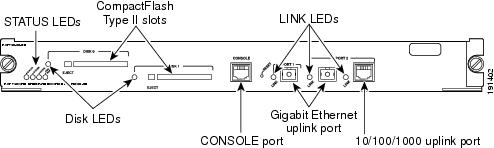
Route switch processor (RSP) is a module that is installed in one of the card slots in the router. The RSP provides switching and local and remote management for the router and also contains the uplink ports for the router. Both types of modules (supervisor engine and RSP) perform the same functions in the router.


RSP720-3CXL-GE (RSP720 with Integrated Switch Fabric/3CXL-GE)


Front Panel of RSP720-3CXL-GE Explanation

Cisco Router 7206 with RSP720-3CXL-GE


RSP720-3CXL-GE

Two Gigabit Ethernet uplink ports: port 1 supports a 1-Gbps SFP module; port 2 is configurable with either a 1-Gbps SFP module or a 10/100/1000-Mbps RJ-45 connector

Integrated 720-Gbps switch fabric

PFC3CXL (high-capacity) and MSFC4 with 512-MB bootdisk 4-MB NVRAM, 4-MB ROMmon, and several DRAM options:

Route processor (RP): 1- to 4-GB DRAM (default 2 GB)

Switch processor (SP): 1- to 2-GB DRAM (default 1GB)

Two CompactFlash Type II slots on front panel (512 MB default with option to 1 GB) and two internal CompactFlash slots (one each for RP and SP, 512 MB default for each)

Requires larger power supplies and a high-speed fan tray

QoS port architecture (Rx/Tx): 1p1q4t/1p2q2t


Reference: 

Cisco 7600 Series Route Switch Processor 720 Data Sheet

Wednesday, August 26, 2015

Check Point Error: Partial Overlapping Encryption Domains When Verifying or Installing Policy

Usually when your firewall policy is not configured properly, Checkpoint SmartDashboard will notify you with useful details when you verify or install it. But sometimes, those information will make you feel lost. I met one case recently.

I worked on one IPSec VPN configuration  from my vpn gateway fw-ras to customer's gateway. The interesting traffic is from Customer public ip to our server's public ip address 20.153.121.59 which is NAT-ed to internal ip address 10.1.106.59. On my gateway's vpn domain includes this public ip 20.153.121.59 and Internal Segment 10.1.106.x/24.

The VPN works fine. Customer was able to reach us through IPSec VPN Tunnel. By the way I am using default NAT behaviour which is NAT happening on client side. The issue I met is the Partial Overlapping Encryption Domains warning message when I verified and installed policy.


Symptons:

Here is screenshots and copied error / warning messages:


"Network Security Policy 'Standard' was prepared on Wed Aug 26 13:36:44 2015.

The following errors and warnings exist: The gateways fw-ras and vpnm have partial overlapping encryption domains. Therefore, Endpoint Connect users will not support MEP configuration SecureRemote/SecureClient users will not be able to create site. If any of the GWs should not be exported to SR/SC, please remove it from the RemoteAccess community or uncheck the exportable for SR box. The overlapping domain include : 10.1.72.14 - 10.1.72.16 The exclusive domain of fw-ras include: 20.153.121.59 - 20.153.121.62 The exclusive domain of vpnm include: 10.1.240.0 - 10.1.240.255"

Basically it mentioned some ip addresses are used in multiple vpn domains, especially in RemoteAccess community. But I double checked both gateways fw-ras and vpnm, their encryption domains are not overlapping at all.

Interesting things, if I removed  20.153.121.59 from vpn encryption domain of gateway fw-ras, this error/warning message disappeared. But IPSec vpn configuration will need this public ip address to make sure the traffic can be encrypted and sent to customer's gateway.


Solutions:

Good thing in the message is it mentioned "If any of the GWs should not be exported to SR/SC, please remove it from the RemoteAccess community or uncheck the exportable for SR box". Since the gateway fw-ras is not in RemoteAccess community, the only option for me is to uncheck the exportable for SR box.

I found the option in the gateway's properties window -> IPSec VPN -> Traditional mode configuration...:


After unchecked the Exportable for SecuRemote/SecureClient, the installation is flawless.

Reference:

sk101986 - "The gateways XXX and YYY have partial overlapping encryption domains" error during Policy Verification