Pages

Monday, October 24, 2016

Check Point Firewall USB Installation Step by Step (R77.20 and R77.30)

Customer is asking a new fresh installation on their UTM 272 devices and apparently usb stick or usb cd-rom is best solution. Checkpoint sk65205 explains very detail for all steps. I did follow the Check Point instruction but still got a problem while using USB stick. Here are all my steps I worked on.

1. Preparing USB Stick

I am using a Kingston Traveller G3 8G USB stick which shows supported from Check Point sk92423 (Which USB flash keys work with ISOmorphic Tool).

2. Use ISOMorphic to make a R77.20 bootable USB Stick.


3. Start your Device with USB Stick Plugged in

Insert USB Stick into one of two Check Point Appliance UTM 272 USB ports. Powered on device:

4. BIOS Configuration

Press TAB or DEL to enter into BIOS setup the booking devices. USB-HDD and USB-CDROM has been picked for boot devices.

5. USB Stick Does Not Work

Unfortunately the system did not start with the USB device but still with internal hard disk drive. I did find following error messages from the booting screen:

usb 1-2: device not accepting address 2, error 071

 6. USB CDROM Worked

No Matter how I did the configurations on appliance, usb still did not work. I gave up and tried another UTM272, but same result. Finally I got a USB CD-ROM, burned same image into a DVD, it was able to get me into SYSLINUX page.

 7. With those options, the only works is Smart-1 option. 

 8. Installing

After you entered Smart-1 option, the installation is completely automatic.

9. Complete Installation

Wait probably 15-30 minutes, the whole installation will be done and your console window will show your appliance can be safely rebooted with new image. Also Appliance LCD Screen will show ***Installed*** R77.20 124. Powers Cycle your device, you will get your a new fresh installed R77.20. By the way, first time installation wizard will be used to configure your device with LAN port ip set to 192.168.1.1. User name is admin and password is admin.


Notes:

I tested the stick with my laptop, and it is able to booted from USB stick and I did get SYSLINUX prompt on my laptop. It bothered me a couple of day why it is not working on UTM 272s.

Since USB CD-ROM is working, I decided to wipe USB Stick out and tried ISOMorphic again on another laptop. This time, USB Stick works. I am guessing when ISOMorphic is making a bootable USB Stick, your computer is going to affect the final image on the stick.

More notes on Oct 2016;
Tried it again on Check Point 2012 4200 appliance to install R77.30. I were using same usb memory stick as my previous post. Added some more screenshots and words here:

once you plugged in your usb key, if it has been recognized, you will get a chance to run setup or boot it from network.
You may get a error message to say usb 3-1: device descriptor read/all, error -71

If all goes well, you should get SYSLINUX 4.06 booting screen and choose serial as output:

starting installation process


Reference:


Gartner Magic Quadrant for Cloud-Enabled Managed Hosting, North America (2015, 2014)

Cloud-Enabled Managed Hosting Market Definition/Description

The cloud-enabled managed hosting (CEMH) market deals in standardized, productized hosting offerings that combine a cloud-enabled system infrastructure (CESI) platform — comprising compute, network and storage hardware owned and operated by a service provider — with cloud management platform software to facilitate self-service and rapid provisioning with managed services (see "Technology Overview for Cloud-Enabled System Infrastructure" note that this document has been archived; some of its content may not reflect current conditions ). The infrastructure platform may be located in a service provider's data center, or optionally at the customer's data center, but, either way, it requires standardized deployment across all customers and uses a single code base that has been pre-engineered and/or predeployed by the provider prior to customer sign-up. At minimum, a service provider must supply server OS management services, including guest OS instances when virtualization is used. The provider may optionally supply other managed and professional services relating to the infrastructure's deployment and operation.
Cloud-enabled managed hosting allows only limited customization. It is sold on a stand-alone basis, with no requirement to bundle it with — for example — application development, application maintenance or data center outsourcing (DCO) services.
Customers must be able to access a self-service interface, which may be different from the platform interfaces used internally by the provider. A service provider can potentially intervene in the self-service workflow to manually approve, deny or alter a customer's requests, as long as the provisioning requested is fulfilled in a fully automated manner thereafter. Managed services (such as OS backups, patching and monitoring) must be available to customers on commitments of less than one year.

For a more detailed overview of cloud-enabled managed hosting, see "Technology Overview for Cloud-Enabled Managed Hosting."
This Magic Quadrant focuses on the enterprise-class cloud-enabled managed hosting market. Multiple delivery models are used in this market:
  • Multitenant, on the provider's premises: Compute, storage and networking hardware is shared by many customers, housed in the service provider's facilities and fully managed by that provider. This is the most common use case. It encompasses cloud infrastructure as a service (IaaS) offerings for which the provider offers management of guest OS instances.
  • Single-tenant, on the provider's premises: Compute and storage hardware is dedicated to one customer and housed in the service provider's facilities.
  • Single-tenant, on the customer's premises: Compute, storage and networking hardware is dedicated to one customer and housed in that customer's data center facilities, but owned and managed by the service provider in a nearly identical fashion to the multitenant and single-tenant provider-housed approaches.
In addition to server OS management, managed and professional services related to infrastructure operations may be offered, such as:
  • Management of infrastructure software at the middleware or persistence layer, such as Web server software, application servers and database servers
  • Management of storage, including backup and recovery
  • Management of host-based and network-based security functions
  • Management of network devices, such as application delivery controllers
  • Professional services associated with hosting, such as architecture consultation, capacity planning, performance testing, security auditing and data center migration
Cloud-enabled managed hosting services must be available to customers on contracts shorter than the multiyear contracts historically used for traditional managed hosting. Customers may opt for longer contracts of one to three years to secure greater overall discounts, but this is entirely at their discretion. Ultimately, cloud-enabled managed hosting must afford customers the ability to change the amount of capacity in use without any contract alterations.
Use Cases Covered by This Evaluation
This Magic Quadrant focuses on the following common use cases, independent of the type or types of infrastructure used for the associated workloads:
  • E-business hosting for digital marketing sites, e-commerce websites, SaaS, social websites, and similar modern online properties and applications. These workloads are often complex and are associated with a high rate of change in systems and application infrastructure.
  • Web-based business application hosting for corporate intranets and Web-based applications delivered to users primarily within enterprises. The applications may be commercial software or developed in-house; workloads are often relatively static and do not have a high rate of change.
  • Enterprise application hosting. Managed hosting for the infrastructure used to support large commercial software applications, such as those of Oracle, SAP and other enterprise software vendors. These workloads are often complex and require specialized knowledge to operate optimally, but do not have a high rate of change.

In 2016, Gartner will be making a number of significant changes to Magic Quadrants related to the hosting and Infrastructure-as-a-Service markets, including the retirement of some Magic Quadrants into overall Market Guides, and the launch of a brand new Magic Quadrant.
In 2015, we noted in both our Magic Quadrant for Cloud Infrastructure as a Service, Worldwide and our Magic Quadrant for Cloud-Enabled Managed Hosting, North America the rather significant changes that were taking place in the market for hosting and cloud infrastructure services. Through thousands of inquiries with end-user organizations over 2014 and 2015, Gartner has watched as customers have evolved their view of the marketplace. The outsized mindshare that hyperscale Infrastructure-as-a-Service platforms such as Amazon Web Services, Microsoft Azure, or Google Compute Engine have obtained has led buyers to analyze these offerings as far more than a vendor or a technology … but as more of an overall “strategic platform” for their organizations to build new and innovative/disruptive applications on over the next decade. This is especially true among North American clients.
Therefore Gartner will be making the following changes to our Magic Quadrants in the hosting and IaaS markets in 2016:
  • First, Gartner will be launching a new “Magic Quadrant for Public Cloud Infrastructure Managed Service Providers, Global” in 2016. More details on this Magic Quadrant will be available soon on Lydia Leong’s blog.
  • Second, in order to make room for the new Magic Quadrant for Public Cloud Infrastructure Managed Service Providers, and because buyer behavior in North America has moved the most towards this direction, we have retired our Magic Quadrant for Cloud-Enabled Managed Hosting in North America. In its place, we will be publishing a North American Market Guide for hosting for our end-user clients, roughly at the same time last year’s Magic Quadrant was published (July).
  • Third, in Europe and Asia-Pacific there is still more of a focus on locally-hosted services than in North America, therefore our Magic Quadrants for Cloud-Enabled Managed Hosting will continue in those markets but will be changing their focus slightly, as represented by their new titles – Magic Quadrant for Managed Hybrid Cloud Hosting.


2015
Magic Quadrant for Cloud-Enabled Managed Hosting, North America, 2015
https://www.gartner.com/doc/reprints?id=1-2K50B8G&ct=150729&st=sb

2014
Gartner Magic Quadrants tend to evolve over time as technologies and buyer expectations mature, and our views on the hosting market are no exception.  Gartner has been publishing Magic Quadrants in the hosting market since 
2004 1998, which later became a combined hosting and cloud IaaS Magic Quadrant in 2009 (link) and now the two exist as separate Magic Quadrants.  The first thing that most readers will notice in this year’s MQ is the change in title –Cloud-Enabled Managed Hosting.

This is not simply a cloudwashing of our previous Magic Quadrant for Managed Hosting, the term Cloud-Enabled encapsulates how we view the market as evolving at this point in time.   In a nutshell, Gartner expects that Cloud-Enabled Managed Hosting will evolve managed services over the next several years … much like Infrastructure-as-a-Service has done to infrastructure provisioning and management over the past several years.

Why has the name of the Magic Quadrant for Managed Hosting changed to “Cloud-Enabled Managed Hosting”?
These new Magic Quadrants cover the market that is created by the intersection of managed services and a cloud-enabled infrastructure platform (which might or might not be cloud IaaS).  These magic quadrants will begin to place more focus more on the service layer on top of the infrastructure, rather than the infrastructure itself.

Magic Quadrant for Cloud-Enabled Managed Hosting, North America, 2014


http://blogs.gartner.com/douglas-toombs/the-2014-magic-quadrant-for-cloud-enabled-managed-hosting-in-north-america/

http://pages.peak10.com/%20Gartner-Magic-Quadrant-Landing-Page.html

http://www.peak10.com/wp-content/uploads/2015/04/2014-magic-quadrant-for-cloud-enabled-managed-hosting-north-america.pdf

Wednesday, October 19, 2016

Cisco Active Advisor - CAA

Cisco Active Advisor is a free online cloud service that automates network discovery and analysis of your network inventory. Cisco Active Advisor reduces the overall risk of your network administration by keeping you up-to-date on:

  • Warranty and service contract status
  • Product advisories, including Product Security Incident Response Teams (PSIRTs) and field notices
  • End-of-life milestones for hardware and software
Cisco Active Advisor log in with your Cisco CCO account:

Main Interface includes following buttons:

  • Add Devices
  • View Devices
  • Tools
  • Switching Health
  • Wireless Health
  • Security Health


If it is your first time to log in, you will need to scan your network to add devices. You can choose three different ways to do that:
  • Web Scanner
  • Desktop Scanner
  • Upload from file

 
This is the web scanner interface. You will need to enter the scanning scope, username, password, snmp information. 


Following screenshots are captured from Desktop Scanner. 
 
 
Eventually, you will get all your devices with many advisories from Cisco. 


Reference:


Monday, October 17, 2016

Cisco Catalyst 2960X and 2960S Stacking

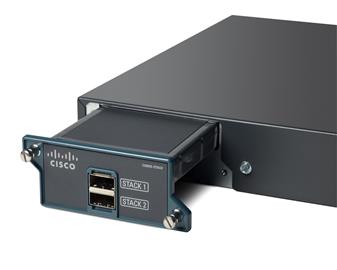
Working on stacking two Cisco 2060X switches recently, and two 2960X Stack module and 0.5m stacking cables received today. Product name is C2960X-STACK= and description is Catalyst 2960-X FlexStack Plus Stacking Module optional. Part Number is CMUCAEGBAA.


Stacking Requirements:

Hardware Requirement:
The 2960-S and 2960-X support a mixed stack of 2960 models. All these 2960 models run the FlexStack protocol, allowing them to be stacked together into a single stack. The exception is the 2960-XR does not stack with either the 2960-X or the 2960-S.

When the 2960-S and 2960-X members are stacked together, the entire stack (even the 2960-X members) fall back to FlexStack capabilities. Mixing 2960 members limits the max stack members to four, and 20Gbps stack bandwidth per member, and 40Gbps per stack also stack convergence time is increased from milliseconds to 1 to 2 seconds.

Software Version Requirement:
All stack members must run the same Cisco IOS software image to ensure compatibility among stack members. Stacking is not supported on switches running the LAN Lite image. All switches in the stack must be running the LAN Base image.


Installation:
1. Insert the Module

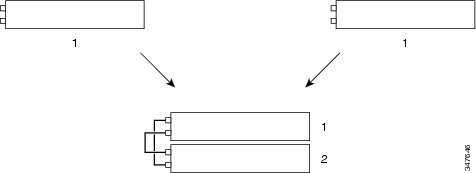
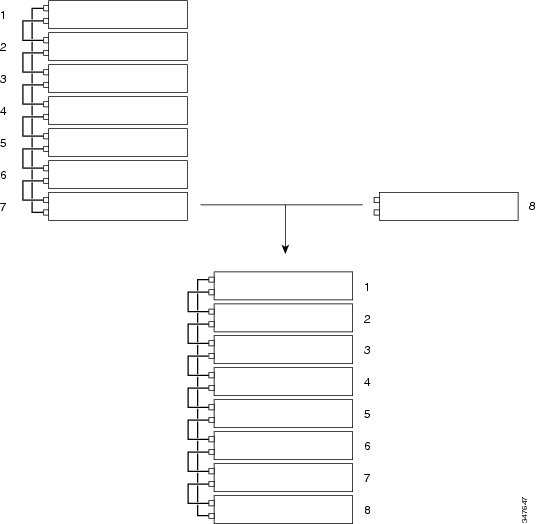
2. Connect Cables
Creating a Switch Stack from Two Standalone Switches 

Adding a Standalone Switch to a Switch Stack 

3. Verification 


EXT1#show ver
Cisco IOS Software, C2960X Software (C2960X-UNIVERSALK9-M), Version 15.0(2a)EX5, RELEASE SOFTWARE (fc3)
Technical Support: http://www.cisco.com/techsupport
Copyright (c) 1986-2015 by Cisco Systems, Inc.
Compiled Mon 16-Feb-15 08:16 by prod_rel_team

ROM: Bootstrap program is C2960X boot loader
BOOTLDR: C2960X Boot Loader (C2960X-HBOOT-M) Version 15.2(3r)E1, RELEASE SOFTWARE (fc1)

SW-TRN1-DMZ-F5EXT1 uptime is 3 hours, 59 minutes
System returned to ROM by power-on
System restarted at 11:02:11 EDT Mon Oct 17 2016
System image file is "flash:/c2960x-universalk9-mz.150-2a.EX5/c2960x-universalk9-mz.150-2a.EX5.bin"


This product contains cryptographic features and is subject to United
States and local country laws governing import, export, transfer and
use. Delivery of Cisco cryptographic products does not imply
third-party authority to import, export, distribute or use encryption.
Importers, exporters, distributors and users are responsible for
compliance with U.S. and local country laws. By using this product you
agree to comply with applicable laws and regulations. If you are unable
to comply with U.S. and local laws, return this product immediately.

A summary of U.S. laws governing Cisco cryptographic products may be found at:
http://www.cisco.com/wwl/export/crypto/tool/stqrg.html

If you require further assistance please contact us by sending email to
export@cisco.com.

cisco WS-C2960X-24PS-L (APM86XXX) processor (revision L0) with 524288K bytes of memory.
Processor board ID FCW2014B3YB
Last reset from power-on
1 Virtual Ethernet interface
1 FastEthernet interface
56 Gigabit Ethernet interfaces
The password-recovery mechanism is enabled.

512K bytes of flash-simulated non-volatile configuration memory.
Base ethernet MAC Address : 00:6C:BC:CE:5C:00
Motherboard assembly number : 73-16694-04
Power supply part number : 341-0528-02
Motherboard serial number : FOC20145HSN
Power supply serial number : LIT20021AUV
Model revision number : L0
Motherboard revision number : B0
Model number : WS-C2960X-24PS-L
Daughterboard assembly number : 73-14200-03
Daughterboard serial number : FOC20145WY6
System serial number : FCW2015B3YB
Top Assembly Part Number : 68-100472-02
Top Assembly Revision Number : A0
Version ID : V04
CLEI Code Number : CMMLR00ARD
Daughterboard revision number : A0
Hardware Board Revision Number : 0x18


Switch Ports Model SW Version SW Image
------ ----- ----- ---------- ----------
* 1 28 WS-C2960X-24PS-L 15.0(2a)EX5 C2960X-UNIVERSALK9-M
2 28 WS-C2960X-24TS-L 15.0(2)EX5 C2960X-UNIVERSALK9-M


EXT1#
show switch
Switch/Stack Mac Address : 006c.bccd.5c00
H/W Current
Switch# Role Mac Address Priority Version State
----------------------------------------------------------
*1 Master 006c.bccd.5c00 14 4 Ready
2 Member ccd8.c149.a080 1 4 Ready


EXT1#
show switch detail
Switch/Stack Mac Address : 006c.bccd.5c00
H/W Current
Switch# Role Mac Address Priority Version State
----------------------------------------------------------
*1 Master 006c.bccd.5c00 14 4 Ready
2 Member ccd8.c149.a080 1 4 Ready


Stack Port Status Neighbors
Switch# Port 1 Port 2 Port 1 Port 2
--------------------------------------------------------
1 Ok Ok 2 2
2 Ok Ok 1 1


Reloading one member:
EXT1#reload slot ?
<1-8> Slot number of RP or line card

EXT1#
reload slot 2
Proceed with reload? [confirm]
EXT1#show swi
EXT1#show switch
Switch/Stack Mac Address : 006c.bccd.5c00
H/W Current
Switch# Role Mac Address Priority Version State
----------------------------------------------------------
*1 Master 006c.bccd.5c00 14 4 Ready
2 Member ccd8.c149.a080 1 4 Ready


EXT1#reload slot 1
Proceed with reload? [confirm]
Switch 1 reloading...
EXT1#show switch 
Switch/Stack Mac Address : ccd8.c149.a080
H/W Current
Switch# Role Mac Address Priority Version State
----------------------------------------------------------
1 Member 006c.bccd.5c00 14 4 Ready
*2 Master ccd8.c149.a080 1 4 Ready


EXT1#
show switch
Switch/Stack Mac Address : 006c.bccd.5c00
H/W Current
Switch# Role Mac Address Priority Version State
----------------------------------------------------------
*1 Master 006c.bccd.5c00 14 4 Ready
2 Member 0000.0000.0000 0 0 Removed

EXT1#session ?
<1-8> Switch number

EXT1#
session 1
EXT1-1#


4. Other Commands:

4.1 Dir Flash:

EXT1#dir flash:
Directory of flash:/

2 -rwx 6052 Sep 8 2015 16:22:58 -04:00 backup-Sep--8-16-22-58.780-EDT-3
3 -rwx 5859 Sep 4 2015 14:48:57 -04:00 backup-Sep--4-14-48-57.033-EDT-0
4 -rwx 616 Sep 27 2016 22:58:35 -04:00 vlan.dat.renamed
5 -rwx 6035 Sep 8 2015 13:52:08 -04:00 backup-Sep--8-13-52-08.835-EDT-1
6 -rwx 5780 Sep 4 2015 15:19:15 -04:00 backup-Sep--4-15-19-15.225-EDT-0
7 -rwx 6071 Sep 8 2015 13:52:31 -04:00 backup-Sep--8-13-52-31.858-EDT-2
8 drwx 512 Jan 3 2000 10:02:28 -05:00 c2960x-universalk9-mz.150-2.EX5
647 drwx 512 Jan 3 2000 10:02:28 -05:00 dc_profile_dir
649 -rwx 6185 Jan 5 2016 21:25:51 -05:00 backup-Jan--5-21-25-51.166-EST-0
650 -rwx 6282 Jan 15 2016 19:52:56 -05:00 backup-Jan-15-19-52-56.460-EST-1
651 -rwx 5637 Sep 27 2016 22:59:24 -04:00 backup-Sep-27-22-59-24.303-EDT-2
653 -rwx 3563 Sep 27 2016 22:59:24 -04:00 private-config.text.renamed
654 -rwx 5637 Sep 27 2016 22:59:24 -04:00 config.text.renamed
655 -rwx 759 Sep 30 2016 00:10:23 -04:00 express_setup.debug
656 -rwx 556 Oct 17 2016 11:29:24 -04:00 vlan.dat
657 -rwx 9113 Oct 17 2016 15:10:59 -04:00 config.text
658 -rwx 3932 Oct 17 2016 15:11:00 -04:00 private-config.text
659 -rwx 1048 Oct 18 2016 11:15:09 -04:00 multiple-fs

122185728 bytes total (98629632 bytes free)

EXT1#
dir flash1:
Directory of flash1:/

2 -rwx 9113 Oct 17 2016 15:11:00 -04:00 backup-Oct-17-15-11-00.081-EDT-3
3 -rwx 9113 Oct 17 2016 15:01:10 -04:00 backup-Oct-17-15-01-10.353-EDT-2
4 -rwx 556 Oct 18 2016 07:18:55 -04:00 vlan.dat
5 -rwx 9113 Oct 17 2016 13:58:28 -04:00 backup-Oct-17-13-58-28.859-EDT-1
6 -rwx 8132 Oct 7 2016 16:51:18 -04:00 backup-Oct--7-16-51-18.005-EDT-0
7 -rwx 8134 Oct 17 2016 12:43:53 -04:00 backup-Oct-17-12-43-53.701-EDT-0
8 drwx 512 Apr 7 2016 05:22:59 -04:00 c2960x-universalk9-mz.150-2a.EX5
647 drwx 512 Apr 7 2016 05:23:01 -04:00 dc_profile_dir
649 -rwx 3932 Oct 17 2016 15:10:59 -04:00 private-config.text
650 -rwx 9113 Oct 17 2016 15:10:59 -04:00 config.text
651 -rwx 2072 Oct 17 2016 11:15:34 -04:00 multiple-fs

122185728 bytes total (98645504 bytes free)


The command "dir flash:" means "show me the flash content of the MASTER switch".
The command "dir flash1:" means "show me the flash content of switch stack member 1".
The command "dir flash2:" means "show me the flash content of switch stack member 2".

4.2 Steps to upgrade Stacking Switches IOS:
4.2.1 TFTP or FTP to both flash:
copy ftp: flash1:
copy ftp: flash2:
4.2.2Configure both switches to use new BIN file:
boot system switch all flash:/c2960s-universalk9-mz.150-2.SE5.bin
4.2.3 Save and reload both switch members at the same time:

Remember: If you don’t upgrade the IOS on every switch, you will have a version mismatch! To resolve this problem, use the command “archive copy-sw /force-reload /overwrite /dest 2 1” as suggested by the local log!


Copy system image from member 1 to member 2

EXT1#
archive copy-sw /force-reload /overwrite /destination-system 2 1
System software to be uploaded:
System Type: 0x00000000
archiving c2960x-universalk9-mz.150-2a.EX5 (directory)
archiving c2960x-universalk9-mz.150-2a.EX5/info (803 bytes)
archiving c2960x-universalk9-mz.150-2a.EX5/html (directory)
archiving c2960x-universalk9-mz.150-2a.EX5/html/zh (directory)
........(Omitted)
archiving c2960x-universalk9-mz.150-2a.EX5/c2960x-universalk9-mz.150-2a.EX5.bin (18233984 bytes)
archiving c2960x-universalk9-mz.150-2a.EX5 (directory)
archiving c2960x-universalk9-mz.150-2a.EX5/info (805 bytes)
archiving info (112 bytes)
examining image...
extracting info (112 bytes)
extracting c2960x-universalk9-mz.150-2a.EX5/info (803 bytes)
extracting c2960x-universalk9-mz.150-2a.EX5/info (805 bytes)
extracting info (112 bytes)

Stacking Version Number: 1.55

System Type: 0x00000000
Ios Image File Size: 0x01164A00
Total Image File Size: 0x015DE800
Minimum Dram required: 0x08000000
Image Suffix: universalk9-150-2a.EX5
Image Directory: c2960x-universalk9-mz.150-2a.EX5
Image Name: c2960x-universalk9-mz.150-2a.EX5.bin
Image Feature: IP|LAYER_2|SSH|3DES|MIN_DRAM_MEG=128
FRU Module Version: No FRU Version Specified

Old image for switch 2: flash:/c2960x-universalk9-mz.150-2.EX5
Old image will be deleted before download.

Deleting `flash:/c2960x-universalk9-mz.150-2.EX5' to create required space
Extracting images from archive into flash...

Warning: Unable to allocate memory to display the tar extraction of files,
however upgrade process is still continuing. If you would like to
see the tar extraction output, try upgrading one switch at a time.

Installing (renaming): `flash:update/c2960x-universalk9-mz.150-2a.EX5' ->
`flash:/c2960x-universalk9-mz.150-2a.EX5'
New software image installed in flash:/c2960x-universalk9-mz.150-2a.EX5


Deleting old files from dc profile dir "flash:/dc_profile_dir"
All software images installed.
Requested system reload in progress...


Upgrading IOS from FTP tar file:

EXT1#
archive download-sw /leave-old-sw ftp://test:test@10.94.200.14/c2960x-universalk9-tar.152-2.E5.tar
Loading c2960x-universalk9-tar.152-2.E5.tar !!!!!!!!!!!!!!!!!!!!!!!!!!!!!!!!!!!!!!!!!!!!!!!!!!!!!!!!!!!!!!!!!!!!!!!!!!!!!!!!!!!!!!!!!!!!!!!!!!!!!!!!!!
[OK - 26900480/4096 bytes]

Loading c2960x-universalk9-tar.152-2.E5.tar !!!!!!!!!!!!!!!!!!!!!!!!!!!!!!!!!!!!!!!!!!!!!!!!!!!!!!!!!!!!!!!!!!!!!!!!!!!!!!!!!!!!!!!!!!!!!!!!!!!!!!!!!!
examining image...
extracting info (109 bytes)
extracting c2960x-universalk9-mz.152-2.E5/info (786 bytes)
extracting info (109 bytes)

Stacking Version Number: 1.56

System Type: 0x00000000
Ios Image File Size: 0x0144B200
Total Image File Size: 0x019A7A00
Minimum Dram required: 0x08000000
Image Suffix: universalk9-152-2.E5
Image Directory: c2960x-universalk9-mz.152-2.E5
Image Name: c2960x-universalk9-mz.152-2.E5.bin
Image Feature: IP|LAYER_2|SSH|3DES|MIN_DRAM_MEG=128
FRU Module Version: No FRU Version Specified

Old image for switch 1: flash:/c2960x-universalk9-mz.150-2a.EX5
Old image will be left alone
Old image for switch 2: flash2:/c2960x-universalk9-mz.150-2a.EX5
Old image will be left alone

Extracting images from archive into flash...
Extracting images from archive into flash on switch 2...

Warning: Unable to allocate memory to display the tar extraction of files,
however upgrade process is still continuing. If you would like to
see the tar extraction output, try upgrading one switch at a time.


Warning: Unable to allocate memory to display the tar extraction of files,
however upgrade process is still continuing. If you would like to
see the tar extraction output, try upgrading one switch at a time.

Installing (renaming): `flash:update/c2960x-universalk9-mz.152-2.E5' ->
`flash:/c2960x-universalk9-mz.152-2.E5'
New software image installed in flash:/c2960x-universalk9-mz.152-2.E5

Installing (renaming): `flash2:/update/c2960x-universalk9-mz.152-2.E5' ->
`flash2:/c2960x-universalk9-mz.152-2.E5'
New software image installed in flash2:/c2960x-universalk9-mz.152-2.E5


Deleting old files from dc profile dir "flash:/dc_profile_dir"

extracting dc profile file from "flash:/c2960x-universalk9-mz.152-2.E5/dc_default_profiles.txt" to "flash:/dc_profile_dir/dc_default_profiles.txt"

extracting dc profile file from "flash2:/c2960x-universalk9-mz.152-2.E5/dc_default_profiles.txt" to "flash2:/dc_profile_dir/dc_default_profiles.txt"
All software images installed.

EXT1(config)#do dir flash:
Directory of flash:/

2 -rwx 9113 Oct 17 2016 15:11:00 -04:00 backup-Oct-17-15-11-00.081-EDT-3
3 -rwx 9113 Oct 17 2016 15:01:10 -04:00 backup-Oct-17-15-01-10.353-EDT-2
4 -rwx 556 Oct 18 2016 07:18:55 -04:00 vlan.dat
5 -rwx 9113 Oct 17 2016 13:58:28 -04:00 backup-Oct-17-13-58-28.859-EDT-1
6 -rwx 8132 Oct 7 2016 16:51:18 -04:00 backup-Oct--7-16-51-18.005-EDT-0
7 -rwx 8134 Oct 17 2016 12:43:53 -04:00 backup-Oct-17-12-43-53.701-EDT-0
8 drwx 512 Apr 7 2016 05:22:59 -04:00 c2960x-universalk9-mz.150-2a.EX5
647 drwx 512 Oct 18 2016 12:28:11 -04:00 dc_profile_dir
652 -rwx 9242 Oct 18 2016 11:57:34 -04:00 backup-Oct-18-11-57-34.967-EDT-0
649 -rwx 2072 Oct 18 2016 11:57:34 -04:00 multiple-fs
650 -rwx 3932 Oct 18 2016 11:57:34 -04:00 private-config.text
651 -rwx 9242 Oct 18 2016 11:57:34 -04:00 config.text
654 drwx 512 Oct 18 2016 12:28:10 -04:00 c2960x-universalk9-mz.152-2.E5

122185728 bytes total (71591936 bytes free)

EXT1# show switch 
Switch/Stack Mac Address : 006c.bccd.5c00
H/W Current
Switch# Role Mac Address Priority Version State
----------------------------------------------------------
*1 Master 006c.bccd.5c00 14 4 Ready
2 Member ccd8.c149.a080 1 4 Ready

For TFTP:

EXT1#
archive download-sw /leave-old-sw /reload tftp:10.20.10.30/saved/myImage.tar


Reference:
1. Catalyst 2960-X Switch Stack Manager Configuration Guide, Cisco IOS Release 15.0(2)EX
2. Cisco Catalyst 2960-S, 2960-X, and 2960-XR Stacking with FlexStack and FlexStack-Plus Technology: Description, Usage, and Best Practices
3. How to upgrade a Cisco stack


Sunday, October 2, 2016

Check Point 5000 Appliance

Recently received two Check Point 5600 appliance which has R77.30 pre-installed. I have racked them into data center. Both will be used as a cluster to replace existing Check Point UTM devices. It comes with one Sync port, one Mgmt port and eight 10/100/1000base-T ports. Here comes with the picture after console, mgmt and sync ports connected.
Check Point 5600 Appliance Cluster


Check Point 5600 Appliance Cluster


The web GUI is similar as previous version which makes firewall administrators put their hands on quicker and easier.


Technical Specifications:

Check Point 5600

5600 Security Appliance

  1. Sync 10/100/1000Base-T RJ45 port
  2. RJ45/micro USB console port
  3. One network card expansion slot (HPP)
  4. 8x 10/100/1000Base-T RJ45 ports
  5. Management 10/100/1000Base-T RJ45 port
  6. 2x USB ports for ISO installation
  7. Lights-Out Management port


Appliance5200540056005800
Production Performance (Real-World Traffic Blend) 1
Security Power4256009501750
Firewall Throughput (Gbps)5.31017.522
IPS throughput (Gbps)810 Mbps1.081.93.05
NGFW throughput (Gbps)520 Mbps690 Mbps1.182
Threat prevention (Gbps)250 Mbps330 Mbps540 Mbps1
Ideal Testing Conditions Performance (RFC 3511, 2544, 2647, 1242)
Firewall, 1518 byte UDP (Gbps)16222535
Connections per Second (K)125150185185
Concurrent Connections (M)23.2/6.43.2/6.43.2/6.43.2/6.4
VPN AES-128 Throughput (Gbps)1.882.166.510
IPS throughput (Gbps)33.97.810
NGFW throughput (Gbps)2.73.45.88.1
Virtual Systems
VS Supported (Default/Max)210/2010/2010/2010/20
Hardware Specifications (Default/Max)
10/100/1000Base-T Ports6/1410/1810/1810/26
1000Base-F SFP Ports0/40/40/40/8
10GBase-F-SFP+ Ports0/00/00/40/8
40GBase-F SFP+ Ports0/00/00/00/4
Memory8 ,168, 168, 168, 16
Storage1x 500 GB1x 500 GB1x 500 GB1x 500 GB
I/O Expansion Slots1112
Lights-Out-ManagementOptionalOptionalOptionalIncluded