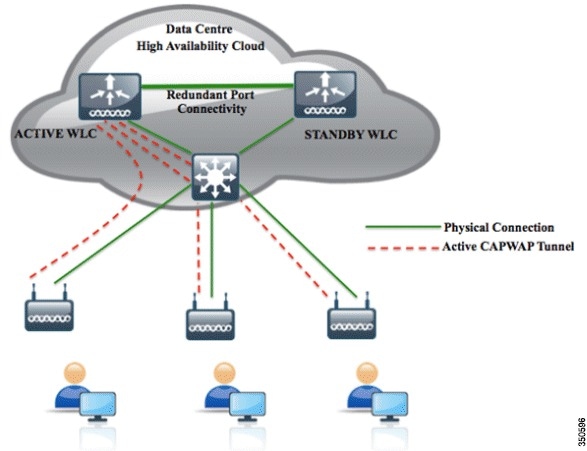
There are two options for Cisco Wireless Controller redundancy solutions, either Backup Controllers or High Availability, depending on the firmware version of WLC's, failover time requirement, and budget.
Using Backup Controller method, a single controller at another location can act as a backup for access points when they lose connectivity with the primary controller in the local region. Centralized and regional controllers do not need to be in the same mobility group. You can specify a primary, secondary, and tertiary controller for specific access points in your network. Using the controller GUI or CLI, you can specify the IP addresses of the backup controllers, which allows the access points to fail over to controllers outside of the mobility group. You can set the Primary and Secondary controllers for the AP on the controller via the GUI, the CLI, or even SNMP. With Backup Controllers, in the case of a WLC failure, APs would begin to search for their Secondary Controller and re-establish their CAPWAP tunnel. The obvious downside is the outage that occurs from the client prospective while the AP drops it's tunnel and begins to build it again to the Secondary Controller.

The new High Availability (HA) feature (that is, AP SSO) set within the Cisco Unified Wireless Network software release version 7.3 and 7.4 allows the access point (AP) to establish a CAPWAP tunnel with the Active WLC and share a mirror copy of the AP database with the Standby WLC. The APs do not go into the Discovery state when the Active WLC fails and the Standby WLC takes over the network as the Active WLC. There is only one CAPWAP tunnel maintained at a time between the APs and the WLC that is in an Active state. The overall goal for the addition of AP SSO support to the Cisco Unified Wireless LAN is to reduce major downtime in wireless networks due to failure conditions that may occur due to box failover or network failover. Once you purchase a second WLC and license it specifically to serve as a standby, it shares an IP address and session/Config/AP information with the main controller.
Relate Posts:
Now with all of that said, which is better? Based on some
professional opinions I found from Internet:
"Backup Controllers is the cheaper way if your existing 5508's at different networks have enough available capacity to carry the load of either site, and your business can tolerate a few minutes of downtime in the event of a WLC failure. In that case, simply configure your secondary controllers on each Access Point, and off you go. Note that there is some more management overhead with using Backup Controllers, you will have to configure VLANs/Interfaces for all of your SSID's in each network, make your AP Groups on each controller if you use them, etc. Now, when the WLC goes down at their site, users will experience some downtime as the AP's migrate, but at least they're not down hard.
High Availability becomes a reasonable solution here if you don't have capacity on your existing 5508's and/or your business can't tolerate the failover time in the Backup Controllers method. In other words, if you don't have capacity on your existing controller to use them as a backup for each other, and you're going to have to spend some money anyways, I would recommend looking into the High Availability solution and pricing."
 Topology:
WLC-1 Active : (It is already in Production)Management: 10.9.1.10/24
Redundancy-MGNT: 10.9.1.22/24
Service-Port: 10.9.20.30 /24
Virtual: 2.2.2.2
WLC-2 Secondary
Management: 10.9.1.21/24 (This is only used temporary to complete configuration)
Redundancy-MGNT: 10.9.1.23 /24
Service-Port: 10.9.20.31 /24
Virtual: 2.2.2.2 (needs to be the same as the Active Unit)
Some Terms:
Redundancy Management Interface
The IP address on this interface should be configured in the same subnet as the management interface. This interface will check the health of the Active WLC via network infrastructure once the Active WLC does not respond to Keepalive messages on the Redundant Port. This provides an additional health check of the network and Active WLC, and confirms if switchover should or should not be executed. Also, the Standby WLC uses this interface in order to source ICMP ping packets to check gateway reachability. This interface is also used in order to send notifications from the Active WLC to the Standby WLC in the event of Box failure or Manual Reset. The Standby WLC will use this interface in order to communicate to Syslog, the NTP server, and the TFTP server for any configuration upload.
Redundancy Port
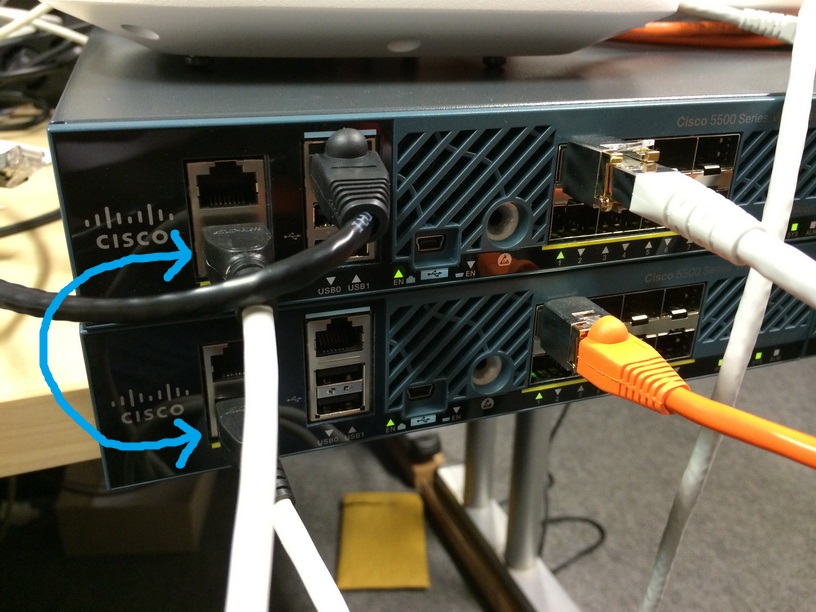
This interface has a very important role in the new HA architecture. Bulk configuration during boot up and incremental configuration are synced from the Active WLC to the Standby WLC using the Redundant Port. WLCs in a HA setup will use this port to perform HA role negotiation. The Redundancy Port is also used in order to check peer reachability sending UDP keep-alive messages every 100 msec (default timer) from the Standby WLC to the Active WLC. Also, in the event of a box failure, the Active WLC will send notification to the Standby WLC via the Redundant Port. If the NTP server is not configured, a manual time sync is performed from the Active WLC to the Standby WLC on the Redundant Port. This port in case of standalone controller and redundancy VLAN in case of WISM-2 will be assigned an auto generated IP Address where last 2 octets are picked from the last 2 octets of Redundancy Management Interface (the first 2 octets are always 169.254).
Note: After HA enabled, you only have console access to both WLCs using the console port. Only the primary HA you have access to GUI. When AP SSO is enabled, there is no SNMP access on the service port for both the WLCs in the HA setup. You either console into the WLCs or you https/ssh to the primary HA. The primary is the only one that can be reachable using http/https/telnet/ssh with AP SSO enabled.Initial Configuration
System Name [Cisco_e3:7b:64] (31 characters max):
AUTO-INSTALL: no interfaces registered.

AUTO-INSTALL: process terminated -- no configuration loaded

Enter Administrative User Name (24 characters max): admin
Enter Administrative Password (3 to 24 characters): **********
Re-enter Administrative Password                 : **********


Service Interface IP Address Configuration [static][DHCP]: static
Service Interface IP Address: 10.9.20.31
Service Interface Netmask: 255.255.255.128

Enable Link Aggregation (LAG) [yes][NO]: no

Management Interface IP Address: 10.9.1.21
Management Interface Netmask: 255.255.255.0
Management Interface Default Router: 10.9.1.1
Cleaning up Provisioning SSID
Management Interface VLAN Identifier (0 = untagged):
Management Interface Port Num [1 to 8]: 1
Management Interface DHCP Server IP Address:
Invalid response

Management Interface DHCP Server IP Address: 10.9.1.2

Enable HA [yes][NO]: no

Virtual Gateway IP Address: 2.2.2.2

Mobility/RF Group Name:
Invalid response


Mobility/RF Group Name: test

Network Name (SSID):
Invalid response


Network Name (SSID): gdsci-commercial

Configure DHCP Bridging Mode [yes][NO]: no

Allow Static IP Addresses [YES][no]: yes

Configure a RADIUS Server now? [YES][no]: no
Warning! The default WLAN security policy requires a RADIUS server.
Please see documentation for more details.

Enter Country Code list (enter 'help' for a list of countries) [US]:

Enable 802.11b Network [YES][no]: n
Invalid response


Enable 802.11b Network [YES][no]: no
Enable 802.11a Network [YES][no]: no
Enable Auto-RF [YES][no]: no

Configure a NTP server now? [YES][no]: no
Configure the system time now? [YES][no]: no

Warning! No AP will come up unless the time is set.
Please see documentation for more details.

Would you like to configure IPv6 parameters[YES][no]: no

Configuration correct? If yes, system will save it and reset. [yes][NO]: yes

Configuration saved!
Resetting system with new configuration...
Configuration HA Steps:
Physical Ports and Connections on both WLC 5508s:
Active WLC-1: (It is already in production)
Secondary WLC-2: ( new Added)
2. Controller Redundancy Global ConfigurationActive WLC-1: (It is already in production)
Secondary WLC-2: ( new Added)
3. Connect Redundancy Port Cable
4. Change SSO configuration on primary WLCIt will save your configuration and reboot it.
(Cisco Controller)

Enter User Name (or 'Recover-Config' this one-time only to reset configuration to factory defaults)

User:  Creating license client restartability thread

Exit Called
Switchdrvr exited!
Restarting system.


WLCNG Boot Loader Version 1.0.20 (Built on Jan  9 2014 at 19:02:44 by cisco)
Board Revision 1.3 (SN: FCW2017B091, Type: AIR-CT5508-K9) (G)

Verifying boot loader integrity... OK.

OCTEON CN5645-NSP pass 2.1, Core clock: 600 MHz, DDR clock: 330 MHz (660 Mhz data rate)
FPGA Revision 1.7
Env FW Revision 1.8
USB Console Revision 2.2
CPU Cores:  10
DRAM:  1024 MB
Flash: 32 MB
Clearing DRAM........ done
Network: octeth0', octeth1
  ' - Active interface
  E - Environment MAC address override
CF Bus 0 (IDE): OK
IDE device 0:
 - Model: SGEFD1GHB9P1D221 Firm: FW981 Ser#: STP194512FP
 - Type: Hard Disk
 - Capacity: 977.4 MB = 0.9 GB (2001888 x 512)


Press <ESC> now to access the Boot Menu...

Loading primary image (8.2.151.0)
100%

36899306 bytes read
Launching...
init started: BusyBox v1.6.0 (2010-05-13 17:50:10 EDT) multi-call binary
starting pid 847, tty '': '/etc/init.d/rcS'
Decompressing... OK
Validating...... OK
Set PLX switch MPS settings .............!!!!!!!
Detecting Hardware ...
set smp_affinity for irq 48
003f
DP from CGE5.0 ...
starting pid 1156, tty '/dev/ttyS0': '/usr/bin/gettyOrMwar'
Setting up ZVM
Exporting LD_LIBRARY_PATH

Cryptographic library self-test....
Testing SHA1 Short Message 1
Testing SHA256 Short Message 1
Testing SHA1 Short Message 1
SHA1 POST PASSED
passed!

XML config selected
Validating XML configuration
octeon_device_init: found 1 DPs
readCPUConfigData: cardid 0x6070001
Cisco is a trademark of Cisco Systems, Inc.
Software Copyright Cisco Systems, Inc. All rights reserved.

Cisco AireOS Version 8.2.151.0
Firmware Version FPGA 1.7, Env 1.8, USB console 2.2
Initializing OS Services: ok
Initializing Serial Services: ok
Initializing Network Services: ok
Initializing Licensing Services: ok

License daemon start initialization.....

License daemon running.....
Starting Statistics Service: ok
Starting Licensing Services: ok
Starting ARP Services: ok
Starting Trap Manager: ok
Starting Network Interface Management Services: ok
Starting System Services: ok
Starting FIPS Features: ok : Not enabled
Starting SNMP services: ok
Starting Fastpath Hardware Acceleration: ok
Starting Fastpath Console redirect : ok
Starting Fastpath DP Heartbeat : ok
Fastpath CPU0.00: Starting Fastpath Application. SDK-1.8.0, build 269. Flags-[DUTY CYCLE] : ok
Fastpath CPU0.00: Initializing last packet received queue. Num of cores(10)
Fastpath CPU0.00: Init MBUF size: 1856, Subsequent MBUF size: 2041
Fastpath CPU0.00: Core 0 Initialization and FIPS self-test: ok
Fastpath CPU0.00: 10 Cores are being initialized
Fastpath CPU0.00: Initializing Timer...
Fastpath CPU0.00: Initializing Timer...done.
Fastpath CPU0.00: Initializing Timer...
Fastpath CPU0.00: Initializing NBAR AGING Timer...done.
Fastpath CPU0.00: Received instruction to get link status
Fastpath CPU0.01: Core 1 Initialization and FIPS self-test: ok
Fastpath CPU0.02: Core 2 Initialization and FIPS self-test: ok
Fastpath CPU0.03: Core 3 Initialization and FIPS self-test: ok
Fastpath CPU0.04: Core 4 Initialization and FIPS self-test: ok
Fastpath CPU0.05: Core 5 Initialization and FIPS self-test: ok
Fastpath CPU0.06: Core 6 Initialization and FIPS self-test: ok
Fastpath CPU0.07: Core 7 Initialization and FIPS self-test: ok
Fastpath CPU0.08: Core 8 Initialization and FIPS self-test: ok
Fastpath CPU0.09: Core 9 Initialization and FIPS self-test: ok
Starting Switching Services: ok
Starting QoS Services: ok
Starting Policy Manager: ok
Starting Data Transport Link Layer: ok
Starting Access Control List Services: ok
Starting System Interfaces: ok
Starting Client Troubleshooting Service: ok
Starting Certificate Database: ok
Starting VPN Services: ok
Starting Management Frame Protection: ok
Starting DNS Services: ok
Starting Redundancy: Starting Peer Search Timer of 120 seconds
Initiate Role Negotiation Message to peer

Role Negotiation timeout. Didn't find Peer..

Peer WLC is not reachable
Negotiation Timeout. Primary controller will become Active-no-Peer
ok
Start rmgrPingTaskok
Starting LWAPP: ok
Starting CAPWAP: ok
Starting LOCP: ok
Starting Security Services: ok
Starting Policy Manager: ok
Starting Authentication Engine: ok
Starting Mobility Management: ok
Starting Ethernet-over-IP: ok
Starting Capwap Ping Component: ok
Starting AVC Services: ok
Starting AVC Flex Services: ok
Starting Virtual AP Services: ok
Starting AireWave Director: ok
Starting Network Time Services: ok
Starting Cisco Discovery Protocol: ok
Starting Broadcast Services: ok
Starting Logging Services: ok
Starting DHCP Server: ok
Starting IDS Signature Manager: ok
Starting RFID Tag Tracking: ok
Starting RF Profiles: ok
Starting Power Supply and Fan Status Monitoring Service: ok
Starting Mesh Services:  ok
Starting TSM: ok
Starting CIDS Services: ok
Starting Ethernet-over-IP: ok
Starting DTLS server:  enabled in CAPWAP
Starting CleanAir: ok
Starting WIPS: ok
Starting SSHPM LSC PROV LIST: ok
Starting RRC Services: ok
Starting SXP Services: ok
Starting Alarm Services: ok
Starting FMC HS: ok
Starting IPv6 Services: ok
Starting Config Sync Manager : ok
Starting Hotspot Services: ok
Starting PMIP Services: ok
Starting Tunnel Services New: ok
Starting Portal Server Services: ok
Starting mDNS Services: ok
Starting Management Services:
   Web Server:    CLI:    Secure Web: ok

(Cisco Controller)

Enter User Name (or 'Recover-Config' this one-time only to reset configuration to factory defaults)

User:
The error is because of missing SSO configuration on Secondary WLC . After did SSO configuration on Secondary WLC. All goes well.
....
Starting Management Frame Protection: ok
Starting DNS Services: ok
Starting Redundancy: Starting Peer Search Timer of 120 seconds
Initiate Role Negotiation Message to peer
Found the Peer. Starting Role Determination...ok
Start rmgrPingTaskok
Starting LWAPP: ok
....
(Cisco Controller) >show redundancy summary
            Redundancy Mode = SSO ENABLED
                Local State = ACTIVE
                 Peer State = STANDBY HOT
                       Unit = Primary
                    Unit ID = 04:62:73:7A:73:E0
           Redundancy State = SSO
               Mobility MAC = 04:62:73:7A:73:E0
            BulkSync Status = Complete
Average Redundancy Peer Reachability Latency = 444 Micro Seconds
Average Management Gateway Reachability Latency = 3572 Micro Seconds
(Cisco Controller) >show redundancy detail
Redundancy Management IP Address................. 10.9.1.22
Peer Redundancy Management IP Address............ 10.9.1.23
Redundancy Port IP Address....................... 169.254.1.22
Peer Redundancy Port IP Address.................. 169.254.1.23
Peer Service Port IP Address..................... 10.9.20.31


Redundancy Timeout Values.....:
----------------------------------------------------
Keep Alive Timeout    : 100 msecs
Peer Search Timeout   : 120 secs


Number of Routes................................. 0

Destination Network          Netmask               Gateway
-------------------    -------------------   -------------------

(Cisco Controller) >
After SSO is enabled, WLC is rebooted, and the XML configuration is synced, WLC 1 will
transition its state to Active and WLC 2 will transition its state to Standby HOT. From this point
onwards, GUI/Telnet/SSH for WLC 2 on the management interface will not work, as all the
configurations and management should be done from the Active WLC. If required, the Standby
WLC (WLC 2, in this example) can only be managed via the Console or Service Port.
Also, once the Peer WLC transitions to the Standby Hot state, -Standby keyword is automatically
appended to the Standby WLCs prompt name.
Here is output from Secondary WLC after enabled SSO:
(Cisco Controller)
User: Creating license client restartability thread

Updating license storage ...  Done.

Exit Called
Switchdrvr exited!
Restarting system.


WLCNG Boot Loader Version 1.0.20 (Built on Jan  9 2014 at 19:02:44 by cisco)
Board Revision 1.3 (SN: FCW2114B5DU, Type: AIR-CT5508-K9) (G)

Verifying boot loader integrity... OK.

OCTEON CN5645-NSP pass 2.1, Core clock: 600 MHz, DDR clock: 330 MHz (660 Mhz data rate)
FPGA Revision 1.7
Env FW Revision 1.8
USB Console Revision 2.2
CPU Cores:  10
DRAM:  1024 MB
Flash: 32 MB
Clearing DRAM........ done
Network: octeth0', octeth1
  ' - Active interface
  E - Environment MAC address override
CF Bus 0 (IDE): OK
IDE device 0:
 - Model: VRFDFC41024ECEE-P1 Firm: 100511g Ser#: VIR20455730
 - Type: Hard Disk
 - Capacity: 1000.1 MB = 0.9 GB (2048256 x 512)


Press <ESC> now to access the Boot Menu...

Loading primary image (8.2.151.0)
100%

36899306 bytes read
Launching...
init started: BusyBox v1.6.0 (2010-05-13 17:50:10 EDT) multi-call binary
starting pid 847, tty '': '/etc/init.d/rcS'
Decompressing... OK
Validating...... OK
Set PLX switch MPS settings .............!!!!!!!
Detecting Hardware ...
set smp_affinity for irq 48
003f
DP from CGE5.0 ...
starting pid 1156, tty '/dev/ttyS0': '/usr/bin/gettyOrMwar'
Setting up ZVM
Exporting LD_LIBRARY_PATH

Cryptographic library self-test....
Testing SHA1 Short Message 1
Testing SHA256 Short Message 1
Testing SHA1 Short Message 1
SHA1 POST PASSED
passed!

XML config selected
Validating XML configuration
octeon_device_init: found 1 DPs
readCPUConfigData: cardid 0x6070001
Cisco is a trademark of Cisco Systems, Inc.
Software Copyright Cisco Systems, Inc. All rights reserved.

Cisco AireOS Version 8.2.151.0
Firmware Version FPGA 1.7, Env 1.8, USB console 2.2
Initializing OS Services: ok
Initializing Serial Services: ok
Initializing Network Services: ok
Initializing Licensing Services: ok

License daemon start initialization.....

License daemon running.....
Starting Statistics Service: ok
Starting Licensing Services: ok
Starting ARP Services: ok
Starting Trap Manager: ok
Starting Network Interface Management Services: ok
Starting System Services: ok
Starting FIPS Features: ok : Not enabled
Starting SNMP services: ok
Starting Fastpath Hardware Acceleration: ok
Starting Fastpath Console redirect : ok
Starting Fastpath DP Heartbeat : ok
Fastpath CPU0.00: Starting Fastpath Application. SDK-1.8.0, build 269. Flags-[DUTY CYCLE] : ok
Fastpath CPU0.00: Initializing last packet received queue. Num of cores(10)
Fastpath CPU0.00: Init MBUF size: 1856, Subsequent MBUF size: 2041
Fastpath CPU0.00: Core 0 Initialization and FIPS self-test: ok
Fastpath CPU0.00: 10 Cores are being initialized
Fastpath CPU0.00: Initializing Timer...
Fastpath CPU0.00: Initializing Timer...done.
Fastpath CPU0.00: Initializing Timer...
Fastpath CPU0.00: Initializing NBAR AGING Timer...done.
Fastpath CPU0.00: Received instruction to get link status
Fastpath CPU0.01: Core 1 Initialization and FIPS self-test: ok
Fastpath CPU0.02: Core 2 Initialization and FIPS self-test: ok
Fastpath CPU0.03: Core 3 Initialization and FIPS self-test: ok
Fastpath CPU0.04: Core 4 Initialization and FIPS self-test: ok
Fastpath CPU0.05: Core 5 Initialization and FIPS self-test: ok
Fastpath CPU0.06: Core 6 Initialization and FIPS self-test: ok
Fastpath CPU0.07: Core 7 Initialization and FIPS self-test: ok
Fastpath CPU0.08: Core 8 Initialization and FIPS self-test: ok
Fastpath CPU0.09: Core 9 Initialization and FIPS self-test: ok
Starting Switching Services: ok
Starting QoS Services: ok
Starting Policy Manager: ok
Starting Data Transport Link Layer: ok
Starting Access Control List Services: ok
Starting System Interfaces: ok
Starting Client Troubleshooting Service: ok
Starting Certificate Database: ok
Starting VPN Services: ok
Starting Management Frame Protection: ok
Starting DNS Services: ok
Starting Redundancy: ok
Start rmgrPingTaskok
Starting LWAPP: ok
Starting CAPWAP: ok
Starting LOCP: ok
Starting Security Services: ok
Starting Policy Manager: ok
Starting Authentication Engine: ok
Starting Mobility Management: ok
Starting Ethernet-over-IP: ok
Starting Capwap Ping Component: ok
Starting AVC Services: ok
Starting AVC Flex Services: ok
Starting Virtual AP Services: ok
Starting AireWave Director: ok
Starting Network Time Services: ok
Starting Cisco Discovery Protocol: ok
Starting Broadcast Services: ok
Starting Logging Services: ok
Starting DHCP Server: ok
Starting IDS Signature Manager: ok
Starting RFID Tag Tracking: ok
Starting RF Profiles: ok
Starting Power Supply and Fan Status Monitoring Service: ok
Starting Mesh Services:  ok
Starting TSM: ok
Starting CIDS Services: ok
Starting Ethernet-over-IP: ok
Starting DTLS server:  enabled in CAPWAP
Starting CleanAir: ok
Starting WIPS: ok
Starting SSHPM LSC PROV LIST: ok
Starting RRC Services: ok
Starting SXP Services: ok
Starting Alarm Services: ok
Starting FMC HS: ok
Starting IPv6 Services: ok
Starting Config Sync Manager : ok
Starting Hotspot Services: ok
Starting PMIP Services: ok
Starting Tunnel Services New: ok
Starting Portal Server Services: ok
Starting mDNS Services: ok
Starting Management Services:
   Web Server:    CLI:    Secure Web: ok

(Cisco Controller)

Enter User Name (or 'Recover-Config' this one-time only to reset configuration to factory defaults)

User:
Configuration Saved!
System will now reboot!
Creating license client restartability thread

Updating license storage ...  Done.

Exit Called
Switchdrvr exited!
Restarting system.


WLCNG Boot Loader Version 1.0.20 (Built on Jan  9 2014 at 19:02:44 by cisco)
Board Revision 1.3 (SN: FCW2114B5DU, Type: AIR-CT5508-K9) (G)

Verifying boot loader integrity... OK.

OCTEON CN5645-NSP pass 2.1, Core clock: 600 MHz, DDR clock: 330 MHz (660 Mhz data rate)
FPGA Revision 1.7
Env FW Revision 1.8
USB Console Revision 2.2
CPU Cores:  10
DRAM:  1024 MB
Flash: 32 MB
Clearing DRAM........ done
Network: octeth0', octeth1
  ' - Active interface
  E - Environment MAC address override
CF Bus 0 (IDE): OK
IDE device 0:
 - Model: VRFDFC41024ECEE-P1 Firm: 100511g Ser#: VIR20455730
 - Type: Hard Disk
 - Capacity: 1000.1 MB = 0.9 GB (2048256 x 512)


Press <ESC> now to access the Boot Menu...

Loading primary image (8.2.151.0)
100%

36899306 bytes read
Launching...
init started: BusyBox v1.6.0 (2010-05-13 17:50:10 EDT) multi-call binary
starting pid 847, tty '': '/etc/init.d/rcS'
Decompressing... OK
Validating...... OK
Set PLX switch MPS settings .............!!!!!!!
Detecting Hardware ...
set smp_affinity for irq 48
003f
DP from CGE5.0 ...
starting pid 1156, tty '/dev/ttyS0': '/usr/bin/gettyOrMwar'
Setting up ZVM
Exporting LD_LIBRARY_PATH

Cryptographic library self-test....
Testing SHA1 Short Message 1
Testing SHA256 Short Message 1
Testing SHA1 Short Message 1
SHA1 POST PASSED
passed!

XML config selected
XML config selected
Validating XML configuration
octeon_device_init: found 1 DPs
readCPUConfigData: cardid 0x6070001
Cisco is a trademark of Cisco Systems, Inc.
Software Copyright Cisco Systems, Inc. All rights reserved.

Cisco AireOS Version 8.2.151.0
Firmware Version FPGA 1.7, Env 1.8, USB console 2.2
Initializing OS Services: ok
Initializing Serial Services: ok
Initializing Network Services: ok
Initializing Licensing Services: ok

License daemon start initialization.....

License daemon running.....
Starting Statistics Service: ok
Starting Licensing Services: ok
Starting ARP Services: ok
Starting Trap Manager: ok
Starting Network Interface Management Services: ok
Starting System Services: ok
Starting FIPS Features: ok : Not enabled
Starting SNMP services: ok
Starting Fastpath Hardware Acceleration: ok
Starting Fastpath Console redirect : ok
Starting Fastpath DP Heartbeat : ok
Fastpath CPU0.00: Starting Fastpath Application. SDK-1.8.0, build 269. Flags-[DUTY CYCLE] : ok
Fastpath CPU0.00: Initializing last packet received queue. Num of cores(10)
Fastpath CPU0.00: Init MBUF size: 1856, Subsequent MBUF size: 2041
Fastpath CPU0.00: Core 0 Initialization and FIPS self-test: ok
Fastpath CPU0.00: 10 Cores are being initialized
Fastpath CPU0.00: Initializing Timer...
Fastpath CPU0.00: Initializing Timer...done.
Fastpath CPU0.00: Initializing Timer...
Fastpath CPU0.00: Initializing NBAR AGING Timer...done.
Fastpath CPU0.00: Received instruction to get link status
Fastpath CPU0.01: Core 1 Initialization and FIPS self-test: ok
Fastpath CPU0.02: Core 2 Initialization and FIPS self-test: ok
Fastpath CPU0.03: Core 3 Initialization and FIPS self-test: ok
Fastpath CPU0.04: Core 4 Initialization and FIPS self-test: ok
Fastpath CPU0.05: Core 5 Initialization and FIPS self-test: ok
Fastpath CPU0.06: Core 6 Initialization and FIPS self-test: ok
Fastpath CPU0.07: Core 7 Initialization and FIPS self-test: ok
Fastpath CPU0.08: Core 8 Initialization and FIPS self-test: ok
Fastpath CPU0.09: Core 9 Initialization and FIPS self-test: ok
Starting Switching Services: ok
Starting QoS Services: ok
Starting Policy Manager: ok
Starting Data Transport Link Layer: ok
Starting Access Control List Services: ok
Starting System Interfaces: ok
Starting Client Troubleshooting Service: ok
Starting Certificate Database: ok
Starting VPN Services: ok
Starting Management Frame Protection: ok
Starting DNS Services: ok
Starting Redundancy: Starting Peer Search Timer of 120 seconds
Initiate Role Negotiation Message to peer
Found the Peer. Starting Role Determination...ok
Start rmgrPingTaskok
Starting LWAPP: ok
Starting CAPWAP: ok
Starting LOCP: ok
Starting Security Services: ok
Starting Policy Manager: ok
Starting Authentication Engine: ok
Starting Mobility Management: ok
Starting Ethernet-over-IP: ok
Starting Capwap Ping Component: ok
Starting AVC Services: ok
Starting AVC Flex Services: ok
Starting Virtual AP Services: ok
Starting AireWave Director: ok
Starting Network Time Services: ok
Starting Cisco Discovery Protocol: ok
Starting Broadcast Services: ok
Starting Logging Services: ok
Starting DHCP Server: ok
Starting IDS Signature Manager: ok
Starting RFID Tag Tracking: ok
Starting RF Profiles: ok
Starting Power Supply and Fan Status Monitoring Service: ok
Starting Mesh Services:  ok
Starting TSM: ok
Starting CIDS Services: ok
Starting Ethernet-over-IP: ok
Starting DTLS server:  enabled in CAPWAP
Starting CleanAir: ok
Starting WIPS: ok
Starting SSHPM LSC PROV LIST: ok
Starting RRC Services: ok
Starting SXP Services: ok
Starting Alarm Services: ok
Starting FMC HS: ok
Starting IPv6 Services: ok
Starting Config Sync Manager : ok
Starting Hotspot Services: ok
Starting PMIP Services: ok
Starting Tunnel Services New: ok
Starting Portal Server Services: ok
Starting mDNS Services: ok
Starting Management Services:
   Web Server:    CLI:    Secure Web: ok

(Cisco Controller-Standby)

Enter User Name (or 'Recover-Config' this one-time only to reset configuration to factory defaults)

User:  admin
Password:**********
(Cisco Controller-Standby) >
 |
| SSO HA Status |
5. Remove SSO HA Configuration:5.1 Disabling SSO on HA Pair 1On primary controller, disable SSO using the command:
config redundancy mode disable
The Active and Standby WLCs reboot once this command is executed. The standby controller, when it comes back after the reboot, has the same IP address on interfaces as the primary controller and all the ports disabled.
5.2. On the standby controllerre-enter the correct IP addresses corresponding to the management and dynamic interfaces and execute the following command:
config port adminmode all enable
5.3. Save the configuration on the controller.6. Test FailoverTo make the Secondary WLC2 become the primary WLC, we made a manual takeover. Connect via SSH to the management ip address (10.9.20.30 in our case) and type in the following command:
redundancy force-switchover
(Cisco Controller) >redundancy force-switchover

Warning: Saving configuration change causes all the configurations to be saved on flash.
If this is not what you intend to do, do not type 'y' below.

The system has unsaved changes.
Would you like to save them now? (y/N) y


Configuration Saved!Creating license client restartability thread

Exit Called
Switchdrvr exited!
Restarting system.

....
(Cisco Controller-Standby) >
(Cisco Controller-Standby) >


HA completed successfully, WLC switch over detection time : ~2 msec and APs switch over time : ~2 msec


(Cisco Controller) >
(Cisco Controller) >
(Cisco Controller) >
Blocked: Configurations blocked as standby WLC is still booting up.
         You will be notified once configurations are Unblocked

Unblocked: Configurations are allowed now...
7. Upgrade Firmware/Code on HA deploymentUpgrading firmware / code to new release is not service upgrading process. The communication will be down since both WLC will need to be rebooted almost at the same time. Please check my another post for detailed steps:
Cisco Wireless Controller 5508 Configuration - Tips and Tricks
Reference: